mirror of
https://github.com/ionic-team/ionic-framework.git
synced 2026-03-13 10:22:08 +08:00
Compare commits
76 Commits
| Author | SHA1 | Date | |
|---|---|---|---|

|
9e41eb485c | ||
|
|
96d7fdd4b5 | ||
|
|
26ca72ccc9 | ||
|
|
fdd2978774 | ||
|
|
72a47548ce | ||
|
|
db1f90d111 | ||
|
|
9443bfeca6 | ||
|
|
2ceacf9d50 | ||
|
|
06c3048828 | ||
|
|
b47c53df72 | ||
|
|
fdd424a2c0 | ||
|
|
a710fdcb66 | ||
|
|
d9a7c635ee | ||
|
|
f2c8db9a0b | ||
|
|
346ecb2a3c | ||
|
|
51614c1b32 | ||
|
|
f69f221e10 | ||
|
|
29d0d0ef28 | ||
|
|
17e8c73b9d | ||
|
|
dbb39cd00d | ||
|
|
04f931f694 | ||
|
|
352797e932 | ||
|
|
a8a48a4ca4 | ||
|
|
016fa16d44 | ||
|
|
583c43127b | ||
|
|
c47764c670 | ||
|
|
1ecfcd1902 | ||
|
|
dceec07390 | ||
|
|
eaec9ca791 | ||
|
|
fccaaf8a91 | ||
|
|
34f6f1d736 | ||
|
|
0cb7db0599 | ||
|
|
c148d3125b | ||
|
|
c29f5a65b4 | ||
|
|
424879df8e | ||
|
|
71e5994c94 | ||
|
|
ee7167512f | ||
|
|
439b10e10d | ||
|
|
27168d938a | ||
|
|
b6569254a3 | ||
|
|
e915aeda6b | ||
|
|
9273f97a0c | ||
|
|
aca78f5ac6 | ||
|
|
2d77cfe27e | ||
|
|
ca36139c80 | ||
|
|
9b71e47e0b | ||
|
|
807820f31b | ||
|
|
67a913773b | ||
|
|
617453ba43 | ||
|
|
9c48fa715d | ||
|
|
b5a393bd48 | ||
|
|
2225941efb | ||
|
|
14f758ca97 | ||
|
|
29dbd0770c | ||
|
|
f6783dbd2e | ||
|
|
7d0120789c | ||
|
|
f097276388 | ||
|
|
6939f7941f | ||
|
|
c551f891d3 | ||
|
|
ec3acc9ec8 | ||
|
|
bab56e8947 | ||
|
|
eb5494e932 | ||
|
|
817f9197f5 | ||
|
|
f9cd169cc7 | ||
|
|
cd0f03e4b6 | ||
|
|
cabbeb2c2f | ||
|
|
bd38f26f9c | ||
|
|
7e6d511969 | ||
|
|
c8ce12c70b | ||
|
|
8174de1f78 | ||
|
|
0e844a189b | ||
|
|
b424553c0c | ||
|
|
d76a3442d8 | ||
|
|
97174a284a | ||
|
|
3a19329dbd | ||
|
|
dfb0c7f3c1 |
2
.github/ISSUE_TEMPLATE.md
vendored
2
.github/ISSUE_TEMPLATE.md
vendored
@@ -1,4 +1,4 @@
|
||||
<!-- Before submitting an issue, please consult our docs (https://beta.ionicframework.com/docs/) and API reference (https://beta.ionicframework.com/docs/api/) -->
|
||||
<!-- Before submitting an issue, please consult our docs (https://ionicframework.com/docs/) and API reference (https://ionicframework.com/docs/api/) -->
|
||||
|
||||
<!-- Please make sure you are posting an issue pertaining to the Ionic Framework. If you are having an issue with the Ionic Appflow services (Ionic View, Ionic Deploy, etc.) please consult the Ionic Appflow support portal (https://ionic.zendesk.com/hc/en-us) -->
|
||||
|
||||
|
||||
103
.github/PROCESS.md
vendored
103
.github/PROCESS.md
vendored
@@ -1,11 +1,12 @@
|
||||
# Process
|
||||
|
||||
This document is to describe the internal process that the Ionic team uses for issue management and project planning.
|
||||
This document is to describe the internal process that the Ionic team uses for issue management, project planning and the development workflow.
|
||||
|
||||
## Table of contents
|
||||
* [Project Boards](#project-boards)
|
||||
* [Managing Issues](#managing-issues)
|
||||
* [Workflow](#workflow)
|
||||
* [Releasing](#releasing)
|
||||
|
||||
## Project Boards
|
||||
|
||||
@@ -80,11 +81,71 @@ if there is no response within 30 days, the issue will be closed and locked.
|
||||
|
||||
## Workflow
|
||||
|
||||
### Overview
|
||||
|
||||
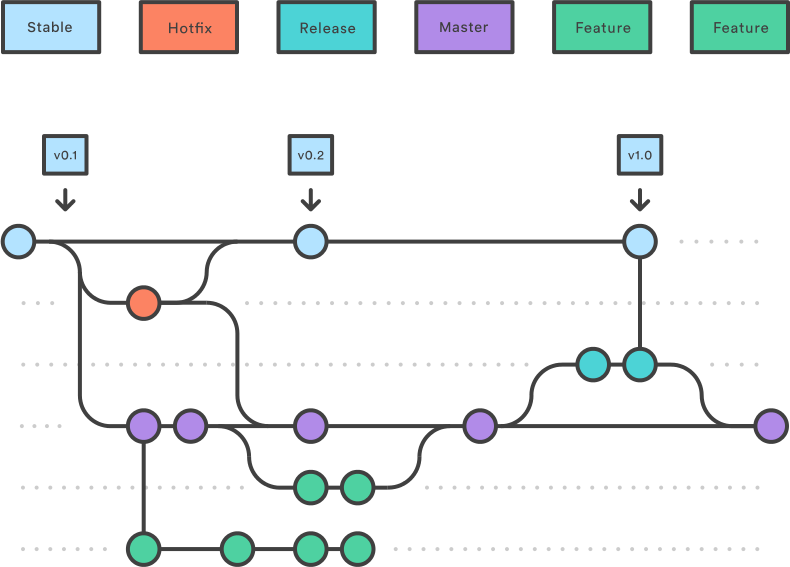
|
||||
|
||||
We have two long-living branches:
|
||||
|
||||
- `master`: completed features, bug fixes, refactors, chores
|
||||
- `stable`: the latest release
|
||||
|
||||
The overall flow:
|
||||
|
||||
1. Feature, refactor, and bug fix branches are created from `master`
|
||||
1. When a feature, refactor, or fix is complete it is merged into `master`
|
||||
1. A release branch is created from `master`
|
||||
1. When the release branch is done it is merged into `master` and `stable`
|
||||
1. If an issue in `stable` is detected a hotfix branch is created from `stable`
|
||||
1. Once the hotfix is complete it is merged to both `master` and `stable`
|
||||
1. All branches should follow the syntax of `{type}-{details}` where `{type}` is the type of branch (`hotfix`, `release`, or one of the [commit types](https://github.com/ionic-team/ionic/blob/master/.github/CONTRIBUTING.md#commit-message-format)) and `{details}` is a few hyphen separated words explaining the branch
|
||||
|
||||
### Stable and Master Branches
|
||||
|
||||
#### Stable Branch
|
||||
|
||||
Branches created from `stable`:
|
||||
|
||||
The following branch should be merged back to **both** `master` and `stable`:
|
||||
|
||||
- A `hotfix` branch (e.g. `hotfix-missing-export`): a bug fix that is fixing a regression or issue with a published release
|
||||
|
||||
A `hotfix` branch should be the **only** branch that is created from stable.
|
||||
|
||||
#### Master Branch
|
||||
|
||||
Branches created from `master`:
|
||||
|
||||
The following branches should be merged back to `master` via a pull request:
|
||||
|
||||
1. A feature branch (e.g. `feat-desktop-support`): an addition to the API that is not a bug fix or regression fix
|
||||
1. A bug fix branch (e.g. `fix-tab-color`): a bug fix that is not fixing a regression or issue with a published release
|
||||
1. All other types listed in the [commit message types](https://github.com/ionic-team/ionic/blob/master/.github/CONTRIBUTING.md#commit-message-format): `docs`, `style`, `refactor`, `perf`, `test`, `chore`
|
||||
|
||||
The following branch should be merged back to **both** `master` and `stable`:
|
||||
|
||||
1. A `release` branch (e.g. `release-4.1.x`): contains all fixes and (optionally) features that are tested and should go into the release
|
||||
|
||||
|
||||
### Feature Branches
|
||||
|
||||
Each new feature should reside in its own branch, based on the `master` branch. When a feature is complete, it should go into a pull request that gets merged back into `master`. A pull request adding a feature should be approved by two team members. Features should never interact directly with `stable`.
|
||||
|
||||
|
||||
### Release Branches
|
||||
|
||||
Once `master` has acquired enough features for a release (or a predetermined release date is approaching), fork a release branch off of `master`. Creating this branch starts the next release cycle, so no new features can be added after this point - only bug fixes, documentation generation, and other release-oriented tasks should go in this branch.
|
||||
|
||||
Once the release is ready to ship, it will get merged into `stable` and `master`, then the release branch will be deleted. It’s important to merge back into `master` because critical updates may have been added to the release branch and they need to be accessible to new features. This should be done in a pull request after review.
|
||||
|
||||
See the [steps for releasing](#releasing) below for detailed information on how to publish a release.
|
||||
|
||||
|
||||
### Hotfix Branches
|
||||
|
||||
Maintenance or “hotfix” branches are used to quickly patch production releases. This is the only branch that should fork directly off of `stable`. As soon as the fix is complete, it should be merged into both `stable` and `master` (or the current release branch).
|
||||
|
||||
|
||||
### Examples
|
||||
|
||||
#### Making a Change
|
||||
@@ -111,7 +172,7 @@ We have two long-living branches:
|
||||
|
||||
1. Confirm squash and merge into `master`.
|
||||
|
||||
#### Merging Changes from `master` into your Branch
|
||||
#### Updating from `master`
|
||||
|
||||
1. Pull the latest changes locally.
|
||||
1. Merge the changes, fixing any conflicts.
|
||||
@@ -125,23 +186,6 @@ OR
|
||||
|
||||
1. Pull the merged changes locally.
|
||||
|
||||
#### Making a Release
|
||||
|
||||
1. Freeze `master`. Only the person doing the release should be modifying `master`.
|
||||
1. Follow the [Making a Change](#making-a-change) steps to prepare the release.
|
||||
|
||||
- Run `npm run release.prepare`
|
||||
- Version changes
|
||||
- `CHANGELOG.MD` tweaks
|
||||
|
||||
1. Create a PR to merge `master` into `stable`.
|
||||
1. Click **Merge pull request**. Use the dropdown to select this option if necessary. This will preserve the commit history from `master` by creating a merge commit.
|
||||
|
||||
<img width="191" alt="Merge pull request button" src="https://user-images.githubusercontent.com/236501/47032669-8be1b980-d138-11e8-9a90-d1518c223184.png">
|
||||
|
||||
1. CI builds `stable`, performing the release.
|
||||
1. Unfreeze `master`.
|
||||
|
||||
#### Hotfixes
|
||||
|
||||
Hotfixes bypass `master` and should only be used for urgent fixes that can't wait for the next release to be ready.
|
||||
@@ -165,3 +209,24 @@ Hotfixes bypass `master` and should only be used for urgent fixes that can't wai
|
||||
1. Click **Merge pull request**. Use the dropdown to select this option if necessary.
|
||||
|
||||
<img width="191" alt="Merge pull request button" src="https://user-images.githubusercontent.com/236501/47032669-8be1b980-d138-11e8-9a90-d1518c223184.png">
|
||||
|
||||
|
||||
## Releasing
|
||||
|
||||
1. Create the release branch from `master`, for example: `release-4.1.0`.
|
||||
1. Submit a pull request from the release branch into `stable`. Do not merge this pull request yet.
|
||||
1. Verify all tests are passing, fix any bugs if needed and make sure no undesired commits are in.
|
||||
1. Navigate to the root of the repository while on the release branch.
|
||||
1. Run `npm i` if it hasn't already been done.
|
||||
1. Run `npm run release.prepare`
|
||||
- Select the version based on the type of commits and the [Ionic Versioning](https://ionicframework.com/docs/intro/versioning)
|
||||
- After the process completes, verify the version number in all packages (`core`, `docs`, `angular`)
|
||||
- Verify the changelog commits are accurate and follow the [proper format]((https://github.com/ionic-team/ionic/blob/master/.github/CONTRIBUTING.md#commit-message-format))
|
||||
- Commit these changes with the version number as the message, e.g. `git commit -m "4.1.0"`
|
||||
1. Run `npm run release`
|
||||
1. Click **Merge pull request**. Use the dropdown to select this option if necessary.
|
||||
|
||||
<img width="191" alt="Merge pull request button" src="https://user-images.githubusercontent.com/236501/47032669-8be1b980-d138-11e8-9a90-d1518c223184.png">
|
||||
|
||||
1. Rewrite the commit message to `merge release-4.1.0` with the proper release branch.
|
||||
1. Create a pull request and merge the release branch back into `master` using the same commit format in the last step, to ensure any changes made on the release branch get added to future releases.
|
||||
|
||||
20
.github/ionic-issue-bot.yml
vendored
20
.github/ionic-issue-bot.yml
vendored
@@ -3,6 +3,26 @@ triage:
|
||||
removeLabelWhenProjectAssigned: true
|
||||
dryRun: false
|
||||
|
||||
comment:
|
||||
labels:
|
||||
- label: "help wanted"
|
||||
message: >
|
||||
This issue has been labeled as `help wanted`. This label is added to issues
|
||||
that we believe would be good for contributors.
|
||||
|
||||
|
||||
If you'd like to work on this issue, please comment here letting us know that
|
||||
you would like to submit a pull request for it. This helps us to keep track of
|
||||
the pull request and make sure there isn't duplicated effort.
|
||||
|
||||
|
||||
For a guide on how to create a pull request and test this project locally to see
|
||||
your changes, see our [contributing documentation](https://ionicframework.com/docs/building/contributing).
|
||||
|
||||
|
||||
Thank you!
|
||||
dryRun: false
|
||||
|
||||
closeAndLock:
|
||||
labels:
|
||||
- label: "ionitron: support"
|
||||
|
||||
@@ -37,7 +37,7 @@ function checkGit(tasks) {
|
||||
{
|
||||
title: 'Check current branch',
|
||||
task: () => execa.stdout('git', ['symbolic-ref', '--short', 'HEAD']).then(branch => {
|
||||
if (branch.indexOf('release') === -1 && branch.indexOf('hofix') === -1) {
|
||||
if (branch.indexOf('release') === -1 && branch.indexOf('hotfix') === -1) {
|
||||
throw new Error(`Must be on a "release" or "hotfix" branch.`);
|
||||
}
|
||||
})
|
||||
|
||||
93
CHANGELOG.md
93
CHANGELOG.md
@@ -1,31 +1,90 @@
|
||||
# [4.1.0](https://github.com/ionic-team/ionic/compare/v4.0.1...v4.1.0) (2019-03-06)
|
||||
## [4.2.1](https://github.com/ionic-team/ionic/compare/v4.2.0...v4.2.1) (2019-04-26)
|
||||
|
||||
|
||||
### Bug Fixes
|
||||
|
||||
* **angular:** support replaceUrl with angular <7.2 ([#18107](https://github.com/ionic-team/ionic/issues/18107)) ([26ca72c](https://github.com/ionic-team/ionic/commit/26ca72c))
|
||||
* sanitize components using innerHTML ([#18145](https://github.com/ionic-team/ionic/issues/18145)) ([96d7fdd](https://github.com/ionic-team/ionic/commit/96d7fdd))
|
||||
|
||||
|
||||
|
||||
# [4.2.0](https://github.com/ionic-team/ionic/compare/v4.1.2...v4.2.0) (2019-04-03)
|
||||
|
||||
|
||||
### Bug Fixes
|
||||
|
||||
* **angular:** properly check for replaceUrl in routing ([#17879](https://github.com/ionic-team/ionic/issues/17879)) ([f2c8db9](https://github.com/ionic-team/ionic/commit/f2c8db9)), closes [#15181](https://github.com/ionic-team/ionic/issues/15181)
|
||||
* **angular:** return proper types in the overlay.getTop method ([#17802](https://github.com/ionic-team/ionic/issues/17802)) ([439b10e](https://github.com/ionic-team/ionic/commit/439b10e))
|
||||
* **angular:** support relative router links ([d9a7c63](https://github.com/ionic-team/ionic/commit/d9a7c63)), closes [#17888](https://github.com/ionic-team/ionic/issues/17888) [#16534](https://github.com/ionic-team/ionic/issues/16534) [#16736](https://github.com/ionic-team/ionic/issues/16736) [#16954](https://github.com/ionic-team/ionic/issues/16954)
|
||||
* **angular:** update ng-add schematic ([9443bfe](https://github.com/ionic-team/ionic/commit/9443bfe))
|
||||
* **css:** resolve spinner and checkbox issues on older chrome versions ([#17896](https://github.com/ionic-team/ionic/issues/17896)) ([dbb39cd](https://github.com/ionic-team/ionic/commit/dbb39cd)), closes [#17524](https://github.com/ionic-team/ionic/issues/17524) [#17501](https://github.com/ionic-team/ionic/issues/17501)
|
||||
* **datetime:** default to local date when no date given ([#17706](https://github.com/ionic-team/ionic/issues/17706)) ([bab56e8](https://github.com/ionic-team/ionic/commit/bab56e8))
|
||||
* **datetime:** recalculate day column when month or year is changed ([#17815](https://github.com/ionic-team/ionic/issues/17815)) ([9273f97](https://github.com/ionic-team/ionic/commit/9273f97)), closes [#14233](https://github.com/ionic-team/ionic/issues/14233) [#14732](https://github.com/ionic-team/ionic/issues/14732) [#15452](https://github.com/ionic-team/ionic/issues/15452) [#15794](https://github.com/ionic-team/ionic/issues/15794) [#17633](https://github.com/ionic-team/ionic/issues/16733) [#17060](https://github.com/ionic-team/ionic/issues/17060) [#17510](https://github.com/ionic-team/ionic/issues/17510) [#17521](https://github.com/ionic-team/ionic/issues/17521)
|
||||
* **item-option:** add styling and behaviour for disabled item-option ([#17909](https://github.com/ionic-team/ionic/issues/17909)) ([346ecb2](https://github.com/ionic-team/ionic/commit/346ecb2)), closes [#17905](https://github.com/ionic-team/ionic/issues/17905)
|
||||
* **progress-bar:** flip rtl using the existing reversed property ([#17464](https://github.com/ionic-team/ionic/issues/17464)) ([fccaaf8](https://github.com/ionic-team/ionic/commit/fccaaf8)), closes [#17012](https://github.com/ionic-team/ionic/issues/17012)
|
||||
* **react:** ensure tabs are resilient to optional tabs ([#17862](https://github.com/ionic-team/ionic/issues/17862)) ([c29f5a6](https://github.com/ionic-team/ionic/commit/c29f5a6))
|
||||
* **reorder-group:** add ability to reorder items inside shadow ([#17747](https://github.com/ionic-team/ionic/issues/17747)) ([352797e](https://github.com/ionic-team/ionic/commit/352797e)), closes [#17746](https://github.com/ionic-team/ionic/issues/17746)
|
||||
* **select:** update overlay options when added asynchronously ([#17860](https://github.com/ionic-team/ionic/issues/17860)) ([1ecfcd1](https://github.com/ionic-team/ionic/commit/1ecfcd1)), closes [#15716](https://github.com/ionic-team/ionic/issues/15716) [#17851](https://github.com/ionic-team/ionic/issues/17851)
|
||||
* **virtual-scroll:** use correct item top calculation with header or footer function ([#15948](https://github.com/ionic-team/ionic/issues/15948)) ([#17345](https://github.com/ionic-team/ionic/issues/17345)) ([a8a48a4](https://github.com/ionic-team/ionic/commit/a8a48a4)), closes [#17298](https://github.com/ionic-team/ionic/issues/17298)
|
||||
* **vue:** back button event handling ([#17877](https://github.com/ionic-team/ionic/issues/17877)) ([dceec07](https://github.com/ionic-team/ionic/commit/dceec07))
|
||||
* **vue:** update popover to use correct controller ([#17865](https://github.com/ionic-team/ionic/issues/17865)) ([0cb7db0](https://github.com/ionic-team/ionic/commit/0cb7db0))
|
||||
|
||||
|
||||
### Features
|
||||
|
||||
* **img:** add ionError event ([#17134](https://github.com/ionic-team/ionic/issues/17134)) ([04f931f](https://github.com/ionic-team/ionic/commit/04f931f)), closes [#16947](https://github.com/ionic-team/ionic/issues/16947)
|
||||
* **range:** add ticks attribute ([#17718](https://github.com/ionic-team/ionic/issues/17718)) ([016fa16](https://github.com/ionic-team/ionic/commit/016fa16)), closes [#17717](https://github.com/ionic-team/ionic/issues/17717)
|
||||
* **vue:** support for ion-tabs ([#17678](https://github.com/ionic-team/ionic/issues/17678)) ([ee71675](https://github.com/ionic-team/ionic/commit/ee71675))
|
||||
* **vue:** support ion-vue-router ([#17821](https://github.com/ionic-team/ionic/issues/17821)) ([71e5994](https://github.com/ionic-team/ionic/commit/71e5994))
|
||||
|
||||
|
||||
|
||||
## [4.1.2](https://github.com/ionic-team/ionic/compare/v4.1.1...v4.1.2) (2019-03-20)
|
||||
|
||||
|
||||
### Bug Fixes
|
||||
|
||||
* **chip:** use transparent outline on color chips ([#17719](https://github.com/ionic-team/ionic/issues/17719)) ([f6783db](https://github.com/ionic-team/ionic/commit/f6783db))
|
||||
* **datetime:** default to local date ([#17706](https://github.com/ionic-team/ionic/issues/17706)) ([bab56e8](https://github.com/ionic-team/ionic/commit/bab56e8))
|
||||
* **input:** use max-height for input for consistency across browsers ([#17394](https://github.com/ionic-team/ionic/issues/17394)) ([67a9137](https://github.com/ionic-team/ionic/commit/67a9137))
|
||||
* **item:** add missing ripple color CSS property ([#17814](https://github.com/ionic-team/ionic/issues/17814)) ([807820f](https://github.com/ionic-team/ionic/commit/807820f)), closes [#17523](https://github.com/ionic-team/ionic/issues/17523)
|
||||
* **item-option:** add styling for slots other than icon-only ([#17711](https://github.com/ionic-team/ionic/issues/17711)) ([14f758c](https://github.com/ionic-team/ionic/commit/14f758c)), closes [#17737](https://github.com/ionic-team/ionic/issues/17737) [#17402](https://github.com/ionic-team/ionic/issues/17402)
|
||||
* **platform:** account for larger tablets ([#17630](https://github.com/ionic-team/ionic/issues/17630)) ([29dbd07](https://github.com/ionic-team/ionic/commit/29dbd07))
|
||||
* **popover:** update animation origin in RTL/MD ([#17645](https://github.com/ionic-team/ionic/issues/17645)) ([617453b](https://github.com/ionic-team/ionic/commit/617453b)), closes [#17012](https://github.com/ionic-team/ionic/issues/17012)
|
||||
* **spinner:** fix default spinner logic for relevant components ([#17660](https://github.com/ionic-team/ionic/issues/17660)) ([9c48fa7](https://github.com/ionic-team/ionic/commit/9c48fa7)), closes [#17659](https://github.com/ionic-team/ionic/issues/17659)
|
||||
* **toggle:** do not use the contrast color for toggle inner color ([#17798](https://github.com/ionic-team/ionic/issues/17798)) ([2225941](https://github.com/ionic-team/ionic/commit/2225941)), closes [#17536](https://github.com/ionic-team/ionic/issues/17536)
|
||||
* **transition:** animate all toolbars in iOS page transitions ([#17224](https://github.com/ionic-team/ionic/issues/17224)) ([7d01207](https://github.com/ionic-team/ionic/commit/7d01207))
|
||||
|
||||
|
||||
|
||||
## [4.1.1](https://github.com/ionic-team/ionic/compare/v4.1.0...v4.1.1) (2019-03-07)
|
||||
|
||||
|
||||
### Bug Fixes
|
||||
|
||||
* **display:** update to correct css classes ([cabbeb2](https://github.com/ionic-team/ionic/commit/cabbeb2))
|
||||
|
||||
|
||||
|
||||
# [4.1.0 Hydrogen](https://github.com/ionic-team/ionic/compare/v4.0.2...v4.1.0) (2019-03-06)
|
||||
|
||||
|
||||
### Bug Fixes
|
||||
|
||||
* **angular:** fix adding [@ionic](https://github.com/ionic)/angular when using ng add ([#17597](https://github.com/ionic-team/ionic/issues/17597)) ([484d92c](https://github.com/ionic-team/ionic/commit/484d92c)), closes [#17596](https://github.com/ionic-team/ionic/issues/17596)
|
||||
* **animation:** fix header flicker on ios ([#17422](https://github.com/ionic-team/ionic/issues/17422)) ([ad20bd6](https://github.com/ionic-team/ionic/commit/ad20bd6))
|
||||
* **button:** show proper shade for activated button on ios ([#17508](https://github.com/ionic-team/ionic/issues/17508)) ([89a908b](https://github.com/ionic-team/ionic/commit/89a908b)), closes [#17436](https://github.com/ionic-team/ionic/issues/17436)
|
||||
* **config:** update types for scrollPadding, inputBlurring and hideCaretOnScroll to boolean ([#17302](https://github.com/ionic-team/ionic/issues/17302)) ([39fbc32](https://github.com/ionic-team/ionic/commit/39fbc32))
|
||||
* **css:** add the missing css classes to flex and float utils ([#17570](https://github.com/ionic-team/ionic/issues/17570)) ([c49276c](https://github.com/ionic-team/ionic/commit/c49276c)), closes [#17569](https://github.com/ionic-team/ionic/issues/17569)
|
||||
* **datetime:** default to current date when no value given ([#17443](https://github.com/ionic-team/ionic/issues/17443)) ([a1ec5f6](https://github.com/ionic-team/ionic/commit/a1ec5f6))
|
||||
* **fab:** disabled fab button no longer opens fab list ([#17620](https://github.com/ionic-team/ionic/issues/17620)) ([c475dab](https://github.com/ionic-team/ionic/commit/c475dab))
|
||||
* **img:** remove space under img ([#17582](https://github.com/ionic-team/ionic/issues/17582)) ([621c79b](https://github.com/ionic-team/ionic/commit/621c79b))
|
||||
* **item:** slotted ion-icon receives custom color ([#17585](https://github.com/ionic-team/ionic/issues/17585)) ([14dd871](https://github.com/ionic-team/ionic/commit/14dd871))
|
||||
* **item-sliding:** no longer close all open items when deleting an item ([#17579](https://github.com/ionic-team/ionic/issues/17579)) ([3de7795](https://github.com/ionic-team/ionic/commit/3de7795))
|
||||
* **item-sliding:** Sliding no longer breaks after removing an item ([#17492](https://github.com/ionic-team/ionic/issues/17492)) ([08fe8e4](https://github.com/ionic-team/ionic/commit/08fe8e4))
|
||||
* **loading:** add backdropDismiss to the interface ([#17668](https://github.com/ionic-team/ionic/issues/17668)) ([28fd75e](https://github.com/ionic-team/ionic/commit/28fd75e)), closes [#17369](https://github.com/ionic-team/ionic/issues/17369)
|
||||
* **popover:** update placement per md spec ([#17429](https://github.com/ionic-team/ionic/issues/17429)) ([a99d179](https://github.com/ionic-team/ionic/commit/a99d179))
|
||||
* **range:** clamp values that are out of bounds ([#17623](https://github.com/ionic-team/ionic/issues/17623)) ([5a197ca](https://github.com/ionic-team/ionic/commit/5a197ca))
|
||||
* **range:** implement RTL (from PR 17157) ([#17384](https://github.com/ionic-team/ionic/issues/17384)) ([4f203bc](https://github.com/ionic-team/ionic/commit/4f203bc)), closes [#17012](https://github.com/ionic-team/ionic/issues/17012)
|
||||
* **range:** improved rtl support ([#17479](https://github.com/ionic-team/ionic/issues/17479)) ([f832de5](https://github.com/ionic-team/ionic/commit/f832de5))
|
||||
* **refresher:** check for cancelable before preventing default ([#17351](https://github.com/ionic-team/ionic/issues/17351)) ([f205b10](https://github.com/ionic-team/ionic/commit/f205b10)), closes [#15256](https://github.com/ionic-team/ionic/issues/15256)
|
||||
* **reorder:** Allow sliding items to be reordered ([#17568](https://github.com/ionic-team/ionic/issues/17568)) ([3b331b5](https://github.com/ionic-team/ionic/commit/3b331b5))
|
||||
* **searchbar:** allow setting of toolbar color and searchbar color ([#17474](https://github.com/ionic-team/ionic/issues/17474)) ([ba4e117](https://github.com/ionic-team/ionic/commit/ba4e117))
|
||||
* **select:** Account for when options are not loaded immediately ([#17405](https://github.com/ionic-team/ionic/issues/17405)) ([1c9c18b](https://github.com/ionic-team/ionic/commit/1c9c18b))
|
||||
* **reorder:** allow sliding items to be reordered ([#17568](https://github.com/ionic-team/ionic/issues/17568)) ([3b331b5](https://github.com/ionic-team/ionic/commit/3b331b5))
|
||||
* **ssr:** fix angular global window and document references ([f44c17e](https://github.com/ionic-team/ionic/commit/f44c17e))
|
||||
* **ssr:** fix global window and document references ([#17590](https://github.com/ionic-team/ionic/issues/17590)) ([4646f53](https://github.com/ionic-team/ionic/commit/4646f53))
|
||||
* **tab-bar:** add translucent tab-bar styles back ([#17376](https://github.com/ionic-team/ionic/issues/17376)) ([374bd77](https://github.com/ionic-team/ionic/commit/374bd77))
|
||||
* **vue:** correct passing of props and data to components ([#17188](https://github.com/ionic-team/ionic/issues/17188)) ([2ce4940](https://github.com/ionic-team/ionic/commit/2ce4940))
|
||||
|
||||
|
||||
@@ -33,7 +92,6 @@
|
||||
|
||||
* **checkbox:** implement indeterminate state ([#16951](https://github.com/ionic-team/ionic/issues/16951)) ([c641ae1](https://github.com/ionic-team/ionic/commit/c641ae1)), closes [#16943](https://github.com/ionic-team/ionic/issues/16943)
|
||||
* **css:** add CSS display utilities ([#17359](https://github.com/ionic-team/ionic/issues/17359)) ([6bea9d3](https://github.com/ionic-team/ionic/commit/6bea9d3)), closes [#10904](https://github.com/ionic-team/ionic/issues/10904)
|
||||
* **range:** add neutral point ([#17400](https://github.com/ionic-team/ionic/issues/17400)) ([15acb4b](https://github.com/ionic-team/ionic/commit/15acb4b))
|
||||
* **select:** add compareWith property ([#17358](https://github.com/ionic-team/ionic/issues/17358)) ([69ecebb](https://github.com/ionic-team/ionic/commit/69ecebb))
|
||||
* **skeleton-text:** adds animated prop and support for CSS styling ([#17612](https://github.com/ionic-team/ionic/issues/17612)) ([d66b12b](https://github.com/ionic-team/ionic/commit/d66b12b)), closes [ionic-team/ionic-docs#407](https://github.com/ionic-team/ionic-docs/issues/407)
|
||||
|
||||
@@ -461,7 +519,7 @@ Tabs got the last bit of changes needed in order to support lazy loading of comp
|
||||
pathMatch: 'full'
|
||||
}
|
||||
];
|
||||
```
|
||||
```
|
||||
|
||||
</detail>
|
||||
|
||||
@@ -592,14 +650,14 @@ Segment Button now requires the text to be wrapped in an `ion-label` element for
|
||||
<ion-segment-button>
|
||||
Item One
|
||||
</ion-segment-button>
|
||||
```
|
||||
```
|
||||
*New usage:*
|
||||
|
||||
```html
|
||||
<ion-segment-button>
|
||||
<ion-label>Item One</ion-label>
|
||||
</ion-segment-button>
|
||||
```
|
||||
```
|
||||
|
||||
#### Simplifying Chip
|
||||
|
||||
@@ -758,8 +816,8 @@ Here, we have an `ion-tab` element that accepts an icon, a label, and a link to
|
||||
<ion-tab-bar>
|
||||
|
||||
<!-- No ion-tab, just a link that looks like a tab -->
|
||||
<ion-tab-button href="https://beta.ionicframework.com">
|
||||
<!-- <a href="https://beta.ionicframework.com"> -->
|
||||
<ion-tab-button href="https://ionicframework.com">
|
||||
<!-- <a href="https://ionicframework.com"> -->
|
||||
<ion-icon name="globe"></ion-icon>
|
||||
<ion-label>Schedule</ion-label>
|
||||
</ion-tab-button>
|
||||
@@ -2115,4 +2173,5 @@ The following dependencies need to be updated to resolve build errors
|
||||
|
||||
|
||||
<a name="0.1.0"></a>
|
||||
|
||||
## [0.1.0](https://github.com/ionic-team/ionic/commit/43a8c4c7a719169336a84964fc1c737562d764a6) (2018-03-01)
|
||||
|
||||
@@ -5,7 +5,7 @@
|
||||
|
||||
### Migration Guide
|
||||
|
||||
If you aren't sure where to start in upgrading to v4, we recommend reading through our [migration guide](https://beta.ionicframework.com/docs/building/migration) first.
|
||||
If you aren't sure where to start in upgrading to v4, we recommend reading through our [migration guide](https://ionicframework.com/docs/building/migration) first.
|
||||
|
||||
### Migration Linter
|
||||
|
||||
@@ -1740,19 +1740,19 @@ Changes the `font-family` of the whole page based on the mode selected (iOS or M
|
||||
The following set of CSS files are optional and can safely be commented out if the application is not using any of the features.
|
||||
|
||||
- **padding.css**
|
||||
Adds utility attributes that allow adding `padding` and `margin` attributes to any element. See [content space](https://beta.ionicframework.com/docs/layout/css-utilities#content-space) for what this includes.
|
||||
Adds utility attributes that allow adding `padding` and `margin` attributes to any element. See [content space](https://ionicframework.com/docs/layout/css-utilities#content-space) for what this includes.
|
||||
|
||||
- **float-elements.css**
|
||||
Adds utility attributes that allow adding `float` attributes to any element. See [element placement](https://beta.ionicframework.com/docs/layout/css-utilities/#element-placement) for what this includes.
|
||||
Adds utility attributes that allow adding `float` attributes to any element. See [element placement](https://ionicframework.com/docs/layout/css-utilities/#element-placement) for what this includes.
|
||||
|
||||
- **text-alignment.css**
|
||||
Adds utility attributes that allow adding text alignment attributes to any element. See [text alignment](https://beta.ionicframework.com/docs/layout/css-utilities/#text-alignment) for what this includes.
|
||||
Adds utility attributes that allow adding text alignment attributes to any element. See [text alignment](https://ionicframework.com/docs/layout/css-utilities/#text-alignment) for what this includes.
|
||||
|
||||
- **text-transformation.css**
|
||||
Adds utility attributes that allow adding text transformation attributes to any element. See [text transformation](https://beta.ionicframework.com/docs/layout/css-utilities/#text-transformation) for what this includes.
|
||||
Adds utility attributes that allow adding text transformation attributes to any element. See [text transformation](https://ionicframework.com/docs/layout/css-utilities/#text-transformation) for what this includes.
|
||||
|
||||
- **flex-utils.css**
|
||||
Adds utility attributes that allow adding flex container and item attributes to any element. See [flex properties](https://beta.ionicframework.com/docs/layout/css-utilities/#flex-properties) for what this includes.
|
||||
Adds utility attributes that allow adding flex container and item attributes to any element. See [flex properties](https://ionicframework.com/docs/layout/css-utilities/#flex-properties) for what this includes.
|
||||
|
||||
|
||||
#### Including the CSS Files
|
||||
@@ -1831,7 +1831,7 @@ p {
|
||||
|
||||
Sass variables should no longer be used to change Ionic components. We have built Ionic to be customizable using CSS variables, instead.
|
||||
|
||||
For more information on theming, check out the [theming documentation](https://beta.ionicframework.com/docs/theming/basics).
|
||||
For more information on theming, check out the [theming documentation](https://ionicframework.com/docs/theming/basics).
|
||||
|
||||
|
||||
## Toast
|
||||
|
||||
@@ -1,6 +1,6 @@
|
||||
{
|
||||
"name": "@ionic/angular",
|
||||
"version": "4.1.0",
|
||||
"version": "4.2.1",
|
||||
"description": "Angular specific wrappers for @ionic/core",
|
||||
"keywords": [
|
||||
"ionic",
|
||||
@@ -45,7 +45,7 @@
|
||||
"css/"
|
||||
],
|
||||
"dependencies": {
|
||||
"@ionic/core": "4.1.0",
|
||||
"@ionic/core": "4.2.1",
|
||||
"tslib": "^1.9.3"
|
||||
},
|
||||
"peerDependencies": {
|
||||
|
||||
@@ -1,5 +1,7 @@
|
||||
import { Attribute, ChangeDetectorRef, ComponentFactoryResolver, ComponentRef, Directive, ElementRef, EventEmitter, Injector, NgZone, OnDestroy, OnInit, Optional, Output, SkipSelf, ViewContainerRef } from '@angular/core';
|
||||
import { ActivatedRoute, ChildrenOutletContexts, OutletContext, PRIMARY_OUTLET, Router } from '@angular/router';
|
||||
import { BehaviorSubject, Observable } from 'rxjs';
|
||||
import { distinctUntilChanged, filter, switchMap } from 'rxjs/operators';
|
||||
|
||||
import { Config } from '../../providers/config';
|
||||
import { NavController } from '../../providers/nav-controller';
|
||||
@@ -13,7 +15,6 @@ import { RouteView, getUrl } from './stack-utils';
|
||||
inputs: ['animated', 'swipeGesture']
|
||||
})
|
||||
export class IonRouterOutlet implements OnDestroy, OnInit {
|
||||
|
||||
private activated: ComponentRef<any> | null = null;
|
||||
private activatedView: RouteView | null = null;
|
||||
|
||||
@@ -23,6 +24,12 @@ export class IonRouterOutlet implements OnDestroy, OnInit {
|
||||
private stackCtrl: StackController;
|
||||
private nativeEl: HTMLIonRouterOutletElement;
|
||||
|
||||
// Maintain map of activated route proxies for each component instance
|
||||
private proxyMap = new WeakMap<any, ActivatedRoute>();
|
||||
|
||||
// Keep the latest activated route in a subject for the proxy routes to switch map to
|
||||
private currentActivatedRoute$ = new BehaviorSubject<{ component: any; activatedRoute: ActivatedRoute } | null>(null);
|
||||
|
||||
tabsPrefix: string | undefined;
|
||||
|
||||
@Output() stackEvents = new EventEmitter<any>();
|
||||
@@ -159,6 +166,8 @@ export class IonRouterOutlet implements OnDestroy, OnInit {
|
||||
const context = this.getContext()!;
|
||||
context.children['contexts'] = saved;
|
||||
}
|
||||
// Updated activated route proxy for this component
|
||||
this.updateActivatedRouteProxy(cmpRef.instance, activatedRoute);
|
||||
} else {
|
||||
const snapshot = (activatedRoute as any)._futureSnapshot;
|
||||
const component = snapshot.routeConfig!.component as any;
|
||||
@@ -167,12 +176,25 @@ export class IonRouterOutlet implements OnDestroy, OnInit {
|
||||
const factory = resolver.resolveComponentFactory(component);
|
||||
const childContexts = this.parentContexts.getOrCreateContext(this.name).children;
|
||||
|
||||
const injector = new OutletInjector(activatedRoute, childContexts, this.location.injector);
|
||||
// We create an activated route proxy object that will maintain future updates for this component
|
||||
// over its lifecycle in the stack.
|
||||
const component$ = new BehaviorSubject<any>(null);
|
||||
const activatedRouteProxy = this.createActivatedRouteProxy(component$, activatedRoute);
|
||||
|
||||
const injector = new OutletInjector(activatedRouteProxy, childContexts, this.location.injector);
|
||||
cmpRef = this.activated = this.location.createComponent(factory, this.location.length, injector);
|
||||
|
||||
// Once the component is created we can push it to our local subject supplied to the proxy
|
||||
component$.next(cmpRef.instance);
|
||||
|
||||
// Calling `markForCheck` to make sure we will run the change detection when the
|
||||
// `RouterOutlet` is inside a `ChangeDetectionStrategy.OnPush` component.
|
||||
enteringView = this.stackCtrl.createView(this.activated, activatedRoute);
|
||||
|
||||
// Store references to the proxy by component
|
||||
this.proxyMap.set(cmpRef.instance, activatedRouteProxy);
|
||||
this.currentActivatedRoute$.next({ component: cmpRef.instance, activatedRoute });
|
||||
|
||||
this.changeDetector.markForCheck();
|
||||
}
|
||||
|
||||
@@ -212,6 +234,66 @@ export class IonRouterOutlet implements OnDestroy, OnInit {
|
||||
getActiveStackId(): string | undefined {
|
||||
return this.stackCtrl.getActiveStackId();
|
||||
}
|
||||
|
||||
/**
|
||||
* Since the activated route can change over the life time of a component in an ion router outlet, we create
|
||||
* a proxy so that we can update the values over time as a user navigates back to components already in the stack.
|
||||
*/
|
||||
private createActivatedRouteProxy(component$: Observable<any>, activatedRoute: ActivatedRoute): ActivatedRoute {
|
||||
const proxy: any = new ActivatedRoute();
|
||||
|
||||
proxy._futureSnapshot = (activatedRoute as any)._futureSnapshot;
|
||||
proxy._routerState = (activatedRoute as any)._routerState;
|
||||
proxy.snapshot = activatedRoute.snapshot;
|
||||
proxy.outlet = activatedRoute.outlet;
|
||||
proxy.component = activatedRoute.component;
|
||||
|
||||
// Setup wrappers for the observables so consumers don't have to worry about switching to new observables as the state updates
|
||||
(proxy as any)._paramMap = this.proxyObservable(component$, 'paramMap');
|
||||
(proxy as any)._queryParamMap = this.proxyObservable(component$, 'queryParamMap');
|
||||
proxy.url = this.proxyObservable(component$, 'url');
|
||||
proxy.params = this.proxyObservable(component$, 'params');
|
||||
proxy.queryParams = this.proxyObservable(component$, 'queryParams');
|
||||
proxy.fragment = this.proxyObservable(component$, 'fragment');
|
||||
proxy.data = this.proxyObservable(component$, 'data');
|
||||
|
||||
return proxy as ActivatedRoute;
|
||||
}
|
||||
|
||||
/**
|
||||
* Create a wrapped observable that will switch to the latest activated route matched by the given component
|
||||
*/
|
||||
private proxyObservable(component$: Observable<any>, path: string): Observable<any> {
|
||||
return component$.pipe(
|
||||
// First wait until the component instance is pushed
|
||||
filter(component => !!component),
|
||||
switchMap(component =>
|
||||
this.currentActivatedRoute$.pipe(
|
||||
filter(current => current !== null && current.component === component),
|
||||
switchMap(current => current && (current.activatedRoute as any)[path]),
|
||||
distinctUntilChanged()
|
||||
)
|
||||
)
|
||||
);
|
||||
}
|
||||
|
||||
/**
|
||||
* Updates the activated route proxy for the given component to the new incoming router state
|
||||
*/
|
||||
private updateActivatedRouteProxy(component: any, activatedRoute: ActivatedRoute): void {
|
||||
const proxy = this.proxyMap.get(component);
|
||||
if (!proxy) {
|
||||
throw new Error(`Could not find activated route proxy for view`);
|
||||
}
|
||||
|
||||
(proxy as any)._futureSnapshot = (activatedRoute as any)._futureSnapshot;
|
||||
(proxy as any)._routerState = (activatedRoute as any)._routerState;
|
||||
proxy.snapshot = activatedRoute.snapshot;
|
||||
proxy.outlet = activatedRoute.outlet;
|
||||
proxy.component = activatedRoute.component;
|
||||
|
||||
this.currentActivatedRoute$.next({ component, activatedRoute });
|
||||
}
|
||||
}
|
||||
|
||||
class OutletInjector implements Injector {
|
||||
|
||||
@@ -58,6 +58,40 @@ export class StackController {
|
||||
animation = undefined;
|
||||
}
|
||||
const viewsSnapshot = this.views.slice();
|
||||
|
||||
let currentNavigation;
|
||||
|
||||
const router = (this.router as any);
|
||||
|
||||
// Angular >= 7.2.0
|
||||
if (router.getCurrentNavigation) {
|
||||
currentNavigation = router.getCurrentNavigation();
|
||||
|
||||
// Angular < 7.2.0
|
||||
} else if (
|
||||
router.navigations &&
|
||||
router.navigations.value
|
||||
) {
|
||||
currentNavigation = router.navigations.value;
|
||||
}
|
||||
|
||||
/**
|
||||
* If the navigation action
|
||||
* sets `replaceUrl: true`
|
||||
* then we need to make sure
|
||||
* we remove the last item
|
||||
* from our views stack
|
||||
*/
|
||||
if (
|
||||
currentNavigation &&
|
||||
currentNavigation.extras &&
|
||||
currentNavigation.extras.replaceUrl
|
||||
) {
|
||||
if (this.views.length > 0) {
|
||||
this.views.splice(-1, 1);
|
||||
}
|
||||
}
|
||||
|
||||
const views = this.insertView(enteringView, direction);
|
||||
return this.wait(async () => {
|
||||
await this.transition(enteringView, leavingView, animation, this.canGoBack(1), false);
|
||||
|
||||
@@ -294,11 +294,12 @@ export declare interface IonImg extends StencilComponents<'IonImg'> {}
|
||||
@Component({ selector: 'ion-img', changeDetection: 0, template: '<ng-content></ng-content>', inputs: ['alt', 'src'] })
|
||||
export class IonImg {
|
||||
ionImgDidLoad!: EventEmitter<CustomEvent>;
|
||||
ionError!: EventEmitter<CustomEvent>;
|
||||
protected el: HTMLElement;
|
||||
constructor(c: ChangeDetectorRef, r: ElementRef) {
|
||||
c.detach();
|
||||
this.el = r.nativeElement;
|
||||
proxyOutputs(this, this.el, ['ionImgDidLoad']);
|
||||
proxyOutputs(this, this.el, ['ionImgDidLoad', 'ionError']);
|
||||
}
|
||||
}
|
||||
proxyInputs(IonImg, ['alt', 'src']);
|
||||
@@ -586,7 +587,7 @@ export class IonRadioGroup {
|
||||
proxyInputs(IonRadioGroup, ['allowEmptySelection', 'name', 'value']);
|
||||
|
||||
export declare interface IonRange extends StencilComponents<'IonRange'> {}
|
||||
@Component({ selector: 'ion-range', changeDetection: 0, template: '<ng-content></ng-content>', inputs: ['color', 'mode', 'debounce', 'name', 'dualKnobs', 'min', 'max', 'pin', 'snaps', 'step', 'disabled', 'value'] })
|
||||
@Component({ selector: 'ion-range', changeDetection: 0, template: '<ng-content></ng-content>', inputs: ['color', 'mode', 'debounce', 'name', 'dualKnobs', 'min', 'max', 'pin', 'snaps', 'step', 'ticks', 'disabled', 'value'] })
|
||||
export class IonRange {
|
||||
ionChange!: EventEmitter<CustomEvent>;
|
||||
ionFocus!: EventEmitter<CustomEvent>;
|
||||
@@ -598,7 +599,7 @@ export class IonRange {
|
||||
proxyOutputs(this, this.el, ['ionChange', 'ionFocus', 'ionBlur']);
|
||||
}
|
||||
}
|
||||
proxyInputs(IonRange, ['color', 'mode', 'debounce', 'name', 'dualKnobs', 'min', 'max', 'pin', 'snaps', 'step', 'disabled', 'value']);
|
||||
proxyInputs(IonRange, ['color', 'mode', 'debounce', 'name', 'dualKnobs', 'min', 'max', 'pin', 'snaps', 'step', 'ticks', 'disabled', 'value']);
|
||||
|
||||
export declare interface IonRefresher extends StencilComponents<'IonRefresher'> {}
|
||||
@Component({ selector: 'ion-refresher', changeDetection: 0, template: '<ng-content></ng-content>', inputs: ['pullMin', 'pullMax', 'closeDuration', 'snapbackDuration', 'disabled'] })
|
||||
|
||||
@@ -1,6 +1,6 @@
|
||||
/* Ionic Variables and Theming. */
|
||||
/* This is just a placeholder file For more info, please see: */
|
||||
/* https://beta.ionicframework.com/docs/theming/basics */
|
||||
/* https://ionicframework.com/docs/theming/basics */
|
||||
|
||||
/* To quickly generate your own theme, check out the color generator */
|
||||
/* https://beta.ionicframework.com/docs/theming/color-generator */
|
||||
/* https://ionicframework.com/docs/theming/color-generator */
|
||||
|
||||
@@ -1,20 +1,9 @@
|
||||
import {
|
||||
apply,
|
||||
chain,
|
||||
mergeWith,
|
||||
move,
|
||||
Rule,
|
||||
SchematicContext,
|
||||
SchematicsException,
|
||||
template,
|
||||
Tree,
|
||||
url
|
||||
} from '@angular-devkit/schematics';
|
||||
import { join, Path } from '@angular-devkit/core';
|
||||
import { apply, chain, mergeWith, move, Rule, SchematicContext, SchematicsException, template, Tree, url } from '@angular-devkit/schematics';
|
||||
import { NodePackageInstallTask } from '@angular-devkit/schematics/tasks';
|
||||
import { addPackageToPackageJson } from './../utils/package';
|
||||
import { addModuleImportToRootModule } from './../utils/ast';
|
||||
import { addArchitectBuilder, addStyle, getWorkspace } from './../utils/config';
|
||||
import { addArchitectBuilder, addStyle, getWorkspace, addAsset } from './../utils/config';
|
||||
import { addPackageToPackageJson } from './../utils/package';
|
||||
import { Schema as IonAddOptions } from './schema';
|
||||
|
||||
function addIonicAngularToPackageJson(): Rule {
|
||||
@@ -68,6 +57,18 @@ function addIonicStyles(): Rule {
|
||||
};
|
||||
}
|
||||
|
||||
function addIonicons(): Rule {
|
||||
return (host: Tree) => {
|
||||
const ioniconsGlob = {
|
||||
glob: '**/*.svg',
|
||||
input: 'node_modules/ionicons/dist/ionicons/svg',
|
||||
output: './svg'
|
||||
};
|
||||
addAsset(host, ioniconsGlob);
|
||||
return host;
|
||||
};
|
||||
}
|
||||
|
||||
function addIonicBuilder(): Rule {
|
||||
return (host: Tree) => {
|
||||
addArchitectBuilder(host, 'ionic-cordova-serve', {
|
||||
@@ -119,7 +120,7 @@ export default function ngAdd(options: IonAddOptions): Rule {
|
||||
|
||||
const sourcePath = join(project.root as Path, 'src');
|
||||
const rootTemplateSource = apply(url('./files/root'), [
|
||||
template({...options}),
|
||||
template({ ...options }),
|
||||
move(sourcePath)
|
||||
]);
|
||||
return chain([
|
||||
@@ -129,6 +130,7 @@ export default function ngAdd(options: IonAddOptions): Rule {
|
||||
addIonicAngularModuleToAppModule(sourcePath),
|
||||
addIonicBuilder(),
|
||||
addIonicStyles(),
|
||||
addIonicons(),
|
||||
mergeWith(rootTemplateSource),
|
||||
// install freshly added dependencies
|
||||
installNodeDeps()
|
||||
|
||||
@@ -64,6 +64,18 @@ export function addStyle(host: Tree, stylePath: string) {
|
||||
}
|
||||
}
|
||||
|
||||
export function addAsset(host: Tree, asset: string | {glob: string; input: string; output: string}) {
|
||||
const config = readConfig(host);
|
||||
const appConfig = getAngularAppConfig(config);
|
||||
|
||||
if (appConfig) {
|
||||
appConfig.architect.build.options.assets.push(asset);
|
||||
writeConfig(host, config);
|
||||
} else {
|
||||
throw new SchematicsException(`Cannot find valid app`);
|
||||
}
|
||||
}
|
||||
|
||||
export function addArchitectBuilder(host: Tree, builderName: string, builderOpts: any){
|
||||
const config = readConfig(host);
|
||||
const appConfig = getAngularAppConfig(config);
|
||||
|
||||
@@ -20,7 +20,7 @@ export class OverlayBaseController<Opts, Overlay> {
|
||||
/**
|
||||
* Returns the top overlay.
|
||||
*/
|
||||
getTop(): Promise<Overlay> {
|
||||
getTop(): Promise<Overlay | undefined> {
|
||||
return proxyMethod(this.ctrl, this.doc, 'getTop');
|
||||
}
|
||||
}
|
||||
|
||||
@@ -23,8 +23,8 @@ The Ionic Core package contains the Web Components that make up the reusable UI
|
||||
Easiest way to start using Ionic Core is by adding a script tag to the CDN:
|
||||
|
||||
```html
|
||||
<link href="https://unpkg.com/@ionic/core@4.1.0/css/ionic.bundle.css" rel="stylesheet">
|
||||
<script src="https://unpkg.com/@ionic/core@4.1.0/dist/ionic.js"></script>
|
||||
<link href="https://unpkg.com/@ionic/core@4.2.1/css/ionic.bundle.css" rel="stylesheet">
|
||||
<script src="https://unpkg.com/@ionic/core@4.2.1/dist/ionic.js"></script>
|
||||
```
|
||||
|
||||
Any Ionic component added to the webpage will automatically load. This includes writing the component tag directly in HTML, or using JavaScript such as `document.createElement('ion-toggle')`.
|
||||
|
||||
@@ -380,6 +380,7 @@ ion-header,prop,translucent,boolean,false,false,false
|
||||
ion-img,shadow
|
||||
ion-img,prop,alt,string | undefined,undefined,false,false
|
||||
ion-img,prop,src,string | undefined,undefined,false,false
|
||||
ion-img,event,ionError,void,true
|
||||
ion-img,event,ionImgDidLoad,void,true
|
||||
|
||||
ion-infinite-scroll-content,none
|
||||
@@ -509,6 +510,7 @@ ion-item,css-prop,--padding-bottom
|
||||
ion-item,css-prop,--padding-end
|
||||
ion-item,css-prop,--padding-start
|
||||
ion-item,css-prop,--padding-top
|
||||
ion-item,css-prop,--ripple-color
|
||||
ion-item,css-prop,--transition
|
||||
|
||||
ion-label,scoped
|
||||
@@ -804,6 +806,7 @@ ion-range,prop,name,string,'',false,false
|
||||
ion-range,prop,pin,boolean,false,false,false
|
||||
ion-range,prop,snaps,boolean,false,false,false
|
||||
ion-range,prop,step,number,1,false,false
|
||||
ion-range,prop,ticks,boolean,true,false,false
|
||||
ion-range,prop,value,number | { lower: number; upper: number; },0,false,false
|
||||
ion-range,event,ionBlur,void,true
|
||||
ion-range,event,ionChange,RangeChangeEventDetail,true
|
||||
|
||||
@@ -1,6 +1,6 @@
|
||||
{
|
||||
"name": "@ionic/core",
|
||||
"version": "4.1.0",
|
||||
"version": "4.2.1",
|
||||
"description": "Base components for Ionic",
|
||||
"keywords": [
|
||||
"ionic",
|
||||
|
||||
@@ -23,8 +23,10 @@ class IonicConnector extends ScreenshotConnector {
|
||||
return true
|
||||
});
|
||||
|
||||
if (missingImages.length > 0) {
|
||||
await Promise.all(missingImages.map(async image => {
|
||||
while (missingImages.length > 0) {
|
||||
const images = missingImages.splice(0, 20);
|
||||
|
||||
await Promise.all(images.map(async image => {
|
||||
this.logger.debug(`downloading: ${image}`);
|
||||
|
||||
try {
|
||||
|
||||
42
core/src/components.d.ts
vendored
42
core/src/components.d.ts
vendored
@@ -284,7 +284,7 @@ export namespace Components {
|
||||
*/
|
||||
'leaveAnimation'?: AnimationBuilder;
|
||||
/**
|
||||
* The main message to be displayed in the alert.
|
||||
* The main message to be displayed in the alert. `message` can accept either plaintext or HTML as a string. To display characters normally reserved for HTML, they must be escaped. For example `<Ionic>` would become `<Ionic>` For more information: [Security Documentation](https://ionicframework.com/docs/faq/security)
|
||||
*/
|
||||
'message'?: string;
|
||||
/**
|
||||
@@ -351,7 +351,7 @@ export namespace Components {
|
||||
*/
|
||||
'leaveAnimation'?: AnimationBuilder;
|
||||
/**
|
||||
* The main message to be displayed in the alert.
|
||||
* The main message to be displayed in the alert. `message` can accept either plaintext or HTML as a string. To display characters normally reserved for HTML, they must be escaped. For example `<Ionic>` would become `<Ionic>` For more information: [Security Documentation](https://ionicframework.com/docs/faq/security)
|
||||
*/
|
||||
'message'?: string;
|
||||
/**
|
||||
@@ -1193,7 +1193,7 @@ export namespace Components {
|
||||
*/
|
||||
'pickerFormat'?: string;
|
||||
/**
|
||||
* Any additional options that the picker interface can accept. See the [Picker API docs](../../picker/Picker) for the picker options.
|
||||
* Any additional options that the picker interface can accept. See the [Picker API docs](../picker) for the picker options.
|
||||
*/
|
||||
'pickerOptions'?: DatetimeOptions;
|
||||
/**
|
||||
@@ -1299,7 +1299,7 @@ export namespace Components {
|
||||
*/
|
||||
'pickerFormat'?: string;
|
||||
/**
|
||||
* Any additional options that the picker interface can accept. See the [Picker API docs](../../picker/Picker) for the picker options.
|
||||
* Any additional options that the picker interface can accept. See the [Picker API docs](../picker) for the picker options.
|
||||
*/
|
||||
'pickerOptions'?: DatetimeOptions;
|
||||
/**
|
||||
@@ -1546,7 +1546,11 @@ export namespace Components {
|
||||
*/
|
||||
'alt'?: string;
|
||||
/**
|
||||
* Emitted when the img src is loaded
|
||||
* Emitted when the img fails to load
|
||||
*/
|
||||
'onIonError'?: (event: CustomEvent<void>) => void;
|
||||
/**
|
||||
* Emitted when the img src has been set
|
||||
*/
|
||||
'onIonImgDidLoad'?: (event: CustomEvent<void>) => void;
|
||||
/**
|
||||
@@ -1561,7 +1565,7 @@ export namespace Components {
|
||||
*/
|
||||
'loadingSpinner'?: SpinnerTypes | null;
|
||||
/**
|
||||
* Optional text to display while loading.
|
||||
* Optional text to display while loading. `loadingText` can accept either plaintext or HTML as a string. To display characters normally reserved for HTML, they must be escaped. For example `<Ionic>` would become `<Ionic>` For more information: [Security Documentation](https://ionicframework.com/docs/faq/security)
|
||||
*/
|
||||
'loadingText'?: string;
|
||||
}
|
||||
@@ -1571,7 +1575,7 @@ export namespace Components {
|
||||
*/
|
||||
'loadingSpinner'?: SpinnerTypes | null;
|
||||
/**
|
||||
* Optional text to display while loading.
|
||||
* Optional text to display while loading. `loadingText` can accept either plaintext or HTML as a string. To display characters normally reserved for HTML, they must be escaped. For example `<Ionic>` would become `<Ionic>` For more information: [Security Documentation](https://ionicframework.com/docs/faq/security)
|
||||
*/
|
||||
'loadingText'?: string;
|
||||
}
|
||||
@@ -1996,7 +2000,7 @@ export namespace Components {
|
||||
*/
|
||||
'color'?: Color;
|
||||
/**
|
||||
* If `true`, a detail arrow will appear on the item. Defaults to `false` unless the `mode` is `ios` and an `href`, `onclick` or `button` property is present.
|
||||
* If `true`, a detail arrow will appear on the item. Defaults to `false` unless the `mode` is `ios` and an `href` or `button` property is present.
|
||||
*/
|
||||
'detail'?: boolean;
|
||||
/**
|
||||
@@ -2038,7 +2042,7 @@ export namespace Components {
|
||||
*/
|
||||
'color'?: Color;
|
||||
/**
|
||||
* If `true`, a detail arrow will appear on the item. Defaults to `false` unless the `mode` is `ios` and an `href`, `onclick` or `button` property is present.
|
||||
* If `true`, a detail arrow will appear on the item. Defaults to `false` unless the `mode` is `ios` and an `href` or `button` property is present.
|
||||
*/
|
||||
'detail'?: boolean;
|
||||
/**
|
||||
@@ -3332,6 +3336,10 @@ export namespace Components {
|
||||
*/
|
||||
'step': number;
|
||||
/**
|
||||
* If `true`, tick marks are displayed based on the step value. Only applies when `snaps` is `true`.
|
||||
*/
|
||||
'ticks': boolean;
|
||||
/**
|
||||
* the value of the range.
|
||||
*/
|
||||
'value': RangeValue;
|
||||
@@ -3394,6 +3402,10 @@ export namespace Components {
|
||||
*/
|
||||
'step'?: number;
|
||||
/**
|
||||
* If `true`, tick marks are displayed based on the step value. Only applies when `snaps` is `true`.
|
||||
*/
|
||||
'ticks'?: boolean;
|
||||
/**
|
||||
* the value of the range.
|
||||
*/
|
||||
'value'?: RangeValue;
|
||||
@@ -3405,7 +3417,7 @@ export namespace Components {
|
||||
*/
|
||||
'pullingIcon'?: string | null;
|
||||
/**
|
||||
* The text you want to display when you begin to pull down
|
||||
* The text you want to display when you begin to pull down. `pullingText` can accept either plaintext or HTML as a string. To display characters normally reserved for HTML, they must be escaped. For example `<Ionic>` would become `<Ionic>` For more information: [Security Documentation](https://ionicframework.com/docs/faq/security)
|
||||
*/
|
||||
'pullingText'?: string;
|
||||
/**
|
||||
@@ -3413,7 +3425,7 @@ export namespace Components {
|
||||
*/
|
||||
'refreshingSpinner'?: SpinnerTypes | null;
|
||||
/**
|
||||
* The text you want to display when performing a refresh
|
||||
* The text you want to display when performing a refresh. `refreshingText` can accept either plaintext or HTML as a string. To display characters normally reserved for HTML, they must be escaped. For example `<Ionic>` would become `<Ionic>` For more information: [Security Documentation](https://ionicframework.com/docs/faq/security)
|
||||
*/
|
||||
'refreshingText'?: string;
|
||||
}
|
||||
@@ -3423,7 +3435,7 @@ export namespace Components {
|
||||
*/
|
||||
'pullingIcon'?: string | null;
|
||||
/**
|
||||
* The text you want to display when you begin to pull down
|
||||
* The text you want to display when you begin to pull down. `pullingText` can accept either plaintext or HTML as a string. To display characters normally reserved for HTML, they must be escaped. For example `<Ionic>` would become `<Ionic>` For more information: [Security Documentation](https://ionicframework.com/docs/faq/security)
|
||||
*/
|
||||
'pullingText'?: string;
|
||||
/**
|
||||
@@ -3431,7 +3443,7 @@ export namespace Components {
|
||||
*/
|
||||
'refreshingSpinner'?: SpinnerTypes | null;
|
||||
/**
|
||||
* The text you want to display when performing a refresh
|
||||
* The text you want to display when performing a refresh. `refreshingText` can accept either plaintext or HTML as a string. To display characters normally reserved for HTML, they must be escaped. For example `<Ionic>` would become `<Ionic>` For more information: [Security Documentation](https://ionicframework.com/docs/faq/security)
|
||||
*/
|
||||
'refreshingText'?: string;
|
||||
}
|
||||
@@ -3715,7 +3727,7 @@ export namespace Components {
|
||||
*/
|
||||
'mode': Mode;
|
||||
/**
|
||||
* Set the input's placeholder.
|
||||
* Set the input's placeholder. `placeholder` can accept either plaintext or HTML as a string. To display characters normally reserved for HTML, they must be escaped. For example `<Ionic>` would become `<Ionic>` For more information: [Security Documentation](https://ionicframework.com/docs/faq/security)
|
||||
*/
|
||||
'placeholder': string;
|
||||
/**
|
||||
@@ -3805,7 +3817,7 @@ export namespace Components {
|
||||
*/
|
||||
'onIonInput'?: (event: CustomEvent<KeyboardEvent>) => void;
|
||||
/**
|
||||
* Set the input's placeholder.
|
||||
* Set the input's placeholder. `placeholder` can accept either plaintext or HTML as a string. To display characters normally reserved for HTML, they must be escaped. For example `<Ionic>` would become `<Ionic>` For more information: [Security Documentation](https://ionicframework.com/docs/faq/security)
|
||||
*/
|
||||
'placeholder'?: string;
|
||||
/**
|
||||
|
||||
@@ -19,7 +19,7 @@ export async function testActionSheet(
|
||||
url: pageUrl
|
||||
});
|
||||
|
||||
const screenShotCompares = [];
|
||||
const screenshotCompares = [];
|
||||
|
||||
const presentBtn = await page.find(selector);
|
||||
await presentBtn.click();
|
||||
@@ -27,20 +27,20 @@ export async function testActionSheet(
|
||||
let actionSheet = await page.find('ion-action-sheet');
|
||||
await actionSheet.waitForVisible();
|
||||
|
||||
screenShotCompares.push(await page.compareScreenshot(screenshotName));
|
||||
screenshotCompares.push(await page.compareScreenshot(screenshotName));
|
||||
|
||||
await afterScreenshotHook(page, screenshotName, screenShotCompares, actionSheet);
|
||||
await afterScreenshotHook(page, screenshotName, screenshotCompares, actionSheet);
|
||||
|
||||
await actionSheet.callMethod('dismiss');
|
||||
await actionSheet.waitForNotVisible();
|
||||
|
||||
screenShotCompares.push(await page.compareScreenshot(`dismissed ${screenshotName}`));
|
||||
screenshotCompares.push(await page.compareScreenshot(`dismissed ${screenshotName}`));
|
||||
|
||||
actionSheet = await page.find('ion-action-sheet');
|
||||
expect(actionSheet).toBe(null);
|
||||
|
||||
for (const screenShotCompare of screenShotCompares) {
|
||||
expect(screenShotCompare).toMatchScreenshot();
|
||||
for (const screenshotCompare of screenshotCompares) {
|
||||
expect(screenshotCompare).toMatchScreenshot();
|
||||
}
|
||||
|
||||
} catch (err) {
|
||||
@@ -51,7 +51,7 @@ export async function testActionSheet(
|
||||
export async function testActionSheetBackdrop(
|
||||
page: any,
|
||||
screenshotName: string,
|
||||
screenShotCompares: any,
|
||||
screenshotCompares: any,
|
||||
actionSheet: any
|
||||
) {
|
||||
try {
|
||||
@@ -59,7 +59,7 @@ export async function testActionSheetBackdrop(
|
||||
const backdrop = await page.find('ion-backdrop');
|
||||
await backdrop.click();
|
||||
|
||||
screenShotCompares.push(await page.compareScreenshot(`dismissed backdrop ${screenshotName}`));
|
||||
screenshotCompares.push(await page.compareScreenshot(`dismissed backdrop ${screenshotName}`));
|
||||
|
||||
const isVisible = await actionSheet.isVisible();
|
||||
expect(isVisible).toBe(true);
|
||||
@@ -71,7 +71,7 @@ export async function testActionSheetBackdrop(
|
||||
export async function testActionSheetAlert(
|
||||
page: any,
|
||||
screenshotName: string,
|
||||
screenShotCompares: any
|
||||
screenshotCompares: any
|
||||
) {
|
||||
try {
|
||||
const openAlertBtn = await page.find({ text: 'Open Alert' });
|
||||
@@ -81,7 +81,7 @@ export async function testActionSheetAlert(
|
||||
await alert.waitForVisible();
|
||||
await page.waitFor(250);
|
||||
|
||||
screenShotCompares.push(await page.compareScreenshot(`alert open ${screenshotName}`));
|
||||
screenshotCompares.push(await page.compareScreenshot(`alert open ${screenshotName}`));
|
||||
|
||||
const alertOkayBtn = await page.find({ contains: 'Okay' });
|
||||
await alertOkayBtn.click();
|
||||
|
||||
@@ -2,6 +2,7 @@ import { Component, ComponentInterface, Element, Event, EventEmitter, Listen, Me
|
||||
|
||||
import { AlertButton, AlertInput, Animation, AnimationBuilder, Config, CssClassMap, Mode, OverlayEventDetail, OverlayInterface } from '../../interface';
|
||||
import { BACKDROP, dismiss, eventMethod, isCancel, present } from '../../utils/overlays';
|
||||
import { sanitizeDOMString } from '../../utils/sanitization';
|
||||
import { getClassMap } from '../../utils/theme';
|
||||
|
||||
import { iosEnterAnimation } from './animations/ios.enter';
|
||||
@@ -72,6 +73,12 @@ export class Alert implements ComponentInterface, OverlayInterface {
|
||||
|
||||
/**
|
||||
* The main message to be displayed in the alert.
|
||||
* `message` can accept either plaintext or HTML as a string.
|
||||
* To display characters normally reserved for HTML, they
|
||||
* must be escaped. For example `<Ionic>` would become
|
||||
* `<Ionic>`
|
||||
*
|
||||
* For more information: [Security Documentation](https://ionicframework.com/docs/faq/security)
|
||||
*/
|
||||
@Prop() message?: string;
|
||||
|
||||
@@ -439,7 +446,7 @@ export class Alert implements ComponentInterface, OverlayInterface {
|
||||
{this.subHeader && <h2 id={subHdrId} class="alert-sub-title">{this.subHeader}</h2>}
|
||||
</div>
|
||||
|
||||
<div id={msgId} class="alert-message" innerHTML={this.message}></div>
|
||||
<div id={msgId} class="alert-message" innerHTML={sanitizeDOMString(this.message)}></div>
|
||||
|
||||
{this.renderAlertInputs(labelledById)}
|
||||
{this.renderAlertButtons()}
|
||||
|
||||
@@ -1055,21 +1055,21 @@ export default {
|
||||
|
||||
## Properties
|
||||
|
||||
| Property | Attribute | Description | Type | Default |
|
||||
| ----------------- | ------------------ | ---------------------------------------------------------------------------------------------------------------- | -------------------------------------------------------------------------------------- | ----------- |
|
||||
| `animated` | `animated` | If `true`, the alert will animate. | `boolean` | `true` |
|
||||
| `backdropDismiss` | `backdrop-dismiss` | If `true`, the alert will be dismissed when the backdrop is clicked. | `boolean` | `true` |
|
||||
| `buttons` | -- | Array of buttons to be added to the alert. | `(string \| AlertButton)[]` | `[]` |
|
||||
| `cssClass` | `css-class` | Additional classes to apply for custom CSS. If multiple classes are provided they should be separated by spaces. | `string \| string[] \| undefined` | `undefined` |
|
||||
| `enterAnimation` | -- | Animation to use when the alert is presented. | `((Animation: Animation, baseEl: any, opts?: any) => Promise<Animation>) \| undefined` | `undefined` |
|
||||
| `header` | `header` | The main title in the heading of the alert. | `string \| undefined` | `undefined` |
|
||||
| `inputs` | -- | Array of input to show in the alert. | `AlertInput[]` | `[]` |
|
||||
| `keyboardClose` | `keyboard-close` | If `true`, the keyboard will be automatically dismissed when the overlay is presented. | `boolean` | `true` |
|
||||
| `leaveAnimation` | -- | Animation to use when the alert is dismissed. | `((Animation: Animation, baseEl: any, opts?: any) => Promise<Animation>) \| undefined` | `undefined` |
|
||||
| `message` | `message` | The main message to be displayed in the alert. | `string \| undefined` | `undefined` |
|
||||
| `mode` | `mode` | The mode determines which platform styles to use. | `"ios" \| "md"` | `undefined` |
|
||||
| `subHeader` | `sub-header` | The subtitle in the heading of the alert. Displayed under the title. | `string \| undefined` | `undefined` |
|
||||
| `translucent` | `translucent` | If `true`, the alert will be translucent. | `boolean` | `false` |
|
||||
| Property | Attribute | Description | Type | Default |
|
||||
| ----------------- | ------------------ | ---------------------------------------------------------------------------------------------------------------------------------------------------------------------------------------------------------------------------------------------------------------------------------------------------------------------------------- | -------------------------------------------------------------------------------------- | ----------- |
|
||||
| `animated` | `animated` | If `true`, the alert will animate. | `boolean` | `true` |
|
||||
| `backdropDismiss` | `backdrop-dismiss` | If `true`, the alert will be dismissed when the backdrop is clicked. | `boolean` | `true` |
|
||||
| `buttons` | -- | Array of buttons to be added to the alert. | `(string \| AlertButton)[]` | `[]` |
|
||||
| `cssClass` | `css-class` | Additional classes to apply for custom CSS. If multiple classes are provided they should be separated by spaces. | `string \| string[] \| undefined` | `undefined` |
|
||||
| `enterAnimation` | -- | Animation to use when the alert is presented. | `((Animation: Animation, baseEl: any, opts?: any) => Promise<Animation>) \| undefined` | `undefined` |
|
||||
| `header` | `header` | The main title in the heading of the alert. | `string \| undefined` | `undefined` |
|
||||
| `inputs` | -- | Array of input to show in the alert. | `AlertInput[]` | `[]` |
|
||||
| `keyboardClose` | `keyboard-close` | If `true`, the keyboard will be automatically dismissed when the overlay is presented. | `boolean` | `true` |
|
||||
| `leaveAnimation` | -- | Animation to use when the alert is dismissed. | `((Animation: Animation, baseEl: any, opts?: any) => Promise<Animation>) \| undefined` | `undefined` |
|
||||
| `message` | `message` | The main message to be displayed in the alert. `message` can accept either plaintext or HTML as a string. To display characters normally reserved for HTML, they must be escaped. For example `<Ionic>` would become `<Ionic>` For more information: [Security Documentation](https://ionicframework.com/docs/faq/security) | `string \| undefined` | `undefined` |
|
||||
| `mode` | `mode` | The mode determines which platform styles to use. | `"ios" \| "md"` | `undefined` |
|
||||
| `subHeader` | `sub-header` | The subtitle in the heading of the alert. Displayed under the title. | `string \| undefined` | `undefined` |
|
||||
| `translucent` | `translucent` | If `true`, the alert will be translucent. | `boolean` | `false` |
|
||||
|
||||
|
||||
## Events
|
||||
|
||||
@@ -18,7 +18,7 @@ export async function testAlert(
|
||||
url: pageUrl
|
||||
});
|
||||
|
||||
const screenShotCompares = [];
|
||||
const screenshotCompares = [];
|
||||
|
||||
await page.click(selector);
|
||||
await page.waitForSelector(selector);
|
||||
@@ -28,18 +28,18 @@ export async function testAlert(
|
||||
expect(alert).not.toBe(null);
|
||||
await alert.waitForVisible();
|
||||
|
||||
screenShotCompares.push(await page.compareScreenshot(screenshotName));
|
||||
screenshotCompares.push(await page.compareScreenshot(screenshotName));
|
||||
|
||||
await alert.callMethod('dismiss');
|
||||
await alert.waitForNotVisible();
|
||||
|
||||
screenShotCompares.push(await page.compareScreenshot(`dismiss ${screenshotName}`));
|
||||
screenshotCompares.push(await page.compareScreenshot(`dismiss ${screenshotName}`));
|
||||
|
||||
alert = await page.find('ion-alert');
|
||||
expect(alert).toBe(null);
|
||||
|
||||
for (const screenShotCompare of screenShotCompares) {
|
||||
expect(screenShotCompare).toMatchScreenshot();
|
||||
for (const screenshotCompare of screenshotCompares) {
|
||||
expect(screenshotCompare).toMatchScreenshot();
|
||||
}
|
||||
|
||||
} catch (err) {
|
||||
|
||||
@@ -59,7 +59,6 @@ button {
|
||||
|
||||
background: var(--background);
|
||||
|
||||
contain: strict;
|
||||
box-sizing: border-box;
|
||||
}
|
||||
|
||||
|
||||
@@ -37,20 +37,9 @@
|
||||
box-sizing: border-box;
|
||||
}
|
||||
|
||||
:host(:focus) {
|
||||
outline: none;
|
||||
}
|
||||
|
||||
:host(:focus) {
|
||||
--background: rgba(0, 0, 0, .16);
|
||||
}
|
||||
|
||||
:host(.activated) {
|
||||
--background: rgba(0, 0, 0, .20);
|
||||
}
|
||||
|
||||
|
||||
// Colors
|
||||
// Chip Colors
|
||||
// ---------------------------------------------
|
||||
|
||||
:host(.ion-color) {
|
||||
background: current-color(base, .08);
|
||||
@@ -66,14 +55,16 @@
|
||||
}
|
||||
|
||||
|
||||
// Outline
|
||||
// Outline Chip
|
||||
// ---------------------------------------------
|
||||
|
||||
:host(.chip-outline) {
|
||||
border-width: 1px;
|
||||
border-style: solid;
|
||||
}
|
||||
|
||||
:host(.chip-outline:not(.ion-color)) {
|
||||
:host(.chip-outline) {
|
||||
|
||||
border-color: rgba(0, 0, 0, .32);
|
||||
|
||||
background: transparent;
|
||||
@@ -92,7 +83,8 @@
|
||||
}
|
||||
|
||||
|
||||
// Icon
|
||||
// Chip Icon
|
||||
// ---------------------------------------------
|
||||
|
||||
::slotted(ion-icon) {
|
||||
font-size: 20px;
|
||||
@@ -111,7 +103,8 @@
|
||||
}
|
||||
|
||||
|
||||
// Avatar
|
||||
// Chip Avatar
|
||||
// ---------------------------------------------
|
||||
|
||||
::slotted(ion-avatar) {
|
||||
width: 24px;
|
||||
@@ -127,7 +120,28 @@
|
||||
}
|
||||
|
||||
|
||||
// Hover
|
||||
// Chip: Focus
|
||||
// ---------------------------------------------
|
||||
|
||||
:host(:focus) {
|
||||
outline: none;
|
||||
}
|
||||
|
||||
:host(:focus) {
|
||||
--background: rgba(0, 0, 0, .16);
|
||||
}
|
||||
|
||||
|
||||
// Chip: Activated
|
||||
// ---------------------------------------------
|
||||
|
||||
:host(.activated) {
|
||||
--background: rgba(0, 0, 0, .20);
|
||||
}
|
||||
|
||||
|
||||
// Chip: Hover
|
||||
// ---------------------------------------------
|
||||
|
||||
@media (any-hover: hover) {
|
||||
:host(:hover) {
|
||||
|
||||
@@ -6,7 +6,7 @@
|
||||
export function getDateValue(date: DatetimeData, format: string): number {
|
||||
const getValue = getValueFromFormat(date, format);
|
||||
|
||||
if (getValue) { return getValue; }
|
||||
if (getValue !== undefined) { return getValue; }
|
||||
|
||||
const defaultDate = parseDate(new Date().toISOString());
|
||||
return getValueFromFormat((defaultDate as DatetimeData), format);
|
||||
@@ -241,7 +241,38 @@ export function parseDate(val: string | undefined | null): DatetimeData | undefi
|
||||
};
|
||||
}
|
||||
|
||||
/**
|
||||
* Converts a valid UTC datetime string
|
||||
* To the user's local timezone
|
||||
* Note: This is not meant for time strings
|
||||
* such as "01:47"
|
||||
*/
|
||||
export const getLocalDateTime = (dateString: any = ''): Date => {
|
||||
const date = (typeof dateString === 'string' && dateString.length > 0) ? new Date(dateString) : new Date();
|
||||
|
||||
return new Date(
|
||||
Date.UTC(
|
||||
date.getFullYear(),
|
||||
date.getMonth(),
|
||||
date.getDate(),
|
||||
date.getHours(),
|
||||
date.getMinutes(),
|
||||
date.getSeconds(),
|
||||
date.getMilliseconds()
|
||||
)
|
||||
);
|
||||
};
|
||||
|
||||
export function updateDate(existingData: DatetimeData, newData: any): boolean {
|
||||
|
||||
if (!newData || typeof newData === 'string') {
|
||||
const localDateTime = getLocalDateTime(newData);
|
||||
|
||||
if (!Number.isNaN(localDateTime.getTime())) {
|
||||
newData = localDateTime.toISOString();
|
||||
}
|
||||
}
|
||||
|
||||
if (newData && newData !== '') {
|
||||
|
||||
if (typeof newData === 'string') {
|
||||
@@ -368,6 +399,7 @@ export function convertDataToISO(data: DatetimeData): string {
|
||||
rtn += 'Z';
|
||||
|
||||
} else {
|
||||
|
||||
// YYYY-MM-DDTHH:mm:SS+/-HH:mm
|
||||
rtn += (data.tzOffset > 0 ? '+' : '-') + twoDigit(Math.floor(Math.abs(data.tzOffset / 60))) + ':' + twoDigit(data.tzOffset % 60);
|
||||
}
|
||||
|
||||
@@ -175,7 +175,7 @@ export class Datetime implements ComponentInterface {
|
||||
|
||||
/**
|
||||
* Any additional options that the picker interface can accept.
|
||||
* See the [Picker API docs](../../picker/Picker) for the picker options.
|
||||
* See the [Picker API docs](../picker) for the picker options.
|
||||
*/
|
||||
@Prop() pickerOptions?: DatetimeOptions;
|
||||
|
||||
@@ -261,11 +261,36 @@ export class Datetime implements ComponentInterface {
|
||||
|
||||
const pickerOptions = this.generatePickerOptions();
|
||||
const picker = await this.pickerCtrl.create(pickerOptions);
|
||||
|
||||
this.isExpanded = true;
|
||||
picker.onDidDismiss().then(() => {
|
||||
this.isExpanded = false;
|
||||
this.setFocus();
|
||||
});
|
||||
picker.addEventListener('ionPickerColChange', async (event: any) => {
|
||||
const data = event.detail;
|
||||
|
||||
/**
|
||||
* Don't bother checking for non-dates as things like hours or minutes
|
||||
* are always going to have the same number of column options
|
||||
*/
|
||||
if (data.name !== 'month' && data.name !== 'day' && data.name !== 'year') { return; }
|
||||
|
||||
const colSelectedIndex = data.selectedIndex;
|
||||
const colOptions = data.options;
|
||||
|
||||
const changeData: any = {};
|
||||
changeData[data.name] = {
|
||||
value: colOptions[colSelectedIndex].value
|
||||
};
|
||||
|
||||
this.updateDatetimeValue(changeData);
|
||||
const columns = this.generateColumns();
|
||||
|
||||
picker.columns = columns;
|
||||
|
||||
await this.validate(picker);
|
||||
});
|
||||
await this.validate(picker);
|
||||
await picker.present();
|
||||
}
|
||||
@@ -300,6 +325,7 @@ export class Datetime implements ComponentInterface {
|
||||
text: this.cancelText,
|
||||
role: 'cancel',
|
||||
handler: () => {
|
||||
this.updateDatetimeValue(this.value);
|
||||
this.ionCancel.emit();
|
||||
}
|
||||
},
|
||||
@@ -307,6 +333,19 @@ export class Datetime implements ComponentInterface {
|
||||
text: this.doneText,
|
||||
handler: (data: any) => {
|
||||
this.updateDatetimeValue(data);
|
||||
|
||||
/**
|
||||
* Prevent convertDataToISO from doing any
|
||||
* kind of transformation based on timezone
|
||||
* This cancels out any change it attempts to make
|
||||
*
|
||||
* Important: Take the timezone offset based on
|
||||
* the date that is currently selected, otherwise
|
||||
* there can be 1 hr difference when dealing w/ DST
|
||||
*/
|
||||
const date = new Date(convertDataToISO(this.datetimeValue));
|
||||
this.datetimeValue.tzOffset = date.getTimezoneOffset() * -1;
|
||||
|
||||
this.value = convertDataToISO(this.datetimeValue);
|
||||
}
|
||||
}
|
||||
@@ -360,6 +399,7 @@ export class Datetime implements ComponentInterface {
|
||||
// cool, we've loaded up the columns with options
|
||||
// preselect the option for this column
|
||||
const optValue = getDateValue(this.datetimeValue, format);
|
||||
|
||||
const selectedIndex = colOptions.findIndex(opt => opt.value === optValue);
|
||||
|
||||
return {
|
||||
@@ -527,6 +567,13 @@ export class Datetime implements ComponentInterface {
|
||||
private getText() {
|
||||
// create the text of the formatted data
|
||||
const template = this.displayFormat || this.pickerFormat || DEFAULT_FORMAT;
|
||||
|
||||
if (
|
||||
this.value === undefined ||
|
||||
this.value === null ||
|
||||
this.value.length === 0
|
||||
) { return; }
|
||||
|
||||
return renderDatetime(template, this.datetimeValue, this.locale);
|
||||
}
|
||||
|
||||
|
||||
@@ -287,30 +287,28 @@ dates in JavaScript.
|
||||
</ion-item>
|
||||
```
|
||||
|
||||
```javascript
|
||||
this.customYearValues = [2020, 2016, 2008, 2004, 2000, 1996];
|
||||
```typescript
|
||||
@Component({…})
|
||||
export class MyComponent {
|
||||
customYearValues = [2020, 2016, 2008, 2004, 2000, 1996];
|
||||
customDayShortNames = ['s\u00f8n', 'man', 'tir', 'ons', 'tor', 'fre', 'l\u00f8r'];
|
||||
customPickerOptions: any;
|
||||
|
||||
this.customDayShortNames = [
|
||||
's\u00f8n',
|
||||
'man',
|
||||
'tir',
|
||||
'ons',
|
||||
'tor',
|
||||
'fre',
|
||||
'l\u00f8r'
|
||||
];
|
||||
|
||||
this.customPickerOptions = {
|
||||
buttons: [{
|
||||
text: 'Save',
|
||||
handler: () => console.log('Clicked Save!')
|
||||
}, {
|
||||
text: 'Log',
|
||||
handler: () => {
|
||||
console.log('Clicked Log. Do not Dismiss.');
|
||||
return false;
|
||||
constructor() {
|
||||
this.customPickerOptions = {
|
||||
buttons: [{
|
||||
text: 'Save',
|
||||
handler: () => console.log('Clicked Save!')
|
||||
}, {
|
||||
text: 'Log',
|
||||
handler: () => {
|
||||
console.log('Clicked Log. Do not Dismiss.');
|
||||
return false;
|
||||
}
|
||||
}]
|
||||
}
|
||||
}]
|
||||
}
|
||||
|
||||
}
|
||||
```
|
||||
|
||||
@@ -697,7 +695,7 @@ export default Example;
|
||||
| `monthValues` | `month-values` | Values used to create the list of selectable months. By default the month values range from `1` to `12`. However, to control exactly which months to display, the `monthValues` input can take a number, an array of numbers, or a string of comma separated numbers. For example, if only summer months should be shown, then this input value would be `monthValues="6,7,8"`. Note that month numbers do *not* have a zero-based index, meaning January's value is `1`, and December's is `12`. | `number \| number[] \| string \| undefined` | `undefined` |
|
||||
| `name` | `name` | The name of the control, which is submitted with the form data. | `string` | `this.inputId` |
|
||||
| `pickerFormat` | `picker-format` | The format of the date and time picker columns the user selects. A datetime input can have one or many datetime parts, each getting their own column which allow individual selection of that particular datetime part. For example, year and month columns are two individually selectable columns which help choose an exact date from the datetime picker. Each column follows the string parse format. Defaults to use `displayFormat`. | `string \| undefined` | `undefined` |
|
||||
| `pickerOptions` | -- | Any additional options that the picker interface can accept. See the [Picker API docs](../../picker/Picker) for the picker options. | `undefined \| { columns?: PickerColumn[] \| undefined; buttons?: PickerButton[] \| undefined; cssClass?: string \| string[] \| undefined; backdropDismiss?: boolean \| undefined; animated?: boolean \| undefined; mode?: "ios" \| "md" \| undefined; keyboardClose?: boolean \| undefined; id?: string \| undefined; enterAnimation?: AnimationBuilder \| undefined; leaveAnimation?: AnimationBuilder \| undefined; }` | `undefined` |
|
||||
| `pickerOptions` | -- | Any additional options that the picker interface can accept. See the [Picker API docs](../picker) for the picker options. | `undefined \| { columns?: PickerColumn[] \| undefined; buttons?: PickerButton[] \| undefined; cssClass?: string \| string[] \| undefined; backdropDismiss?: boolean \| undefined; animated?: boolean \| undefined; mode?: "ios" \| "md" \| undefined; keyboardClose?: boolean \| undefined; id?: string \| undefined; enterAnimation?: AnimationBuilder \| undefined; leaveAnimation?: AnimationBuilder \| undefined; }` | `undefined` |
|
||||
| `placeholder` | `placeholder` | The text to display when there's no date selected yet. Using lowercase to match the input attribute | `null \| string \| undefined` | `undefined` |
|
||||
| `readonly` | `readonly` | If `true`, the datetime appears normal but is not interactive. | `boolean` | `false` |
|
||||
| `value` | `value` | The value of the datetime as a valid ISO 8601 datetime string. | `null \| string \| undefined` | `undefined` |
|
||||
|
||||
@@ -99,6 +99,11 @@
|
||||
<ion-datetime display-format="HH:mm"></ion-datetime>
|
||||
</ion-item>
|
||||
|
||||
<ion-item>
|
||||
<ion-label>HH:mm (initial value 00:00)</ion-label>
|
||||
<ion-datetime display-format="HH:mm" value="00:00"></ion-datetime>
|
||||
</ion-item>
|
||||
|
||||
<ion-item>
|
||||
<ion-label>h:mm a</ion-label>
|
||||
<ion-datetime display-format="h:mm a" value="01:47"></ion-datetime>
|
||||
|
||||
@@ -1,20 +1,19 @@
|
||||
import { DatetimeOptions } from '../datetime-interface';
|
||||
import { DatetimeData, getDateValue } from '../datetime-util';
|
||||
import { DatetimeData, daysInMonth, getDateValue, getLocalDateTime } from '../datetime-util';
|
||||
|
||||
describe('Datetime', () => {
|
||||
describe('getDateValue()', () => {
|
||||
it('it should return the date value for the current day', () => {
|
||||
const today = new Date();
|
||||
|
||||
|
||||
const dayValue = getDateValue({}, 'DD');
|
||||
const monthvalue = getDateValue({}, 'MM');
|
||||
const yearValue = getDateValue({}, 'YYYY');
|
||||
|
||||
|
||||
expect(dayValue).toEqual(today.getDate());
|
||||
expect(monthvalue).toEqual(today.getMonth() + 1);
|
||||
expect(yearValue).toEqual(today.getFullYear());
|
||||
});
|
||||
|
||||
|
||||
it('it should return the date value for a given day', () => {
|
||||
const date = new Date('15 October 1995');
|
||||
const dateTimeData: DatetimeData = {
|
||||
@@ -22,14 +21,58 @@ describe('Datetime', () => {
|
||||
month: date.getMonth() + 1,
|
||||
day: date.getDate()
|
||||
}
|
||||
|
||||
|
||||
const dayValue = getDateValue(dateTimeData, 'DD');
|
||||
const monthvalue = getDateValue(dateTimeData, 'MM');
|
||||
const yearValue = getDateValue(dateTimeData, 'YYYY');
|
||||
|
||||
|
||||
expect(dayValue).toEqual(date.getDate());
|
||||
expect(monthvalue).toEqual(date.getMonth() + 1);
|
||||
expect(yearValue).toEqual(date.getFullYear());
|
||||
});
|
||||
});
|
||||
});
|
||||
|
||||
describe('getLocalDateTime()', () => {
|
||||
it('should format a datetime string according to the local timezone', () => {
|
||||
|
||||
const dateStringTests = [
|
||||
{ expectedHourUTC: 12, input: `2019-03-02T12:08:06.601-00:00`, expectedOutput: `2019-03-02T%HOUR%:08:06.601Z` },
|
||||
{ expectedHourUTC: 12, input: `2019-11-02T12:08:06.601-00:00`, expectedOutput: `2019-11-02T%HOUR%:08:06.601Z` },
|
||||
{ expectedHourUTC: 8, input: `1994-12-15T13:47:20.789+05:00`, expectedOutput: `1994-12-15T%HOUR%:47:20.789Z` },
|
||||
{ expectedHourUTC: 18, input: `1994-12-15T13:47:20.789-05:00`, expectedOutput: `1994-12-15T%HOUR%:47:20.789Z` },
|
||||
{ expectedHourUTC: 9, input: `2019-02-14T09:00:00.000Z`, expectedOutput: `2019-02-14T%HOUR%:00:00.000Z` }
|
||||
];
|
||||
|
||||
dateStringTests.forEach(test => {
|
||||
const convertToLocal = getLocalDateTime(test.input);
|
||||
|
||||
const timeZoneOffset = convertToLocal.getTimezoneOffset() / 60;
|
||||
const expectedDateString = test.expectedOutput.replace('%HOUR%', padNumber(test.expectedHourUTC - timeZoneOffset));
|
||||
|
||||
expect(convertToLocal.toISOString()).toEqual(expectedDateString);
|
||||
});
|
||||
});
|
||||
});
|
||||
|
||||
describe('daysInMonth()', () => {
|
||||
it('should return correct days in month for month and year', () => {
|
||||
expect(daysInMonth(1, 2019)).toBe(31);
|
||||
expect(daysInMonth(2, 2019)).toBe(28);
|
||||
expect(daysInMonth(3, 2019)).toBe(31);
|
||||
expect(daysInMonth(4, 2019)).toBe(30);
|
||||
expect(daysInMonth(5, 2019)).toBe(31);
|
||||
expect(daysInMonth(6, 2019)).toBe(30);
|
||||
expect(daysInMonth(7, 2019)).toBe(31);
|
||||
expect(daysInMonth(8, 2019)).toBe(31);
|
||||
expect(daysInMonth(9, 2019)).toBe(30);
|
||||
expect(daysInMonth(10, 2019)).toBe(31);
|
||||
expect(daysInMonth(11, 2019)).toBe(30);
|
||||
expect(daysInMonth(12, 2019)).toBe(31);
|
||||
expect(daysInMonth(2, 2020)).toBe(29);
|
||||
});
|
||||
});
|
||||
});
|
||||
|
||||
function padNumber(number: number, totalLength: number = 2): string {
|
||||
return number.toString().padStart(totalLength, '0');
|
||||
}
|
||||
|
||||
@@ -78,29 +78,27 @@
|
||||
</ion-item>
|
||||
```
|
||||
|
||||
```javascript
|
||||
this.customYearValues = [2020, 2016, 2008, 2004, 2000, 1996];
|
||||
```typescript
|
||||
@Component({…})
|
||||
export class MyComponent {
|
||||
customYearValues = [2020, 2016, 2008, 2004, 2000, 1996];
|
||||
customDayShortNames = ['s\u00f8n', 'man', 'tir', 'ons', 'tor', 'fre', 'l\u00f8r'];
|
||||
customPickerOptions: any;
|
||||
|
||||
this.customDayShortNames = [
|
||||
's\u00f8n',
|
||||
'man',
|
||||
'tir',
|
||||
'ons',
|
||||
'tor',
|
||||
'fre',
|
||||
'l\u00f8r'
|
||||
];
|
||||
|
||||
this.customPickerOptions = {
|
||||
buttons: [{
|
||||
text: 'Save',
|
||||
handler: () => console.log('Clicked Save!')
|
||||
}, {
|
||||
text: 'Log',
|
||||
handler: () => {
|
||||
console.log('Clicked Log. Do not Dismiss.');
|
||||
return false;
|
||||
constructor() {
|
||||
this.customPickerOptions = {
|
||||
buttons: [{
|
||||
text: 'Save',
|
||||
handler: () => console.log('Clicked Save!')
|
||||
}, {
|
||||
text: 'Log',
|
||||
handler: () => {
|
||||
console.log('Clicked Log. Do not Dismiss.');
|
||||
return false;
|
||||
}
|
||||
}]
|
||||
}
|
||||
}]
|
||||
}
|
||||
|
||||
}
|
||||
```
|
||||
```
|
||||
|
||||
@@ -24,6 +24,8 @@ export async function testFab(
|
||||
const fab = await getFabComponent(page, selector);
|
||||
await fab.click();
|
||||
|
||||
await page.waitFor(250);
|
||||
|
||||
await ensureFabState(fab, 'active');
|
||||
|
||||
screenshotCompares.push(await page.compareScreenshot(`${screenshotName} open`));
|
||||
@@ -31,12 +33,14 @@ export async function testFab(
|
||||
const fabButton = await getFabButton(fab);
|
||||
await fabButton.click();
|
||||
|
||||
await page.waitFor(250);
|
||||
|
||||
await ensureFabState(fab, 'inactive');
|
||||
|
||||
screenshotCompares.push(await page.compareScreenshot(`${screenshotName} close`));
|
||||
|
||||
for (const screenShotCompare of screenshotCompares) {
|
||||
expect(screenShotCompare).toMatchScreenshot();
|
||||
for (const screenshotCompare of screenshotCompares) {
|
||||
expect(screenshotCompare).toMatchScreenshot();
|
||||
}
|
||||
} catch (err) {
|
||||
throw err;
|
||||
@@ -69,8 +73,8 @@ export async function testDisabledFab(
|
||||
|
||||
screenshotCompares.push(await page.compareScreenshot(`disabled ${screenshotName} attempt open`));
|
||||
|
||||
for (const screenShotCompare of screenshotCompares) {
|
||||
expect(screenShotCompare).toMatchScreenshot();
|
||||
for (const screenshotCompare of screenshotCompares) {
|
||||
expect(screenshotCompare).toMatchScreenshot();
|
||||
}
|
||||
} catch (err) {
|
||||
throw err;
|
||||
|
||||
@@ -13,6 +13,8 @@ export class Img implements ComponentInterface {
|
||||
|
||||
@State() loadSrc?: string;
|
||||
|
||||
@State() loadError?: () => void;
|
||||
|
||||
/**
|
||||
* This attribute defines the alternative text describing the image.
|
||||
* Users will see this text displayed if the image URL is wrong,
|
||||
@@ -29,9 +31,12 @@ export class Img implements ComponentInterface {
|
||||
this.addIO();
|
||||
}
|
||||
|
||||
/** Emitted when the img src is loaded */
|
||||
/** Emitted when the img src has been set */
|
||||
@Event() ionImgDidLoad!: EventEmitter<void>;
|
||||
|
||||
/** Emitted when the img fails to load */
|
||||
@Event() ionError!: EventEmitter<void>;
|
||||
|
||||
componentDidLoad() {
|
||||
this.addIO();
|
||||
}
|
||||
@@ -60,10 +65,15 @@ export class Img implements ComponentInterface {
|
||||
}
|
||||
|
||||
private load() {
|
||||
this.loadError = this.onError;
|
||||
this.loadSrc = this.src;
|
||||
this.ionImgDidLoad.emit();
|
||||
}
|
||||
|
||||
private onError = () => {
|
||||
this.ionError.emit();
|
||||
}
|
||||
|
||||
private removeIO() {
|
||||
if (this.io) {
|
||||
this.io.disconnect();
|
||||
@@ -77,6 +87,7 @@ export class Img implements ComponentInterface {
|
||||
src={this.loadSrc}
|
||||
alt={this.alt}
|
||||
decoding="async"
|
||||
onError={this.loadError}
|
||||
/>
|
||||
);
|
||||
}
|
||||
|
||||
@@ -79,9 +79,10 @@ export default Example
|
||||
|
||||
## Events
|
||||
|
||||
| Event | Description | Type |
|
||||
| --------------- | ---------------------------------- | ------------------- |
|
||||
| `ionImgDidLoad` | Emitted when the img src is loaded | `CustomEvent<void>` |
|
||||
| Event | Description | Type |
|
||||
| --------------- | ------------------------------------- | ------------------- |
|
||||
| `ionError` | Emitted when the img fails to load | `CustomEvent<void>` |
|
||||
| `ionImgDidLoad` | Emitted when the img src has been set | `CustomEvent<void>` |
|
||||
|
||||
|
||||
----------------------------------------------
|
||||
|
||||
@@ -31,6 +31,13 @@
|
||||
<f></f>
|
||||
<f></f>
|
||||
<ion-img id="hidden" src="data:image/png;base64,iVBORw0KGgoAAAANSUhEUgAAB4AAAARQAQMAAAA2ut43AAAABlBMVEXMzMz////TjRV2AAAEPUlEQVR42u3RMREAMBDDsPAn/eXhavOq87Ztu7u7+6eBgYGBgYGBgYGBgYGBgYGBgYGBgYGBgYGBgYGBgYGBgYGBgYGBgYGBgYGBf2hvgYGBgYGBgYGBgYGBgYGBgYGBgYGBgYGBgYGBgYGBgYGBgYGBgYGBgYGBgatgn4GBgYGBgYGBgYGBgYGBgYGBgYGBgYGBgYGBgYGBgYGBgYGBgYGBgYGBgYGr7S0wMDAwMDAwMDAwMDAwMDAwMDAwMDAwMDAwMDAwMDAwMDAwMDAwMDAwMDBwFewzMDAwMDAwMDAwMDAwMDAwMDAwMDAwMDAwMDAwMDAwMDAwMDAwMDAwMDAwcLW9BQYGBgYGBgYGBgYGBgYGBgYGBgYGBgYGBgYGBgYGBgYGBgYGBgYGBgYGBq6CfQYGBgYGBgYGBgYGBgYGBgYGBgYGBgYGBgYGBgYGBgYGBgYGBgYGBgYGBgautrfAwMDAwMDAwMDAwMDAwMDAwMDAwMDAwMDAwMDAwMDAwMDAwMDAwMDAwMDAVbDPwMDAwMDAwMDAwMDAwMDAwMDAwMDAwMDAwMDAwMDAwMDAwMDAwMDAwMDAwNX2FhgYGBgYGBgYGBgYGBgYGBgYGBgYGBgYGBgYGBgYGBgYGBgYGBgYGBgYGLgK9hkYGBgYGBgYGBgYGBgYGBgYGBgYGBgYGBgYGBgYGBgYGBgYGBgYGBgYGBi42t4CAwMDAwMDAwMDAwMDAwMDAwMDAwMDAwMDAwMDAwMDAwMDAwMDAwMDAwMDV8E+AwMDAwMDAwMDAwMDAwMDAwMDAwMDAwMDAwMDAwMDAwMDAwMDAwMDAwMDA1fbW2BgYGBgYGBgYGBgYGBgYGBgYGBgYGBgYGBgYGBgYGBgYGBgYGBgYGBgYOAq2GdgYGBgYGBgYGBgYGBgYGBgYGBgYGBgYGBgYGBgYGBgYGBgYGBgYGBgYGDgansLDAwMDAwMDAwMDAwMDAwMDAwMDAwMDAwMDAwMDAwMDAwMDAwMDAwMDAwMXAX7DAwMDAwMDAwMDAwMDAwMDAwMDAwMDAwMDAwMDAwMDAwMDAwMDAwMDAwMDFxtb4GBgYGBgYGBgYGBgYGBgYGBgYGBgYGBgYGBgYGBgYGBgYGBgYGBgYGBgYGrYJ+BgYGBgYGBgYGBgYGBgYGBgYGBgYGBgYGBgYGBgYGBgYGBgYGBgYGBgYGBq+0tMDAwMDAwMDAwMDAwMDAwMDAwMDAwMDAwMDAwMDAwMDAwMDAwMDAwMDAwcBXsMzAwMDAwMDAwMDAwMDAwMDAwMDAwMDAwMDAwMDAwMDAwMDAwMDAwMDAwMHC1vQUGBgYGBgYGBgYGBgYGBgYGBgYGBgYGBgYGBgYGBgYGBgYGBgYGBgYGBgaugn0GBgYGBgYGBgYGBgYGBgYGBgYGBgYGBgYGBgYGBgYGBgYGBgYGBgYGBgYGjvYD5WuYrpZqdmcAAAAASUVORK5CYII="></ion-img>
|
||||
<f></f>
|
||||
<f></f>
|
||||
<f></f>
|
||||
<f></f>
|
||||
<f></f>
|
||||
<f></f>
|
||||
<ion-img id="hidden" src="data:image/png;base64,"></ion-img>
|
||||
|
||||
</ion-content>
|
||||
|
||||
@@ -63,6 +70,10 @@
|
||||
document.body.addEventListener('ionImgDidLoad', (event) => {
|
||||
console.log('image did load', event.target);
|
||||
});
|
||||
|
||||
document.body.addEventListener('ionError', (event) => {
|
||||
console.error('image error', event.target);
|
||||
});
|
||||
</script>
|
||||
</body>
|
||||
|
||||
|
||||
@@ -1,6 +1,7 @@
|
||||
import { Component, ComponentInterface, Prop } from '@stencil/core';
|
||||
|
||||
import { Config, Mode, SpinnerTypes } from '../../interface';
|
||||
import { sanitizeDOMString } from '../../utils/sanitization';
|
||||
import { createThemedClasses } from '../../utils/theme';
|
||||
|
||||
@Component({
|
||||
@@ -23,6 +24,12 @@ export class InfiniteScrollContent implements ComponentInterface {
|
||||
|
||||
/**
|
||||
* Optional text to display while loading.
|
||||
* `loadingText` can accept either plaintext or HTML as a string.
|
||||
* To display characters normally reserved for HTML, they
|
||||
* must be escaped. For example `<Ionic>` would become
|
||||
* `<Ionic>`
|
||||
*
|
||||
* For more information: [Security Documentation](https://ionicframework.com/docs/faq/security)
|
||||
*/
|
||||
@Prop() loadingText?: string;
|
||||
|
||||
@@ -30,7 +37,7 @@ export class InfiniteScrollContent implements ComponentInterface {
|
||||
if (this.loadingSpinner === undefined) {
|
||||
this.loadingSpinner = this.config.get(
|
||||
'infiniteLoadingSpinner',
|
||||
this.config.get('spinner', 'lines')
|
||||
this.config.get('spinner', this.mode === 'ios' ? 'lines' : 'crescent')
|
||||
);
|
||||
}
|
||||
}
|
||||
@@ -50,7 +57,7 @@ export class InfiniteScrollContent implements ComponentInterface {
|
||||
</div>
|
||||
)}
|
||||
{this.loadingText && (
|
||||
<div class="infinite-loading-text" innerHTML={this.loadingText} />
|
||||
<div class="infinite-loading-text" innerHTML={sanitizeDOMString(this.loadingText)} />
|
||||
)}
|
||||
</div>
|
||||
);
|
||||
|
||||
@@ -76,10 +76,10 @@ export default Example
|
||||
|
||||
## Properties
|
||||
|
||||
| Property | Attribute | Description | Type | Default |
|
||||
| ---------------- | ----------------- | ------------------------------------------------- | ------------------------------------------------------------------------------------------------- | ----------- |
|
||||
| `loadingSpinner` | `loading-spinner` | An animated SVG spinner that shows while loading. | `"bubbles" \| "circles" \| "crescent" \| "dots" \| "lines" \| "lines-small" \| null \| undefined` | `undefined` |
|
||||
| `loadingText` | `loading-text` | Optional text to display while loading. | `string \| undefined` | `undefined` |
|
||||
| Property | Attribute | Description | Type | Default |
|
||||
| ---------------- | ----------------- | ------------------------------------------------------------------------------------------------------------------------------------------------------------------------------------------------------------------------------------------------------------------------------------------------------------------------------- | ------------------------------------------------------------------------------------------------- | ----------- |
|
||||
| `loadingSpinner` | `loading-spinner` | An animated SVG spinner that shows while loading. | `"bubbles" \| "circles" \| "crescent" \| "dots" \| "lines" \| "lines-small" \| null \| undefined` | `undefined` |
|
||||
| `loadingText` | `loading-text` | Optional text to display while loading. `loadingText` can accept either plaintext or HTML as a string. To display characters normally reserved for HTML, they must be escaped. For example `<Ionic>` would become `<Ionic>` For more information: [Security Documentation](https://ionicframework.com/docs/faq/security) | `string \| undefined` | `undefined` |
|
||||
|
||||
|
||||
----------------------------------------------
|
||||
|
||||
@@ -30,7 +30,7 @@
|
||||
<ion-list id="list"></ion-list>
|
||||
|
||||
<ion-infinite-scroll threshold="100px" id="infinite-scroll">
|
||||
<ion-infinite-scroll-content loadingSpinner="bubbles" loadingText="Loading more data...">
|
||||
<ion-infinite-scroll-content loading-spinner="crescent" loading-text="Loading more data...">
|
||||
</ion-infinite-scroll-content>
|
||||
</ion-infinite-scroll>
|
||||
</ion-content>
|
||||
|
||||
@@ -30,7 +30,7 @@
|
||||
</ion-list>
|
||||
|
||||
<ion-infinite-scroll threshold="100px" id="infinite-scroll">
|
||||
<ion-infinite-scroll-content loadingSpinner="bubbles" loadingText="Loading more data...">
|
||||
<ion-infinite-scroll-content loading-spinner="bubbles" loading-text="Loading more data...">
|
||||
</ion-infinite-scroll-content>
|
||||
</ion-infinite-scroll>
|
||||
</ion-content>
|
||||
|
||||
@@ -18,8 +18,8 @@
|
||||
|
||||
<ion-infinite-scroll threshold="100px" id="infinite-scroll">
|
||||
<ion-infinite-scroll-content
|
||||
loadingSpinner="bubbles"
|
||||
loadingText="Loading more data...">
|
||||
loading-spinner="bubbles"
|
||||
loading-text="Loading more data...">
|
||||
</ion-infinite-scroll-content>
|
||||
</ion-infinite-scroll>
|
||||
</ion-content>
|
||||
|
||||
@@ -24,7 +24,7 @@
|
||||
<ion-content id="content" padding>
|
||||
|
||||
<ion-infinite-scroll threshold="100px" id="infinite-scroll" position="top">
|
||||
<ion-infinite-scroll-content loadingSpinner="bubbles" loadingText="Loading more data...">
|
||||
<ion-infinite-scroll-content loading-spinner="bubbles" loading-text="Loading more data...">
|
||||
</ion-infinite-scroll-content>
|
||||
</ion-infinite-scroll>
|
||||
|
||||
|
||||
@@ -68,7 +68,7 @@
|
||||
|
||||
width: 100%;
|
||||
max-width: 100%;
|
||||
height: 100%;
|
||||
max-height: 100%;
|
||||
|
||||
border: 0;
|
||||
|
||||
|
||||
@@ -35,7 +35,7 @@
|
||||
</ion-label>
|
||||
<ion-icon name="trash" slot="start"></ion-icon>
|
||||
</ion-item-divider>
|
||||
|
||||
|
||||
<ion-item-divider>
|
||||
<ion-label>
|
||||
Divider in List
|
||||
@@ -84,8 +84,8 @@
|
||||
<ion-button slot="end">button</ion-button>
|
||||
</ion-item-divider>
|
||||
|
||||
<ion-item text-wrap class="custom-item">
|
||||
<ion-label>
|
||||
<ion-item class="custom-item">
|
||||
<ion-label text-wrap>
|
||||
Multiline text that should wrap when it is too long to fit on one line in the item. Attribute on .item
|
||||
</ion-label>
|
||||
</ion-item>
|
||||
@@ -108,7 +108,7 @@
|
||||
</ion-label>
|
||||
</ion-item-divider>
|
||||
|
||||
<ion-item text-wrap>
|
||||
<ion-item>
|
||||
<ion-label>
|
||||
<h1>H1 Title Text</h1>
|
||||
</ion-label>
|
||||
|
||||
@@ -38,6 +38,8 @@
|
||||
@include text-inherit();
|
||||
@include padding(0, .7em);
|
||||
|
||||
display: inline-block;
|
||||
|
||||
position: relative;
|
||||
|
||||
width: 100%;
|
||||
@@ -51,13 +53,14 @@
|
||||
|
||||
cursor: pointer;
|
||||
appearance: none;
|
||||
|
||||
box-sizing: border-box;
|
||||
}
|
||||
|
||||
.button-inner {
|
||||
display: flex;
|
||||
|
||||
flex-direction: column;
|
||||
flex-flow: row nowrap;
|
||||
flex-flow: column nowrap;
|
||||
flex-shrink: 0;
|
||||
align-items: center;
|
||||
justify-content: center;
|
||||
@@ -66,6 +69,29 @@
|
||||
height: 100%;
|
||||
}
|
||||
|
||||
.horizontal-wrapper {
|
||||
display: flex;
|
||||
|
||||
flex-flow: row nowrap;
|
||||
flex-shrink: 0;
|
||||
align-items: center;
|
||||
justify-content: center;
|
||||
|
||||
width: 100%;
|
||||
}
|
||||
|
||||
::slotted(*) {
|
||||
flex-shrink: 0;
|
||||
}
|
||||
|
||||
::slotted([slot="start"]) {
|
||||
@include margin(0, 5px, 0, 0);
|
||||
}
|
||||
|
||||
::slotted([slot="end"]) {
|
||||
@include margin(0, 0, 0, 5px);
|
||||
}
|
||||
|
||||
::slotted([slot="icon-only"]) {
|
||||
@include padding(0);
|
||||
@include margin(0, 10px);
|
||||
@@ -86,3 +112,17 @@
|
||||
transition-property: none;
|
||||
transition-timing-function: cubic-bezier(.65, .05, .36, 1);
|
||||
}
|
||||
|
||||
|
||||
// Item Disabled Styling
|
||||
// --------------------------------------------------
|
||||
|
||||
:host(.item-option-disabled) {
|
||||
pointer-events: none;
|
||||
}
|
||||
|
||||
:host(.item-option-disabled) .button-native {
|
||||
cursor: default;
|
||||
opacity: .5;
|
||||
pointer-events: none;
|
||||
}
|
||||
|
||||
@@ -60,10 +60,12 @@ export class ItemOption implements ComponentInterface {
|
||||
}
|
||||
|
||||
hostData() {
|
||||
const { disabled, expandable } = this;
|
||||
return {
|
||||
class: {
|
||||
...createColorClasses(this.color),
|
||||
'item-option-expandable': this.expandable,
|
||||
'item-option-disabled': disabled,
|
||||
'item-option-expandable': expandable,
|
||||
'ion-activatable': true,
|
||||
}
|
||||
};
|
||||
@@ -80,12 +82,14 @@ export class ItemOption implements ComponentInterface {
|
||||
href={this.href}
|
||||
>
|
||||
<span class="button-inner">
|
||||
<slot name="start"></slot>
|
||||
<slot name="top" />
|
||||
<slot name="icon-only" />
|
||||
<slot></slot>
|
||||
<slot name="bottom" />
|
||||
<slot name="end"></slot>
|
||||
<slot name="top"></slot>
|
||||
<div class="horizontal-wrapper">
|
||||
<slot name="start"></slot>
|
||||
<slot name="icon-only"></slot>
|
||||
<slot></slot>
|
||||
<slot name="end"></slot>
|
||||
</div>
|
||||
<slot name="bottom"></slot>
|
||||
</span>
|
||||
{this.mode === 'md' && <ion-ripple-effect></ion-ripple-effect>}
|
||||
</TagType>
|
||||
|
||||
@@ -319,10 +319,10 @@ export class ItemSliding implements ComponentInterface {
|
||||
|
||||
function swipeShouldReset(isResetDirection: boolean, isMovingFast: boolean, isOnResetZone: boolean): boolean {
|
||||
// The logic required to know when the sliding item should close (openAmount=0)
|
||||
// depends on three booleans (isCloseDirection, isMovingFast, isOnCloseZone)
|
||||
// depends on three booleans (isResetDirection, isMovingFast, isOnResetZone)
|
||||
// and it ended up being too complicated to be written manually without errors
|
||||
// so the truth table is attached below: (0=false, 1=true)
|
||||
// isCloseDirection | isMovingFast | isOnCloseZone || shouldClose
|
||||
// isResetDirection | isMovingFast | isOnResetZone || shouldClose
|
||||
// 0 | 0 | 0 || 0
|
||||
// 0 | 0 | 1 || 1
|
||||
// 0 | 1 | 0 || 0
|
||||
|
||||
@@ -35,19 +35,145 @@ Options can be expanded to take up the full width of the item if you swipe past
|
||||
|
||||
```html
|
||||
<ion-list>
|
||||
<!-- Sliding item with text options on both sides -->
|
||||
<ion-item-sliding>
|
||||
<ion-item>
|
||||
<ion-label>Item</ion-label>
|
||||
</ion-item>
|
||||
<ion-item-options side="start">
|
||||
<ion-item-option (click)="favorite(item)">Favorite</ion-item-option>
|
||||
<ion-item-option color="danger" (click)="share(item)">Share</ion-item-option>
|
||||
</ion-item-options>
|
||||
|
||||
<ion-item>
|
||||
<ion-label>Item Options</ion-label>
|
||||
</ion-item>
|
||||
|
||||
<ion-item-options side="end">
|
||||
<ion-item-option (click)="unread(item)">Unread</ion-item-option>
|
||||
</ion-item-options>
|
||||
</ion-item-sliding>
|
||||
|
||||
<!-- Sliding item with expandable options on both sides -->
|
||||
<ion-item-sliding>
|
||||
<ion-item-options side="start">
|
||||
<ion-item-option color="danger" expandable>
|
||||
Delete
|
||||
</ion-item-option>
|
||||
</ion-item-options>
|
||||
|
||||
<ion-item>
|
||||
<ion-label>Expandable Options</ion-label>
|
||||
</ion-item>
|
||||
|
||||
<ion-item-options side="end">
|
||||
<ion-item-option color="tertiary" expandable>
|
||||
Archive
|
||||
</ion-item-option>
|
||||
</ion-item-options>
|
||||
</ion-item-sliding>
|
||||
|
||||
<!-- Multi-line sliding item with icon options on both sides -->
|
||||
<ion-item-sliding id="item100">
|
||||
<ion-item href="#">
|
||||
<ion-label>
|
||||
<h2>HubStruck Notifications</h2>
|
||||
<p>A new message in your network</p>
|
||||
<p>Oceanic Next has joined your network</p>
|
||||
</ion-label>
|
||||
<ion-note slot="end">
|
||||
10:45 AM
|
||||
</ion-note>
|
||||
</ion-item>
|
||||
|
||||
<ion-item-options side="start">
|
||||
<ion-item-option>
|
||||
<ion-icon slot="icon-only" name="heart"></ion-icon>
|
||||
</ion-item-option>
|
||||
</ion-item-options>
|
||||
|
||||
<ion-item-options side="end">
|
||||
<ion-item-option color="danger">
|
||||
<ion-icon slot="icon-only" name="trash"></ion-icon>
|
||||
</ion-item-option>
|
||||
<ion-item-option>
|
||||
<ion-icon slot="icon-only" name="star"></ion-icon>
|
||||
</ion-item-option>
|
||||
</ion-item-options>
|
||||
</ion-item-sliding>
|
||||
|
||||
<!-- Sliding item with icon start options on end side -->
|
||||
<ion-item-sliding>
|
||||
<ion-item>
|
||||
<ion-label>
|
||||
Sliding Item, Icons Start
|
||||
</ion-label>
|
||||
</ion-item>
|
||||
<ion-item-options>
|
||||
<ion-item-option color="primary">
|
||||
<ion-icon slot="start" name="more"></ion-icon>
|
||||
More
|
||||
</ion-item-option>
|
||||
<ion-item-option color="secondary">
|
||||
<ion-icon slot="start" name="archive"></ion-icon>
|
||||
Archive
|
||||
</ion-item-option>
|
||||
</ion-item-options>
|
||||
</ion-item-sliding>
|
||||
|
||||
<!-- Sliding item with icon end options on end side -->
|
||||
<ion-item-sliding>
|
||||
<ion-item>
|
||||
<ion-label>
|
||||
Sliding Item, Icons End
|
||||
</ion-label>
|
||||
</ion-item>
|
||||
<ion-item-options>
|
||||
<ion-item-option color="primary">
|
||||
<ion-icon slot="end" name="more"></ion-icon>
|
||||
More
|
||||
</ion-item-option>
|
||||
<ion-item-option color="secondary">
|
||||
<ion-icon slot="end" name="archive"></ion-icon>
|
||||
Archive
|
||||
</ion-item-option>
|
||||
</ion-item-options>
|
||||
</ion-item-sliding>
|
||||
|
||||
<!-- Sliding item with icon top options on end side -->
|
||||
<ion-item-sliding>
|
||||
<ion-item>
|
||||
<ion-label>
|
||||
Sliding Item, Icons Top
|
||||
</ion-label>
|
||||
</ion-item>
|
||||
<ion-item-options>
|
||||
<ion-item-option color="primary">
|
||||
<ion-icon slot="top" name="more"></ion-icon>
|
||||
More
|
||||
</ion-item-option>
|
||||
<ion-item-option color="secondary">
|
||||
<ion-icon slot="top" name="archive"></ion-icon>
|
||||
Archive
|
||||
</ion-item-option>
|
||||
</ion-item-options>
|
||||
</ion-item-sliding>
|
||||
|
||||
<!-- Sliding item with icon bottom options on end side -->
|
||||
<ion-item-sliding>
|
||||
<ion-item>
|
||||
<ion-label>
|
||||
Sliding Item, Icons Bottom
|
||||
</ion-label>
|
||||
</ion-item>
|
||||
<ion-item-options>
|
||||
<ion-item-option color="primary">
|
||||
<ion-icon slot="bottom" name="more"></ion-icon>
|
||||
More
|
||||
</ion-item-option>
|
||||
<ion-item-option color="secondary">
|
||||
<ion-icon slot="bottom" name="archive"></ion-icon>
|
||||
Archive
|
||||
</ion-item-option>
|
||||
</ion-item-options>
|
||||
</ion-item-sliding>
|
||||
</ion-list>
|
||||
```
|
||||
|
||||
@@ -56,19 +182,145 @@ Options can be expanded to take up the full width of the item if you swipe past
|
||||
|
||||
```html
|
||||
<ion-list>
|
||||
<!-- Sliding item with text options on both sides -->
|
||||
<ion-item-sliding>
|
||||
<ion-item>
|
||||
<ion-label>Item</ion-label>
|
||||
</ion-item>
|
||||
<ion-item-options side="start">
|
||||
<ion-item-option onClick="favorite(item)">Favorite</ion-item-option>
|
||||
<ion-item-option color="danger" onClick="share(item)">Share</ion-item-option>
|
||||
</ion-item-options>
|
||||
|
||||
<ion-item>
|
||||
<ion-label>Item Options</ion-label>
|
||||
</ion-item>
|
||||
|
||||
<ion-item-options side="end">
|
||||
<ion-item-option onClick="unread(item)">Unread</ion-item-option>
|
||||
</ion-item-options>
|
||||
</ion-item-sliding>
|
||||
|
||||
<!-- Sliding item with expandable options on both sides -->
|
||||
<ion-item-sliding>
|
||||
<ion-item-options side="start">
|
||||
<ion-item-option color="danger" expandable>
|
||||
Delete
|
||||
</ion-item-option>
|
||||
</ion-item-options>
|
||||
|
||||
<ion-item>
|
||||
<ion-label>Expandable Options</ion-label>
|
||||
</ion-item>
|
||||
|
||||
<ion-item-options side="end">
|
||||
<ion-item-option color="tertiary" expandable>
|
||||
Archive
|
||||
</ion-item-option>
|
||||
</ion-item-options>
|
||||
</ion-item-sliding>
|
||||
|
||||
<!-- Multi-line sliding item with icon options on both sides -->
|
||||
<ion-item-sliding id="item100">
|
||||
<ion-item href="#">
|
||||
<ion-label>
|
||||
<h2>HubStruck Notifications</h2>
|
||||
<p>A new message in your network</p>
|
||||
<p>Oceanic Next has joined your network</p>
|
||||
</ion-label>
|
||||
<ion-note slot="end">
|
||||
10:45 AM
|
||||
</ion-note>
|
||||
</ion-item>
|
||||
|
||||
<ion-item-options side="start">
|
||||
<ion-item-option>
|
||||
<ion-icon slot="icon-only" name="heart"></ion-icon>
|
||||
</ion-item-option>
|
||||
</ion-item-options>
|
||||
|
||||
<ion-item-options side="end">
|
||||
<ion-item-option color="danger">
|
||||
<ion-icon slot="icon-only" name="trash"></ion-icon>
|
||||
</ion-item-option>
|
||||
<ion-item-option>
|
||||
<ion-icon slot="icon-only" name="star"></ion-icon>
|
||||
</ion-item-option>
|
||||
</ion-item-options>
|
||||
</ion-item-sliding>
|
||||
|
||||
<!-- Sliding item with icon start options on end side -->
|
||||
<ion-item-sliding>
|
||||
<ion-item>
|
||||
<ion-label>
|
||||
Sliding Item, Icons Start
|
||||
</ion-label>
|
||||
</ion-item>
|
||||
<ion-item-options>
|
||||
<ion-item-option color="primary">
|
||||
<ion-icon slot="start" name="more"></ion-icon>
|
||||
More
|
||||
</ion-item-option>
|
||||
<ion-item-option color="secondary">
|
||||
<ion-icon slot="start" name="archive"></ion-icon>
|
||||
Archive
|
||||
</ion-item-option>
|
||||
</ion-item-options>
|
||||
</ion-item-sliding>
|
||||
|
||||
<!-- Sliding item with icon end options on end side -->
|
||||
<ion-item-sliding>
|
||||
<ion-item>
|
||||
<ion-label>
|
||||
Sliding Item, Icons End
|
||||
</ion-label>
|
||||
</ion-item>
|
||||
<ion-item-options>
|
||||
<ion-item-option color="primary">
|
||||
<ion-icon slot="end" name="more"></ion-icon>
|
||||
More
|
||||
</ion-item-option>
|
||||
<ion-item-option color="secondary">
|
||||
<ion-icon slot="end" name="archive"></ion-icon>
|
||||
Archive
|
||||
</ion-item-option>
|
||||
</ion-item-options>
|
||||
</ion-item-sliding>
|
||||
|
||||
<!-- Sliding item with icon top options on end side -->
|
||||
<ion-item-sliding>
|
||||
<ion-item>
|
||||
<ion-label>
|
||||
Sliding Item, Icons Top
|
||||
</ion-label>
|
||||
</ion-item>
|
||||
<ion-item-options>
|
||||
<ion-item-option color="primary">
|
||||
<ion-icon slot="top" name="more"></ion-icon>
|
||||
More
|
||||
</ion-item-option>
|
||||
<ion-item-option color="secondary">
|
||||
<ion-icon slot="top" name="archive"></ion-icon>
|
||||
Archive
|
||||
</ion-item-option>
|
||||
</ion-item-options>
|
||||
</ion-item-sliding>
|
||||
|
||||
<!-- Sliding item with icon bottom options on end side -->
|
||||
<ion-item-sliding>
|
||||
<ion-item>
|
||||
<ion-label>
|
||||
Sliding Item, Icons Bottom
|
||||
</ion-label>
|
||||
</ion-item>
|
||||
<ion-item-options>
|
||||
<ion-item-option color="primary">
|
||||
<ion-icon slot="bottom" name="more"></ion-icon>
|
||||
More
|
||||
</ion-item-option>
|
||||
<ion-item-option color="secondary">
|
||||
<ion-icon slot="bottom" name="archive"></ion-icon>
|
||||
Archive
|
||||
</ion-item-option>
|
||||
</ion-item-options>
|
||||
</ion-item-sliding>
|
||||
</ion-list>
|
||||
```
|
||||
|
||||
@@ -83,17 +335,143 @@ import { IonList, IonItemSliding, IonItem, IonLabel, IonItemOptions, IonItemOpti
|
||||
const Example: React.SFC<{}> = () => (
|
||||
|
||||
<IonList>
|
||||
{/* Sliding item with text options on both sides */}
|
||||
<IonItemSliding>
|
||||
<IonItem>
|
||||
<IonLabel>Item</IonLabel>
|
||||
</IonItem>
|
||||
<IonItemOptions side="start">
|
||||
<IonItemOption onClick={() => {}}>Favorite</IonItemOption>
|
||||
<IonItemOption color="danger" onClick={() => {}}>Share</IonItemOption>
|
||||
<IonItemOption onClick={favorite(item)}>Favorite</IonItemOption>
|
||||
<IonItemOption color="danger" onClick={share(item)}>Share</IonItemOption>
|
||||
</IonItemOptions>
|
||||
|
||||
<IonItem>
|
||||
<IonLabel>Item Options</IonLabel>
|
||||
</IonItem>
|
||||
|
||||
<IonItemOptions side="end">
|
||||
<IonItemOption onClick={unread(item)}>Unread</IonItemOption>
|
||||
</IonItemOptions>
|
||||
</IonItemSliding>
|
||||
|
||||
{/* Sliding item with expandable options on both sides */}
|
||||
<IonItemSliding>
|
||||
<IonItemOptions side="start">
|
||||
<IonItemOption color="danger" expandable>
|
||||
Delete
|
||||
</IonItemOption>
|
||||
</IonItemOptions>
|
||||
|
||||
<IonItem>
|
||||
<IonLabel>Expandable Options</IonLabel>
|
||||
</IonItem>
|
||||
|
||||
<IonItemOptions side="end">
|
||||
<IonItemOption color="tertiary" expandable>
|
||||
Archive
|
||||
</IonItemOption>
|
||||
</IonItemOptions>
|
||||
</IonItemSliding>
|
||||
|
||||
{/* Multi-line sliding item with icon options on both sides */}
|
||||
<IonItemSliding id="item100">
|
||||
<IonItem href="#">
|
||||
<IonLabel>
|
||||
<h2>HubStruck Notifications</h2>
|
||||
<p>A new message in your network</p>
|
||||
<p>Oceanic Next has joined your network</p>
|
||||
</IonLabel>
|
||||
<IonNote slot="end">
|
||||
10:45 AM
|
||||
</IonNote>
|
||||
</IonItem>
|
||||
|
||||
<IonItemOptions side="start">
|
||||
<IonItemOption>
|
||||
<IonIcon slot="icon-only" name="heart"></IonIcon>
|
||||
</IonItemOption>
|
||||
</IonItemOptions>
|
||||
|
||||
<IonItemOptions side="end">
|
||||
<IonItemOption onClick={() => {}}>Unread</IonItemOption>
|
||||
<IonItemOption color="danger">
|
||||
<IonIcon slot="icon-only" name="trash"></IonIcon>
|
||||
</IonItemOption>
|
||||
<IonItemOption>
|
||||
<IonIcon slot="icon-only" name="star"></IonIcon>
|
||||
</IonItemOption>
|
||||
</IonItemOptions>
|
||||
</IonItemSliding>
|
||||
|
||||
{/* Sliding item with icon start options on end side */}
|
||||
<IonItemSliding>
|
||||
<IonItem>
|
||||
<IonLabel>
|
||||
Sliding Item, Icons Start
|
||||
</IonLabel>
|
||||
</IonItem>
|
||||
<IonItemOptions>
|
||||
<IonItemOption color="primary">
|
||||
<IonIcon slot="start" name="more"></IonIcon>
|
||||
More
|
||||
</IonItemOption>
|
||||
<IonItemOption color="secondary">
|
||||
<IonIcon slot="start" name="archive"></IonIcon>
|
||||
Archive
|
||||
</IonItemOption>
|
||||
</IonItemOptions>
|
||||
</IonItemSliding>
|
||||
|
||||
{/* Sliding item with icon end options on end side */}
|
||||
<IonItemSliding>
|
||||
<IonItem>
|
||||
<IonLabel>
|
||||
Sliding Item, Icons End
|
||||
</IonLabel>
|
||||
</IonItem>
|
||||
<IonItemOptions>
|
||||
<IonItemOption color="primary">
|
||||
<IonIcon slot="end" name="more"></IonIcon>
|
||||
More
|
||||
</IonItemOption>
|
||||
<IonItemOption color="secondary">
|
||||
<IonIcon slot="end" name="archive"></IonIcon>
|
||||
Archive
|
||||
</IonItemOption>
|
||||
</IonItemOptions>
|
||||
</IonItemSliding>
|
||||
|
||||
{/* Sliding item with icon top options on end side */}
|
||||
<IonItemSliding>
|
||||
<IonItem>
|
||||
<IonLabel>
|
||||
Sliding Item, Icons Top
|
||||
</IonLabel>
|
||||
</IonItem>
|
||||
<IonItemOptions>
|
||||
<IonItemOption color="primary">
|
||||
<IonIcon slot="top" name="more"></IonIcon>
|
||||
More
|
||||
</IonItemOption>
|
||||
<IonItemOption color="secondary">
|
||||
<IonIcon slot="top" name="archive"></IonIcon>
|
||||
Archive
|
||||
</IonItemOption>
|
||||
</IonItemOptions>
|
||||
</IonItemSliding>
|
||||
|
||||
{/* Sliding item with icon bottom options on end side */}
|
||||
<IonItemSliding>
|
||||
<IonItem>
|
||||
<IonLabel>
|
||||
Sliding Item, Icons Bottom
|
||||
</IonLabel>
|
||||
</IonItem>
|
||||
<IonItemOptions>
|
||||
<IonItemOption color="primary">
|
||||
<IonIcon slot="bottom" name="more"></IonIcon>
|
||||
More
|
||||
</IonItemOption>
|
||||
<IonItemOption color="secondary">
|
||||
<IonIcon slot="bottom" name="archive"></IonIcon>
|
||||
Archive
|
||||
</IonItemOption>
|
||||
</IonItemOptions>
|
||||
</IonItemSliding>
|
||||
</IonList>
|
||||
@@ -109,19 +487,145 @@ export default Example;
|
||||
```html
|
||||
<template>
|
||||
<ion-list>
|
||||
<!-- Sliding item with text options on both sides -->
|
||||
<ion-item-sliding>
|
||||
<ion-item>
|
||||
<ion-label>Item</ion-label>
|
||||
</ion-item>
|
||||
<ion-item-options side="start">
|
||||
<ion-item-option @click="favorite(item)">Favorite</ion-item-option>
|
||||
<ion-item-option color="danger" @click="share(item)">Share</ion-item-option>
|
||||
</ion-item-options>
|
||||
|
||||
<ion-item>
|
||||
<ion-label>Item Options</ion-label>
|
||||
</ion-item>
|
||||
|
||||
<ion-item-options side="end">
|
||||
<ion-item-option @click="unread(item)">Unread</ion-item-option>
|
||||
</ion-item-options>
|
||||
</ion-item-sliding>
|
||||
|
||||
<!-- Sliding item with expandable options on both sides -->
|
||||
<ion-item-sliding>
|
||||
<ion-item-options side="start">
|
||||
<ion-item-option color="danger" expandable>
|
||||
Delete
|
||||
</ion-item-option>
|
||||
</ion-item-options>
|
||||
|
||||
<ion-item>
|
||||
<ion-label>Expandable Options</ion-label>
|
||||
</ion-item>
|
||||
|
||||
<ion-item-options side="end">
|
||||
<ion-item-option color="tertiary" expandable>
|
||||
Archive
|
||||
</ion-item-option>
|
||||
</ion-item-options>
|
||||
</ion-item-sliding>
|
||||
|
||||
<!-- Multi-line sliding item with icon options on both sides -->
|
||||
<ion-item-sliding id="item100">
|
||||
<ion-item href="#">
|
||||
<ion-label>
|
||||
<h2>HubStruck Notifications</h2>
|
||||
<p>A new message in your network</p>
|
||||
<p>Oceanic Next has joined your network</p>
|
||||
</ion-label>
|
||||
<ion-note slot="end">
|
||||
10:45 AM
|
||||
</ion-note>
|
||||
</ion-item>
|
||||
|
||||
<ion-item-options side="start">
|
||||
<ion-item-option>
|
||||
<ion-icon slot="icon-only" name="heart"></ion-icon>
|
||||
</ion-item-option>
|
||||
</ion-item-options>
|
||||
|
||||
<ion-item-options side="end">
|
||||
<ion-item-option color="danger">
|
||||
<ion-icon slot="icon-only" name="trash"></ion-icon>
|
||||
</ion-item-option>
|
||||
<ion-item-option>
|
||||
<ion-icon slot="icon-only" name="star"></ion-icon>
|
||||
</ion-item-option>
|
||||
</ion-item-options>
|
||||
</ion-item-sliding>
|
||||
|
||||
<!-- Sliding item with icon start options on end side -->
|
||||
<ion-item-sliding>
|
||||
<ion-item>
|
||||
<ion-label>
|
||||
Sliding Item, Icons Start
|
||||
</ion-label>
|
||||
</ion-item>
|
||||
<ion-item-options>
|
||||
<ion-item-option color="primary">
|
||||
<ion-icon slot="start" name="more"></ion-icon>
|
||||
More
|
||||
</ion-item-option>
|
||||
<ion-item-option color="secondary">
|
||||
<ion-icon slot="start" name="archive"></ion-icon>
|
||||
Archive
|
||||
</ion-item-option>
|
||||
</ion-item-options>
|
||||
</ion-item-sliding>
|
||||
|
||||
<!-- Sliding item with icon end options on end side -->
|
||||
<ion-item-sliding>
|
||||
<ion-item>
|
||||
<ion-label>
|
||||
Sliding Item, Icons End
|
||||
</ion-label>
|
||||
</ion-item>
|
||||
<ion-item-options>
|
||||
<ion-item-option color="primary">
|
||||
<ion-icon slot="end" name="more"></ion-icon>
|
||||
More
|
||||
</ion-item-option>
|
||||
<ion-item-option color="secondary">
|
||||
<ion-icon slot="end" name="archive"></ion-icon>
|
||||
Archive
|
||||
</ion-item-option>
|
||||
</ion-item-options>
|
||||
</ion-item-sliding>
|
||||
|
||||
<!-- Sliding item with icon top options on end side -->
|
||||
<ion-item-sliding>
|
||||
<ion-item>
|
||||
<ion-label>
|
||||
Sliding Item, Icons Top
|
||||
</ion-label>
|
||||
</ion-item>
|
||||
<ion-item-options>
|
||||
<ion-item-option color="primary">
|
||||
<ion-icon slot="top" name="more"></ion-icon>
|
||||
More
|
||||
</ion-item-option>
|
||||
<ion-item-option color="secondary">
|
||||
<ion-icon slot="top" name="archive"></ion-icon>
|
||||
Archive
|
||||
</ion-item-option>
|
||||
</ion-item-options>
|
||||
</ion-item-sliding>
|
||||
|
||||
<!-- Sliding item with icon bottom options on end side -->
|
||||
<ion-item-sliding>
|
||||
<ion-item>
|
||||
<ion-label>
|
||||
Sliding Item, Icons Bottom
|
||||
</ion-label>
|
||||
</ion-item>
|
||||
<ion-item-options>
|
||||
<ion-item-option color="primary">
|
||||
<ion-icon slot="bottom" name="more"></ion-icon>
|
||||
More
|
||||
</ion-item-option>
|
||||
<ion-item-option color="secondary">
|
||||
<ion-icon slot="bottom" name="archive"></ion-icon>
|
||||
Archive
|
||||
</ion-item-option>
|
||||
</ion-item-options>
|
||||
</ion-item-sliding>
|
||||
</ion-list>
|
||||
</template>
|
||||
```
|
||||
|
||||
@@ -120,6 +120,30 @@
|
||||
|
||||
</ion-item-sliding>
|
||||
|
||||
<ion-item-sliding id="item100">
|
||||
<ion-item href="#">
|
||||
<ion-label>
|
||||
<h2>Disabled Buttons</h2>
|
||||
<p>Buttons should not be clickable</p>
|
||||
</ion-label>
|
||||
</ion-item>
|
||||
|
||||
<ion-item-options side="start">
|
||||
<ion-item-option disabled>
|
||||
Disabled
|
||||
</ion-item-option>
|
||||
</ion-item-options>
|
||||
<ion-item-options side="end">
|
||||
<ion-item-option color="danger" disabled>
|
||||
<ion-icon slot="icon-only" name="trash"></ion-icon>
|
||||
</ion-item-option>
|
||||
<ion-item-option disabled>
|
||||
<ion-icon slot="icon-only" name="star"></ion-icon>
|
||||
</ion-item-option>
|
||||
</ion-item-options>
|
||||
|
||||
</ion-item-sliding>
|
||||
|
||||
<ion-item-sliding id="item0">
|
||||
<ion-item onclick="clickedItem('item0')">
|
||||
<ion-label text-wrap>
|
||||
|
||||
@@ -1,12 +1,14 @@
|
||||
import { newE2EPage } from '@stencil/core/testing';
|
||||
|
||||
import { openItemSliding } from '../test.utils';
|
||||
|
||||
test('item-sliding: interactive', async () => {
|
||||
const page = await newE2EPage({
|
||||
url: '/src/components/item-sliding/test/interactive?ionic:_testing=true'
|
||||
});
|
||||
|
||||
const compare = await page.compareScreenshot();
|
||||
expect(compare).toMatchScreenshot();
|
||||
const compares = [];
|
||||
compares.push(await page.compareScreenshot());
|
||||
|
||||
const items = await page.$$('ion-item-sliding');
|
||||
expect(items.length).toEqual(3);
|
||||
@@ -20,30 +22,30 @@ test('item-sliding: interactive', async () => {
|
||||
|
||||
const itemsAfterSecondSlide = await page.$$('ion-item-sliding');
|
||||
expect(itemsAfterSecondSlide.length).toEqual(1);
|
||||
|
||||
for (const compare of compares) {
|
||||
expect(compare).toMatchScreenshot();
|
||||
}
|
||||
});
|
||||
|
||||
async function slideAndDelete(item: any, page: any) {
|
||||
try {
|
||||
// Get the element's ID
|
||||
const id = await(await item.getProperty('id')).jsonValue();
|
||||
|
||||
// Simulate a drag
|
||||
const boundingBox = await item.boundingBox();
|
||||
const centerX = parseFloat(boundingBox.x + boundingBox.width / 2);
|
||||
const centerY = parseFloat(boundingBox.y + boundingBox.height / 2);
|
||||
|
||||
await page.mouse.move(centerX, centerY);
|
||||
await page.mouse.down();
|
||||
await page.mouse.move(0, centerY);
|
||||
await page.mouse.up();
|
||||
|
||||
// Click the "delete" option
|
||||
const options = await item.$$('ion-item-option');
|
||||
await options[0].click();
|
||||
|
||||
// Wait for element to be removed from DOM
|
||||
await page.waitForSelector(id, { hidden: true });
|
||||
await openItemSliding(`#${id}`, page);
|
||||
await deleteItemSliding(item, page, id);
|
||||
} catch (err) {
|
||||
throw err;
|
||||
}
|
||||
}
|
||||
|
||||
async function deleteItemSliding(item: any, page: any, id: string) {
|
||||
// Click the "delete" option
|
||||
const options = await item.$$('ion-item-option');
|
||||
await options[0].click();
|
||||
|
||||
// Wait for element to be removed from DOM
|
||||
await page.waitForSelector(id, { hidden: true });
|
||||
|
||||
await page.waitFor(1000);
|
||||
}
|
||||
|
||||
@@ -1,10 +1,31 @@
|
||||
import { newE2EPage } from '@stencil/core/testing';
|
||||
|
||||
import { closeItemSliding, openItemSliding } from '../test.utils';
|
||||
|
||||
test('item-sliding: standalone', async () => {
|
||||
const page = await newE2EPage({
|
||||
url: '/src/components/item-sliding/test/standalone?ionic:_testing=true'
|
||||
});
|
||||
|
||||
const compare = await page.compareScreenshot();
|
||||
expect(compare).toMatchScreenshot();
|
||||
const compares = [];
|
||||
compares.push(await page.compareScreenshot());
|
||||
|
||||
// Pass sliding item with start icons in option
|
||||
await openItemSliding('#startItem', page);
|
||||
compares.push(await page.compareScreenshot(`start icons open`));
|
||||
await closeItemSliding(page);
|
||||
|
||||
// Pass sliding item with top icons in option
|
||||
await openItemSliding('#topItem', page);
|
||||
compares.push(await page.compareScreenshot(`top icons open`));
|
||||
await closeItemSliding(page);
|
||||
|
||||
// Pass sliding item with anchor option
|
||||
await openItemSliding('#anchorItem', page);
|
||||
compares.push(await page.compareScreenshot(`anchor option`));
|
||||
await closeItemSliding(page);
|
||||
|
||||
for (const compare of compares) {
|
||||
expect(compare).toMatchScreenshot();
|
||||
}
|
||||
});
|
||||
|
||||
@@ -4,7 +4,8 @@
|
||||
<head>
|
||||
<meta charset="UTF-8">
|
||||
<title>Item Sliding - Standalone</title>
|
||||
<meta name="viewport" content="width=device-width, initial-scale=1.0, minimum-scale=1.0, maximum-scale=1.0, user-scalable=no">
|
||||
<meta name="viewport"
|
||||
content="width=device-width, initial-scale=1.0, minimum-scale=1.0, maximum-scale=1.0, user-scalable=no">
|
||||
<link href="../../../../../css/core.css" rel="stylesheet">
|
||||
<link href="../../../../../scripts/testing/styles.css" rel="stylesheet">
|
||||
<script src="../../../../../scripts/testing/scripts.js"></script>
|
||||
@@ -12,38 +13,168 @@
|
||||
</head>
|
||||
|
||||
<body>
|
||||
<!-- Sliding item with text options on both sides -->
|
||||
<ion-item-sliding>
|
||||
<ion-item-options side="start">
|
||||
<ion-item-option onClick="favorite(item)">Favorite</ion-item-option>
|
||||
<ion-item-option color="danger" onClick="share(item)">Share</ion-item-option>
|
||||
</ion-item-options>
|
||||
|
||||
<ion-item>
|
||||
<ion-label>
|
||||
One Line, icon only
|
||||
</ion-label>
|
||||
<ion-label>Item Options</ion-label>
|
||||
</ion-item>
|
||||
<ion-item-options>
|
||||
<ion-item-option color="secondary">
|
||||
<ion-icon slot="icon-only" name="heart"></ion-icon>
|
||||
|
||||
<ion-item-options side="end">
|
||||
<ion-item-option onClick="unread(item)">Unread</ion-item-option>
|
||||
</ion-item-options>
|
||||
</ion-item-sliding>
|
||||
|
||||
<!-- Sliding item with expandable options on both sides -->
|
||||
<ion-item-sliding>
|
||||
<ion-item-options side="start">
|
||||
<ion-item-option color="danger" expandable>
|
||||
Delete
|
||||
</ion-item-option>
|
||||
<ion-item-option color="danger">
|
||||
<ion-icon slot="icon-only" name="close"></ion-icon>
|
||||
</ion-item-options>
|
||||
|
||||
<ion-item>
|
||||
<ion-label>Expandable Options</ion-label>
|
||||
</ion-item>
|
||||
|
||||
<ion-item-options side="end">
|
||||
<ion-item-option color="tertiary" expandable>
|
||||
Archive
|
||||
</ion-item-option>
|
||||
</ion-item-options>
|
||||
</ion-item-sliding>
|
||||
|
||||
<ion-item-sliding>
|
||||
<!-- Multi-line sliding item with icon options on both sides -->
|
||||
<ion-item-sliding id="item100">
|
||||
<ion-item href="#">
|
||||
<ion-label>
|
||||
<h2>HubStruck Notifications</h2>
|
||||
<p>A new message in your network</p>
|
||||
<p>Oceanic Next has joined your network</p>
|
||||
</ion-label>
|
||||
<ion-note slot="end">
|
||||
10:45 AM
|
||||
</ion-note>
|
||||
</ion-item>
|
||||
|
||||
<ion-item-options side="start">
|
||||
<ion-item-option>
|
||||
<ion-icon slot="icon-only" name="heart"></ion-icon>
|
||||
</ion-item-option>
|
||||
</ion-item-options>
|
||||
|
||||
<ion-item-options side="end">
|
||||
<ion-item-option color="danger">
|
||||
<ion-icon slot="icon-only" name="trash"></ion-icon>
|
||||
</ion-item-option>
|
||||
<ion-item-option>
|
||||
<ion-icon slot="icon-only" name="star"></ion-icon>
|
||||
</ion-item-option>
|
||||
</ion-item-options>
|
||||
</ion-item-sliding>
|
||||
|
||||
<!-- Sliding item with icon start options on end side -->
|
||||
<ion-item-sliding id="startItem">
|
||||
<ion-item>
|
||||
<ion-label>
|
||||
One Line, icon and text
|
||||
Sliding Item, Icons Start
|
||||
</ion-label>
|
||||
</ion-item>
|
||||
<ion-item-options>
|
||||
<ion-item-option color="primary">
|
||||
<ion-icon name="more"></ion-icon>
|
||||
<span class="more-text">More</span>
|
||||
<ion-icon slot="start" name="more"></ion-icon>
|
||||
More
|
||||
</ion-item-option>
|
||||
<ion-item-option color="secondary">
|
||||
<ion-icon name="archive"></ion-icon>
|
||||
<span class="archive-text">Archive</span>
|
||||
<ion-icon slot="start" name="archive"></ion-icon>
|
||||
Archive
|
||||
</ion-item-option>
|
||||
</ion-item-options>
|
||||
</ion-item-sliding>
|
||||
|
||||
<!-- Sliding item with icon end options on end side -->
|
||||
<ion-item-sliding>
|
||||
<ion-item>
|
||||
<ion-label>
|
||||
Sliding Item, Icons End
|
||||
</ion-label>
|
||||
</ion-item>
|
||||
<ion-item-options>
|
||||
<ion-item-option color="primary">
|
||||
<ion-icon slot="end" name="more"></ion-icon>
|
||||
More
|
||||
</ion-item-option>
|
||||
<ion-item-option color="secondary">
|
||||
<ion-icon slot="end" name="archive"></ion-icon>
|
||||
Archive
|
||||
</ion-item-option>
|
||||
</ion-item-options>
|
||||
</ion-item-sliding>
|
||||
|
||||
<!-- Sliding item with icon top options on end side -->
|
||||
<ion-item-sliding id="topItem">
|
||||
<ion-item>
|
||||
<ion-label>
|
||||
Sliding Item, Icons Top
|
||||
</ion-label>
|
||||
</ion-item>
|
||||
<ion-item-options>
|
||||
<ion-item-option color="primary">
|
||||
<ion-icon slot="top" name="more"></ion-icon>
|
||||
More
|
||||
</ion-item-option>
|
||||
<ion-item-option color="secondary">
|
||||
<ion-icon slot="top" name="archive"></ion-icon>
|
||||
Archive
|
||||
</ion-item-option>
|
||||
</ion-item-options>
|
||||
</ion-item-sliding>
|
||||
|
||||
<!-- Sliding item with icon bottom options on end side -->
|
||||
<ion-item-sliding>
|
||||
<ion-item>
|
||||
<ion-label>
|
||||
Sliding Item, Icons Bottom
|
||||
</ion-label>
|
||||
</ion-item>
|
||||
<ion-item-options>
|
||||
<ion-item-option color="primary">
|
||||
<ion-icon slot="bottom" name="more"></ion-icon>
|
||||
More
|
||||
</ion-item-option>
|
||||
<ion-item-option color="secondary">
|
||||
<ion-icon slot="bottom" name="archive"></ion-icon>
|
||||
Archive
|
||||
</ion-item-option>
|
||||
</ion-item-options>
|
||||
</ion-item-sliding>
|
||||
|
||||
<!-- Sliding item with one anchor option -->
|
||||
<ion-item-sliding id="anchorItem">
|
||||
<ion-item>
|
||||
<ion-label>
|
||||
Sliding Item, Anchor Icon Option
|
||||
</ion-label>
|
||||
</ion-item>
|
||||
<ion-item-options>
|
||||
<ion-item-option href="#" color="primary">
|
||||
<ion-icon slot="icon-only" name="star"></ion-icon>
|
||||
</ion-item-option>
|
||||
<ion-item-option color="secondary">
|
||||
<ion-icon slot="icon-only" name="archive"></ion-icon>
|
||||
</ion-item-option>
|
||||
</ion-item-options>
|
||||
</ion-item-sliding>
|
||||
|
||||
</body>
|
||||
|
||||
<style>
|
||||
body {
|
||||
margin: 0;
|
||||
}
|
||||
</style>
|
||||
</html>
|
||||
|
||||
31
core/src/components/item-sliding/test/test.utils.ts
Normal file
31
core/src/components/item-sliding/test/test.utils.ts
Normal file
@@ -0,0 +1,31 @@
|
||||
// Opens a sliding item by simulating a drag event
|
||||
export async function openItemSliding(id: string, page: any) {
|
||||
try {
|
||||
const slidingItem = await page.$(id);
|
||||
|
||||
// Simulate a drag
|
||||
const boundingBox = await slidingItem.boundingBox();
|
||||
const centerX = parseFloat(boundingBox.x + boundingBox.width / 2);
|
||||
const centerY = parseFloat(boundingBox.y + boundingBox.height / 2);
|
||||
|
||||
await page.mouse.move(centerX, centerY);
|
||||
await page.mouse.down();
|
||||
await page.mouse.move(centerX / 2, centerY);
|
||||
await page.mouse.move(0, centerY);
|
||||
await page.mouse.up();
|
||||
|
||||
// Add a timeout to make sure the item is open
|
||||
await page.waitFor(2000);
|
||||
} catch (err) {
|
||||
throw err;
|
||||
}
|
||||
}
|
||||
|
||||
// Close a sliding item after taking a screenshot
|
||||
// to allow other sliding items to open
|
||||
export async function closeItemSliding(page: any) {
|
||||
await page.mouse.move(0, 0);
|
||||
await page.mouse.down();
|
||||
await page.mouse.up();
|
||||
await page.waitFor(1000);
|
||||
}
|
||||
@@ -1,17 +1,143 @@
|
||||
```html
|
||||
<ion-list>
|
||||
<!-- Sliding item with text options on both sides -->
|
||||
<ion-item-sliding>
|
||||
<ion-item>
|
||||
<ion-label>Item</ion-label>
|
||||
</ion-item>
|
||||
<ion-item-options side="start">
|
||||
<ion-item-option (click)="favorite(item)">Favorite</ion-item-option>
|
||||
<ion-item-option color="danger" (click)="share(item)">Share</ion-item-option>
|
||||
</ion-item-options>
|
||||
|
||||
<ion-item>
|
||||
<ion-label>Item Options</ion-label>
|
||||
</ion-item>
|
||||
|
||||
<ion-item-options side="end">
|
||||
<ion-item-option (click)="unread(item)">Unread</ion-item-option>
|
||||
</ion-item-options>
|
||||
</ion-item-sliding>
|
||||
|
||||
<!-- Sliding item with expandable options on both sides -->
|
||||
<ion-item-sliding>
|
||||
<ion-item-options side="start">
|
||||
<ion-item-option color="danger" expandable>
|
||||
Delete
|
||||
</ion-item-option>
|
||||
</ion-item-options>
|
||||
|
||||
<ion-item>
|
||||
<ion-label>Expandable Options</ion-label>
|
||||
</ion-item>
|
||||
|
||||
<ion-item-options side="end">
|
||||
<ion-item-option color="tertiary" expandable>
|
||||
Archive
|
||||
</ion-item-option>
|
||||
</ion-item-options>
|
||||
</ion-item-sliding>
|
||||
|
||||
<!-- Multi-line sliding item with icon options on both sides -->
|
||||
<ion-item-sliding id="item100">
|
||||
<ion-item href="#">
|
||||
<ion-label>
|
||||
<h2>HubStruck Notifications</h2>
|
||||
<p>A new message in your network</p>
|
||||
<p>Oceanic Next has joined your network</p>
|
||||
</ion-label>
|
||||
<ion-note slot="end">
|
||||
10:45 AM
|
||||
</ion-note>
|
||||
</ion-item>
|
||||
|
||||
<ion-item-options side="start">
|
||||
<ion-item-option>
|
||||
<ion-icon slot="icon-only" name="heart"></ion-icon>
|
||||
</ion-item-option>
|
||||
</ion-item-options>
|
||||
|
||||
<ion-item-options side="end">
|
||||
<ion-item-option color="danger">
|
||||
<ion-icon slot="icon-only" name="trash"></ion-icon>
|
||||
</ion-item-option>
|
||||
<ion-item-option>
|
||||
<ion-icon slot="icon-only" name="star"></ion-icon>
|
||||
</ion-item-option>
|
||||
</ion-item-options>
|
||||
</ion-item-sliding>
|
||||
|
||||
<!-- Sliding item with icon start options on end side -->
|
||||
<ion-item-sliding>
|
||||
<ion-item>
|
||||
<ion-label>
|
||||
Sliding Item, Icons Start
|
||||
</ion-label>
|
||||
</ion-item>
|
||||
<ion-item-options>
|
||||
<ion-item-option color="primary">
|
||||
<ion-icon slot="start" name="more"></ion-icon>
|
||||
More
|
||||
</ion-item-option>
|
||||
<ion-item-option color="secondary">
|
||||
<ion-icon slot="start" name="archive"></ion-icon>
|
||||
Archive
|
||||
</ion-item-option>
|
||||
</ion-item-options>
|
||||
</ion-item-sliding>
|
||||
|
||||
<!-- Sliding item with icon end options on end side -->
|
||||
<ion-item-sliding>
|
||||
<ion-item>
|
||||
<ion-label>
|
||||
Sliding Item, Icons End
|
||||
</ion-label>
|
||||
</ion-item>
|
||||
<ion-item-options>
|
||||
<ion-item-option color="primary">
|
||||
<ion-icon slot="end" name="more"></ion-icon>
|
||||
More
|
||||
</ion-item-option>
|
||||
<ion-item-option color="secondary">
|
||||
<ion-icon slot="end" name="archive"></ion-icon>
|
||||
Archive
|
||||
</ion-item-option>
|
||||
</ion-item-options>
|
||||
</ion-item-sliding>
|
||||
|
||||
<!-- Sliding item with icon top options on end side -->
|
||||
<ion-item-sliding>
|
||||
<ion-item>
|
||||
<ion-label>
|
||||
Sliding Item, Icons Top
|
||||
</ion-label>
|
||||
</ion-item>
|
||||
<ion-item-options>
|
||||
<ion-item-option color="primary">
|
||||
<ion-icon slot="top" name="more"></ion-icon>
|
||||
More
|
||||
</ion-item-option>
|
||||
<ion-item-option color="secondary">
|
||||
<ion-icon slot="top" name="archive"></ion-icon>
|
||||
Archive
|
||||
</ion-item-option>
|
||||
</ion-item-options>
|
||||
</ion-item-sliding>
|
||||
|
||||
<!-- Sliding item with icon bottom options on end side -->
|
||||
<ion-item-sliding>
|
||||
<ion-item>
|
||||
<ion-label>
|
||||
Sliding Item, Icons Bottom
|
||||
</ion-label>
|
||||
</ion-item>
|
||||
<ion-item-options>
|
||||
<ion-item-option color="primary">
|
||||
<ion-icon slot="bottom" name="more"></ion-icon>
|
||||
More
|
||||
</ion-item-option>
|
||||
<ion-item-option color="secondary">
|
||||
<ion-icon slot="bottom" name="archive"></ion-icon>
|
||||
Archive
|
||||
</ion-item-option>
|
||||
</ion-item-options>
|
||||
</ion-item-sliding>
|
||||
</ion-list>
|
||||
```
|
||||
|
||||
@@ -1,17 +1,143 @@
|
||||
```html
|
||||
<ion-list>
|
||||
<!-- Sliding item with text options on both sides -->
|
||||
<ion-item-sliding>
|
||||
<ion-item>
|
||||
<ion-label>Item</ion-label>
|
||||
</ion-item>
|
||||
<ion-item-options side="start">
|
||||
<ion-item-option onClick="favorite(item)">Favorite</ion-item-option>
|
||||
<ion-item-option color="danger" onClick="share(item)">Share</ion-item-option>
|
||||
</ion-item-options>
|
||||
|
||||
<ion-item>
|
||||
<ion-label>Item Options</ion-label>
|
||||
</ion-item>
|
||||
|
||||
<ion-item-options side="end">
|
||||
<ion-item-option onClick="unread(item)">Unread</ion-item-option>
|
||||
</ion-item-options>
|
||||
</ion-item-sliding>
|
||||
|
||||
<!-- Sliding item with expandable options on both sides -->
|
||||
<ion-item-sliding>
|
||||
<ion-item-options side="start">
|
||||
<ion-item-option color="danger" expandable>
|
||||
Delete
|
||||
</ion-item-option>
|
||||
</ion-item-options>
|
||||
|
||||
<ion-item>
|
||||
<ion-label>Expandable Options</ion-label>
|
||||
</ion-item>
|
||||
|
||||
<ion-item-options side="end">
|
||||
<ion-item-option color="tertiary" expandable>
|
||||
Archive
|
||||
</ion-item-option>
|
||||
</ion-item-options>
|
||||
</ion-item-sliding>
|
||||
|
||||
<!-- Multi-line sliding item with icon options on both sides -->
|
||||
<ion-item-sliding id="item100">
|
||||
<ion-item href="#">
|
||||
<ion-label>
|
||||
<h2>HubStruck Notifications</h2>
|
||||
<p>A new message in your network</p>
|
||||
<p>Oceanic Next has joined your network</p>
|
||||
</ion-label>
|
||||
<ion-note slot="end">
|
||||
10:45 AM
|
||||
</ion-note>
|
||||
</ion-item>
|
||||
|
||||
<ion-item-options side="start">
|
||||
<ion-item-option>
|
||||
<ion-icon slot="icon-only" name="heart"></ion-icon>
|
||||
</ion-item-option>
|
||||
</ion-item-options>
|
||||
|
||||
<ion-item-options side="end">
|
||||
<ion-item-option color="danger">
|
||||
<ion-icon slot="icon-only" name="trash"></ion-icon>
|
||||
</ion-item-option>
|
||||
<ion-item-option>
|
||||
<ion-icon slot="icon-only" name="star"></ion-icon>
|
||||
</ion-item-option>
|
||||
</ion-item-options>
|
||||
</ion-item-sliding>
|
||||
|
||||
<!-- Sliding item with icon start options on end side -->
|
||||
<ion-item-sliding>
|
||||
<ion-item>
|
||||
<ion-label>
|
||||
Sliding Item, Icons Start
|
||||
</ion-label>
|
||||
</ion-item>
|
||||
<ion-item-options>
|
||||
<ion-item-option color="primary">
|
||||
<ion-icon slot="start" name="more"></ion-icon>
|
||||
More
|
||||
</ion-item-option>
|
||||
<ion-item-option color="secondary">
|
||||
<ion-icon slot="start" name="archive"></ion-icon>
|
||||
Archive
|
||||
</ion-item-option>
|
||||
</ion-item-options>
|
||||
</ion-item-sliding>
|
||||
|
||||
<!-- Sliding item with icon end options on end side -->
|
||||
<ion-item-sliding>
|
||||
<ion-item>
|
||||
<ion-label>
|
||||
Sliding Item, Icons End
|
||||
</ion-label>
|
||||
</ion-item>
|
||||
<ion-item-options>
|
||||
<ion-item-option color="primary">
|
||||
<ion-icon slot="end" name="more"></ion-icon>
|
||||
More
|
||||
</ion-item-option>
|
||||
<ion-item-option color="secondary">
|
||||
<ion-icon slot="end" name="archive"></ion-icon>
|
||||
Archive
|
||||
</ion-item-option>
|
||||
</ion-item-options>
|
||||
</ion-item-sliding>
|
||||
|
||||
<!-- Sliding item with icon top options on end side -->
|
||||
<ion-item-sliding>
|
||||
<ion-item>
|
||||
<ion-label>
|
||||
Sliding Item, Icons Top
|
||||
</ion-label>
|
||||
</ion-item>
|
||||
<ion-item-options>
|
||||
<ion-item-option color="primary">
|
||||
<ion-icon slot="top" name="more"></ion-icon>
|
||||
More
|
||||
</ion-item-option>
|
||||
<ion-item-option color="secondary">
|
||||
<ion-icon slot="top" name="archive"></ion-icon>
|
||||
Archive
|
||||
</ion-item-option>
|
||||
</ion-item-options>
|
||||
</ion-item-sliding>
|
||||
|
||||
<!-- Sliding item with icon bottom options on end side -->
|
||||
<ion-item-sliding>
|
||||
<ion-item>
|
||||
<ion-label>
|
||||
Sliding Item, Icons Bottom
|
||||
</ion-label>
|
||||
</ion-item>
|
||||
<ion-item-options>
|
||||
<ion-item-option color="primary">
|
||||
<ion-icon slot="bottom" name="more"></ion-icon>
|
||||
More
|
||||
</ion-item-option>
|
||||
<ion-item-option color="secondary">
|
||||
<ion-icon slot="bottom" name="archive"></ion-icon>
|
||||
Archive
|
||||
</ion-item-option>
|
||||
</ion-item-options>
|
||||
</ion-item-sliding>
|
||||
</ion-list>
|
||||
```
|
||||
|
||||
@@ -6,17 +6,143 @@ import { IonList, IonItemSliding, IonItem, IonLabel, IonItemOptions, IonItemOpti
|
||||
const Example: React.SFC<{}> = () => (
|
||||
|
||||
<IonList>
|
||||
{/* Sliding item with text options on both sides */}
|
||||
<IonItemSliding>
|
||||
<IonItem>
|
||||
<IonLabel>Item</IonLabel>
|
||||
</IonItem>
|
||||
<IonItemOptions side="start">
|
||||
<IonItemOption onClick={() => {}}>Favorite</IonItemOption>
|
||||
<IonItemOption color="danger" onClick={() => {}}>Share</IonItemOption>
|
||||
<IonItemOption onClick={favorite(item)}>Favorite</IonItemOption>
|
||||
<IonItemOption color="danger" onClick={share(item)}>Share</IonItemOption>
|
||||
</IonItemOptions>
|
||||
|
||||
<IonItem>
|
||||
<IonLabel>Item Options</IonLabel>
|
||||
</IonItem>
|
||||
|
||||
<IonItemOptions side="end">
|
||||
<IonItemOption onClick={unread(item)}>Unread</IonItemOption>
|
||||
</IonItemOptions>
|
||||
</IonItemSliding>
|
||||
|
||||
{/* Sliding item with expandable options on both sides */}
|
||||
<IonItemSliding>
|
||||
<IonItemOptions side="start">
|
||||
<IonItemOption color="danger" expandable>
|
||||
Delete
|
||||
</IonItemOption>
|
||||
</IonItemOptions>
|
||||
|
||||
<IonItem>
|
||||
<IonLabel>Expandable Options</IonLabel>
|
||||
</IonItem>
|
||||
|
||||
<IonItemOptions side="end">
|
||||
<IonItemOption color="tertiary" expandable>
|
||||
Archive
|
||||
</IonItemOption>
|
||||
</IonItemOptions>
|
||||
</IonItemSliding>
|
||||
|
||||
{/* Multi-line sliding item with icon options on both sides */}
|
||||
<IonItemSliding id="item100">
|
||||
<IonItem href="#">
|
||||
<IonLabel>
|
||||
<h2>HubStruck Notifications</h2>
|
||||
<p>A new message in your network</p>
|
||||
<p>Oceanic Next has joined your network</p>
|
||||
</IonLabel>
|
||||
<IonNote slot="end">
|
||||
10:45 AM
|
||||
</IonNote>
|
||||
</IonItem>
|
||||
|
||||
<IonItemOptions side="start">
|
||||
<IonItemOption>
|
||||
<IonIcon slot="icon-only" name="heart"></IonIcon>
|
||||
</IonItemOption>
|
||||
</IonItemOptions>
|
||||
|
||||
<IonItemOptions side="end">
|
||||
<IonItemOption onClick={() => {}}>Unread</IonItemOption>
|
||||
<IonItemOption color="danger">
|
||||
<IonIcon slot="icon-only" name="trash"></IonIcon>
|
||||
</IonItemOption>
|
||||
<IonItemOption>
|
||||
<IonIcon slot="icon-only" name="star"></IonIcon>
|
||||
</IonItemOption>
|
||||
</IonItemOptions>
|
||||
</IonItemSliding>
|
||||
|
||||
{/* Sliding item with icon start options on end side */}
|
||||
<IonItemSliding>
|
||||
<IonItem>
|
||||
<IonLabel>
|
||||
Sliding Item, Icons Start
|
||||
</IonLabel>
|
||||
</IonItem>
|
||||
<IonItemOptions>
|
||||
<IonItemOption color="primary">
|
||||
<IonIcon slot="start" name="more"></IonIcon>
|
||||
More
|
||||
</IonItemOption>
|
||||
<IonItemOption color="secondary">
|
||||
<IonIcon slot="start" name="archive"></IonIcon>
|
||||
Archive
|
||||
</IonItemOption>
|
||||
</IonItemOptions>
|
||||
</IonItemSliding>
|
||||
|
||||
{/* Sliding item with icon end options on end side */}
|
||||
<IonItemSliding>
|
||||
<IonItem>
|
||||
<IonLabel>
|
||||
Sliding Item, Icons End
|
||||
</IonLabel>
|
||||
</IonItem>
|
||||
<IonItemOptions>
|
||||
<IonItemOption color="primary">
|
||||
<IonIcon slot="end" name="more"></IonIcon>
|
||||
More
|
||||
</IonItemOption>
|
||||
<IonItemOption color="secondary">
|
||||
<IonIcon slot="end" name="archive"></IonIcon>
|
||||
Archive
|
||||
</IonItemOption>
|
||||
</IonItemOptions>
|
||||
</IonItemSliding>
|
||||
|
||||
{/* Sliding item with icon top options on end side */}
|
||||
<IonItemSliding>
|
||||
<IonItem>
|
||||
<IonLabel>
|
||||
Sliding Item, Icons Top
|
||||
</IonLabel>
|
||||
</IonItem>
|
||||
<IonItemOptions>
|
||||
<IonItemOption color="primary">
|
||||
<IonIcon slot="top" name="more"></IonIcon>
|
||||
More
|
||||
</IonItemOption>
|
||||
<IonItemOption color="secondary">
|
||||
<IonIcon slot="top" name="archive"></IonIcon>
|
||||
Archive
|
||||
</IonItemOption>
|
||||
</IonItemOptions>
|
||||
</IonItemSliding>
|
||||
|
||||
{/* Sliding item with icon bottom options on end side */}
|
||||
<IonItemSliding>
|
||||
<IonItem>
|
||||
<IonLabel>
|
||||
Sliding Item, Icons Bottom
|
||||
</IonLabel>
|
||||
</IonItem>
|
||||
<IonItemOptions>
|
||||
<IonItemOption color="primary">
|
||||
<IonIcon slot="bottom" name="more"></IonIcon>
|
||||
More
|
||||
</IonItemOption>
|
||||
<IonItemOption color="secondary">
|
||||
<IonIcon slot="bottom" name="archive"></IonIcon>
|
||||
Archive
|
||||
</IonItemOption>
|
||||
</IonItemOptions>
|
||||
</IonItemSliding>
|
||||
</IonList>
|
||||
|
||||
@@ -1,19 +1,145 @@
|
||||
```html
|
||||
<template>
|
||||
<ion-list>
|
||||
<!-- Sliding item with text options on both sides -->
|
||||
<ion-item-sliding>
|
||||
<ion-item>
|
||||
<ion-label>Item</ion-label>
|
||||
</ion-item>
|
||||
<ion-item-options side="start">
|
||||
<ion-item-option @click="favorite(item)">Favorite</ion-item-option>
|
||||
<ion-item-option color="danger" @click="share(item)">Share</ion-item-option>
|
||||
</ion-item-options>
|
||||
|
||||
<ion-item>
|
||||
<ion-label>Item Options</ion-label>
|
||||
</ion-item>
|
||||
|
||||
<ion-item-options side="end">
|
||||
<ion-item-option @click="unread(item)">Unread</ion-item-option>
|
||||
</ion-item-options>
|
||||
</ion-item-sliding>
|
||||
|
||||
<!-- Sliding item with expandable options on both sides -->
|
||||
<ion-item-sliding>
|
||||
<ion-item-options side="start">
|
||||
<ion-item-option color="danger" expandable>
|
||||
Delete
|
||||
</ion-item-option>
|
||||
</ion-item-options>
|
||||
|
||||
<ion-item>
|
||||
<ion-label>Expandable Options</ion-label>
|
||||
</ion-item>
|
||||
|
||||
<ion-item-options side="end">
|
||||
<ion-item-option color="tertiary" expandable>
|
||||
Archive
|
||||
</ion-item-option>
|
||||
</ion-item-options>
|
||||
</ion-item-sliding>
|
||||
|
||||
<!-- Multi-line sliding item with icon options on both sides -->
|
||||
<ion-item-sliding id="item100">
|
||||
<ion-item href="#">
|
||||
<ion-label>
|
||||
<h2>HubStruck Notifications</h2>
|
||||
<p>A new message in your network</p>
|
||||
<p>Oceanic Next has joined your network</p>
|
||||
</ion-label>
|
||||
<ion-note slot="end">
|
||||
10:45 AM
|
||||
</ion-note>
|
||||
</ion-item>
|
||||
|
||||
<ion-item-options side="start">
|
||||
<ion-item-option>
|
||||
<ion-icon slot="icon-only" name="heart"></ion-icon>
|
||||
</ion-item-option>
|
||||
</ion-item-options>
|
||||
|
||||
<ion-item-options side="end">
|
||||
<ion-item-option color="danger">
|
||||
<ion-icon slot="icon-only" name="trash"></ion-icon>
|
||||
</ion-item-option>
|
||||
<ion-item-option>
|
||||
<ion-icon slot="icon-only" name="star"></ion-icon>
|
||||
</ion-item-option>
|
||||
</ion-item-options>
|
||||
</ion-item-sliding>
|
||||
|
||||
<!-- Sliding item with icon start options on end side -->
|
||||
<ion-item-sliding>
|
||||
<ion-item>
|
||||
<ion-label>
|
||||
Sliding Item, Icons Start
|
||||
</ion-label>
|
||||
</ion-item>
|
||||
<ion-item-options>
|
||||
<ion-item-option color="primary">
|
||||
<ion-icon slot="start" name="more"></ion-icon>
|
||||
More
|
||||
</ion-item-option>
|
||||
<ion-item-option color="secondary">
|
||||
<ion-icon slot="start" name="archive"></ion-icon>
|
||||
Archive
|
||||
</ion-item-option>
|
||||
</ion-item-options>
|
||||
</ion-item-sliding>
|
||||
|
||||
<!-- Sliding item with icon end options on end side -->
|
||||
<ion-item-sliding>
|
||||
<ion-item>
|
||||
<ion-label>
|
||||
Sliding Item, Icons End
|
||||
</ion-label>
|
||||
</ion-item>
|
||||
<ion-item-options>
|
||||
<ion-item-option color="primary">
|
||||
<ion-icon slot="end" name="more"></ion-icon>
|
||||
More
|
||||
</ion-item-option>
|
||||
<ion-item-option color="secondary">
|
||||
<ion-icon slot="end" name="archive"></ion-icon>
|
||||
Archive
|
||||
</ion-item-option>
|
||||
</ion-item-options>
|
||||
</ion-item-sliding>
|
||||
|
||||
<!-- Sliding item with icon top options on end side -->
|
||||
<ion-item-sliding>
|
||||
<ion-item>
|
||||
<ion-label>
|
||||
Sliding Item, Icons Top
|
||||
</ion-label>
|
||||
</ion-item>
|
||||
<ion-item-options>
|
||||
<ion-item-option color="primary">
|
||||
<ion-icon slot="top" name="more"></ion-icon>
|
||||
More
|
||||
</ion-item-option>
|
||||
<ion-item-option color="secondary">
|
||||
<ion-icon slot="top" name="archive"></ion-icon>
|
||||
Archive
|
||||
</ion-item-option>
|
||||
</ion-item-options>
|
||||
</ion-item-sliding>
|
||||
|
||||
<!-- Sliding item with icon bottom options on end side -->
|
||||
<ion-item-sliding>
|
||||
<ion-item>
|
||||
<ion-label>
|
||||
Sliding Item, Icons Bottom
|
||||
</ion-label>
|
||||
</ion-item>
|
||||
<ion-item-options>
|
||||
<ion-item-option color="primary">
|
||||
<ion-icon slot="bottom" name="more"></ion-icon>
|
||||
More
|
||||
</ion-item-option>
|
||||
<ion-item-option color="secondary">
|
||||
<ion-icon slot="bottom" name="archive"></ion-icon>
|
||||
Archive
|
||||
</ion-item-option>
|
||||
</ion-item-options>
|
||||
</ion-item-sliding>
|
||||
</ion-list>
|
||||
</template>
|
||||
```
|
||||
|
||||
@@ -31,6 +31,8 @@
|
||||
* @prop --padding-top: Top padding of the item
|
||||
* @prop --transition: Transition of the item
|
||||
*
|
||||
* @prop --ripple-color: Color of the item ripple effect
|
||||
*
|
||||
* @prop --highlight-height: The height of the highlight on the item
|
||||
* @prop --highlight-color-focused: The color of the highlight on the item when focused
|
||||
* @prop --highlight-color-valid: The color of the highlight on the item when valid
|
||||
@@ -55,6 +57,7 @@
|
||||
--detail-icon-color: initial;
|
||||
--detail-icon-font-size: 20px;
|
||||
--detail-icon-opacity: 0.25;
|
||||
--ripple-color: currentColor;
|
||||
|
||||
@include font-smoothing();
|
||||
|
||||
@@ -366,3 +369,11 @@ button, a {
|
||||
::slotted(ion-reorder[slot]) {
|
||||
@include margin(0, null);
|
||||
}
|
||||
|
||||
|
||||
// Item Button Ripple effect
|
||||
// --------------------------------------------------
|
||||
|
||||
ion-ripple-effect {
|
||||
color: var(--ripple-color);
|
||||
}
|
||||
@@ -44,7 +44,7 @@ export class Item implements ComponentInterface {
|
||||
|
||||
/**
|
||||
* If `true`, a detail arrow will appear on the item. Defaults to `false` unless the `mode`
|
||||
* is `ios` and an `href`, `onclick` or `button` property is present.
|
||||
* is `ios` and an `href` or `button` property is present.
|
||||
*/
|
||||
@Prop() detail?: boolean;
|
||||
|
||||
|
||||
@@ -2,10 +2,13 @@
|
||||
|
||||
Items are elements that can contain text, icons, avatars, images, inputs, and any other native or custom elements. Generally they are placed in a list with other items. Items can be swiped, deleted, reordered, edited, and more.
|
||||
|
||||
## Clickable Items
|
||||
|
||||
An item is considered "clickable" if it has an `href` or `button` property set. Clickable items have a few visual differences that indicate they can be interacted with. For example, a clickable item receives the ripple effect upon activation in `md` mode, has a highlight when activated in `ios` mode, and has a [detail arrow](/#detail-arrows) by default in `ios` mode.
|
||||
|
||||
## Detail Arrows
|
||||
|
||||
By default, clickable items will display a right arrow icon on `ios` mode. To hide the right arrow icon on clickable elements, set the `detail` property to `false`. To show the right arrow icon on an item that doesn't display it naturally, add the `detail` attribute to the item.
|
||||
By default [clickable items](/#clickable-items) will display a right arrow icon on `ios` mode. To hide the right arrow icon on clickable elements, set the `detail` property to `false`. To show the right arrow icon on an item that doesn't display it naturally, set the `detail` property to `true`.
|
||||
|
||||
<!--
|
||||
|
||||
@@ -44,7 +47,7 @@ Items left align text and add an ellipsis when the text is wider than the item.
|
||||
|
||||
### Highlight Height
|
||||
|
||||
Items containing an input will highlight the input with a different color border when focused, valid, or invalid. By default, `md` items have a highlight with a height set to `2px` and `ios` has no highlight (technically the height is set to `0`). The height can be changed using the `--highlight-height` CSS property. To turn off the highlight, set this variable to `0`. For more information on setting CSS properties, see the [theming documentation](/docs/theming/css-variables).
|
||||
Items containing an input will highlight the bottom border of the input with a different color when focused, valid, or invalid. By default, `md` items have a highlight with a height set to `2px` and `ios` has no highlight (technically the height is set to `0`). The height can be changed using the `--highlight-height` CSS property. To turn off the highlight, set this variable to `0`. For more information on setting CSS properties, see the [theming documentation](/docs/theming/css-variables).
|
||||
|
||||
### Highlight Color
|
||||
|
||||
@@ -1365,7 +1368,7 @@ Item Inputs
|
||||
| ----------------- | ------------------ | ---------------------------------------------------------------------------------------------------------------------------------------------------------------------------------------------------------------------------------------------------------------------- | ------------------------------------------ | --------------------- |
|
||||
| `button` | `button` | If `true`, a button tag will be rendered and the item will be tappable. | `boolean` | `false` |
|
||||
| `color` | `color` | The color to use from your application's color palette. Default options are: `"primary"`, `"secondary"`, `"tertiary"`, `"success"`, `"warning"`, `"danger"`, `"light"`, `"medium"`, and `"dark"`. For more information on colors, see [theming](/docs/theming/basics). | `string \| undefined` | `undefined` |
|
||||
| `detail` | `detail` | If `true`, a detail arrow will appear on the item. Defaults to `false` unless the `mode` is `ios` and an `href`, `onclick` or `button` property is present. | `boolean \| undefined` | `undefined` |
|
||||
| `detail` | `detail` | If `true`, a detail arrow will appear on the item. Defaults to `false` unless the `mode` is `ios` and an `href` or `button` property is present. | `boolean \| undefined` | `undefined` |
|
||||
| `detailIcon` | `detail-icon` | The icon to use when `detail` is set to `true`. | `string` | `'ios-arrow-forward'` |
|
||||
| `disabled` | `disabled` | If `true`, the user cannot interact with the item. | `boolean` | `false` |
|
||||
| `href` | `href` | Contains a URL or a URL fragment that the hyperlink points to. If this property is set, an anchor tag will be rendered. | `string \| undefined` | `undefined` |
|
||||
@@ -1414,6 +1417,7 @@ Item Inputs
|
||||
| `--padding-end` | End padding of the item |
|
||||
| `--padding-start` | Start padding of the item |
|
||||
| `--padding-top` | Top padding of the item |
|
||||
| `--ripple-color` | Color of the item ripple effect |
|
||||
| `--transition` | Transition of the item |
|
||||
|
||||
|
||||
|
||||
@@ -64,7 +64,7 @@
|
||||
|
||||
<ion-item>
|
||||
<ion-label text-wrap>
|
||||
Multiline text that should wrap when it is too long to fit on one line in the item. Attribute on .item
|
||||
Multiline text that should wrap when it is too long to fit on one line in the item. Attribute on ion-label
|
||||
</ion-label>
|
||||
</ion-item>
|
||||
|
||||
|
||||
@@ -25,7 +25,7 @@
|
||||
<ion-label>a[ion-item]</ion-label>
|
||||
</ion-item>
|
||||
|
||||
<ion-item class="activated" href="#" onclick="testClick(event)">
|
||||
<ion-item class="custom activated" href="#" onclick="testClick(event)">
|
||||
<ion-label>a[ion-item].activated</ion-label>
|
||||
</ion-item>
|
||||
|
||||
@@ -145,6 +145,12 @@
|
||||
|
||||
</ion-app>
|
||||
|
||||
<style>
|
||||
.custom {
|
||||
--ripple-color: pink;
|
||||
}
|
||||
</style>
|
||||
|
||||
<script>
|
||||
const attach = document.getElementById('attachClick');
|
||||
|
||||
|
||||
@@ -1,10 +0,0 @@
|
||||
import { newE2EPage } from '@stencil/core/testing';
|
||||
|
||||
test('item: sliding', async () => {
|
||||
const page = await newE2EPage({
|
||||
url: '/src/components/item/test/sliding?ionic:_testing=true'
|
||||
});
|
||||
|
||||
const compare = await page.compareScreenshot();
|
||||
expect(compare).toMatchScreenshot();
|
||||
});
|
||||
@@ -1,414 +0,0 @@
|
||||
<!DOCTYPE html>
|
||||
<html dir="ltr">
|
||||
|
||||
<head>
|
||||
<meta charset="UTF-8">
|
||||
<title>Item Sliding - Basic</title>
|
||||
<meta name="viewport" content="width=device-width, initial-scale=1.0, minimum-scale=1.0, maximum-scale=1.0, user-scalable=no, viewport-fit=cover">
|
||||
<link href="../../../../../css/ionic.bundle.css" rel="stylesheet">
|
||||
<link href="../../../../../scripts/testing/styles.css" rel="stylesheet">
|
||||
<script src="../../../../../scripts/testing/scripts.js"></script>
|
||||
<script src="../../../../../dist/ionic.js"></script>
|
||||
</head>
|
||||
|
||||
<body>
|
||||
<ion-app>
|
||||
|
||||
<ion-header>
|
||||
<ion-toolbar>
|
||||
<ion-title>Item Sliding - Basic</ion-title>
|
||||
<ion-buttons slot="secondary">
|
||||
<ion-button onclick="changeDynamicText()">Dynamic</ion-button>
|
||||
</ion-buttons>
|
||||
<ion-buttons slot="primary">
|
||||
<ion-button onclick="reload()">Reload</ion-button>
|
||||
</ion-buttons>
|
||||
</ion-toolbar>
|
||||
</ion-header>
|
||||
|
||||
<ion-content id="content">
|
||||
|
||||
<div padding>
|
||||
<ion-button expand="block" onclick="toggleSliding()">Toggle sliding</ion-button>
|
||||
<ion-button expand="block" onclick="toggleDynamicOptions()">Toggle Dynamic Options</ion-button>
|
||||
<ion-button expand="block" onclick="closeOpened()">Close Opened Items</ion-button>
|
||||
</div>
|
||||
|
||||
<ion-list id="list">
|
||||
<div class="nested-div">
|
||||
<ion-item-sliding>
|
||||
<ion-item>
|
||||
<ion-label>
|
||||
<h2>No Options</h2>
|
||||
<p>Should not error or swipe without options</p>
|
||||
</ion-label>
|
||||
</ion-item>
|
||||
</ion-item-sliding>
|
||||
|
||||
<ion-item-sliding id="item6">
|
||||
<ion-item>
|
||||
<ion-label>
|
||||
One Line, dynamic option and text
|
||||
</ion-label>
|
||||
</ion-item>
|
||||
<ion-item-options class="show-options">
|
||||
<ion-item-option color="primary">
|
||||
<ion-icon name="more"></ion-icon>
|
||||
<span class="more-text"></span>
|
||||
</ion-item-option>
|
||||
<ion-item-option color="secondary" onclick="archive('item6')">
|
||||
<ion-icon name="archive"></ion-icon>
|
||||
<span class="archive-text"></span>
|
||||
</ion-item-option>
|
||||
</ion-item-options>
|
||||
</ion-item-sliding>
|
||||
|
||||
<ion-item-sliding id="item6">
|
||||
<ion-item>
|
||||
<ion-label>
|
||||
Two options, one dynamic option and text
|
||||
</ion-label>
|
||||
</ion-item>
|
||||
<ion-item-options side="start">
|
||||
<ion-item-option color="primary">
|
||||
<ion-icon slot="icon-only" name="more"></ion-icon>
|
||||
</ion-item-option>
|
||||
</ion-item-options>
|
||||
<ion-item-options side="end" class="show-options">
|
||||
<ion-item-option color="primary">
|
||||
<ion-icon name="more"></ion-icon>
|
||||
<span class="more-text"></span>
|
||||
</ion-item-option>
|
||||
<ion-item-option color="secondary" onclick="archive('item6')">
|
||||
<ion-icon name="archive"></ion-icon>
|
||||
<span class="archive-text"></span>
|
||||
</ion-item-option>
|
||||
</ion-item-options>
|
||||
</ion-item-sliding>
|
||||
|
||||
<ion-item-sliding id="item100">
|
||||
<ion-item href="#">
|
||||
<ion-label>
|
||||
<h2>HubStruck Notifications</h2>
|
||||
<p>A new message from a repo in your network</p>
|
||||
<p>Oceanic Next has joined your network</p>
|
||||
</ion-label>
|
||||
<ion-note slot="end">
|
||||
10:45 AM
|
||||
</ion-note>
|
||||
</ion-item>
|
||||
|
||||
<ion-item-options side="start">
|
||||
<ion-item-option onclick="noclose('item100')">
|
||||
No close
|
||||
</ion-item-option>
|
||||
</ion-item-options>
|
||||
<ion-item-options side="end">
|
||||
<ion-item-option color="light" onclick="unread('item100')">
|
||||
<ion-icon slot="icon-only" name="trash"></ion-icon>
|
||||
</ion-item-option>
|
||||
<ion-item-option onclick="unread('item100')">
|
||||
<ion-icon slot="icon-only" name="star"></ion-icon>
|
||||
</ion-item-option>
|
||||
</ion-item-options>
|
||||
|
||||
</ion-item-sliding>
|
||||
|
||||
<ion-item-sliding id="item0">
|
||||
<ion-item onclick="clickedItem('item0')">
|
||||
<ion-label text-wrap>
|
||||
<h2>RIGHT side - no icons</h2>
|
||||
<p>Hey do you want to go to the game tonight?</p>
|
||||
</ion-label>
|
||||
</ion-item>
|
||||
<ion-item-options class="sliding-enabled">
|
||||
<ion-item-option color="primary" onclick="archive('item0')">Archive</ion-item-option>
|
||||
<ion-item-option color="danger" onclick="del('item0')">Delete</ion-item-option>
|
||||
</ion-item-options>
|
||||
</ion-item-sliding>
|
||||
|
||||
<ion-item-sliding id="item1">
|
||||
<ion-item detail href="#" class="activated">
|
||||
<ion-label text-wrap>
|
||||
<h2>LEFT side - no icons</h2>
|
||||
<p>I think I figured out how to get more Mountain Dew</p>
|
||||
</ion-label>
|
||||
</ion-item>
|
||||
<ion-item-options side="start" class="sliding-enabled">
|
||||
<ion-item-option color="primary" onclick="archive('item1')">Archive</ion-item-option>
|
||||
<ion-item-option color="danger" onclick="del('item1')">Delete</ion-item-option>
|
||||
</ion-item-options>
|
||||
</ion-item-sliding>
|
||||
|
||||
|
||||
<ion-item-sliding id="item2">
|
||||
<ion-item detail>
|
||||
<ion-label text-wrap>
|
||||
<h2>RIGHT/LEFT side - icons</h2>
|
||||
<p>I think I figured out how to get more Mountain Dew</p>
|
||||
</ion-label>
|
||||
</ion-item>
|
||||
<ion-item-options side="start" class="sliding-enabled">
|
||||
<ion-item-option color="secondary" expandable onclick="unread('item2')">
|
||||
<ion-icon name="ios-checkmark"></ion-icon>Unread
|
||||
</ion-item-option>
|
||||
</ion-item-options>
|
||||
|
||||
<ion-item-options side="end" class="sliding-enabled">
|
||||
<ion-item-option color="primary" onclick="archive('item2')">
|
||||
<ion-icon name="mail"></ion-icon>Archive
|
||||
</ion-item-option>
|
||||
<ion-item-option color="danger" onclick="del('item2')" expandable>
|
||||
<ion-icon name="trash"></ion-icon>Delete
|
||||
</ion-item-option>
|
||||
</ion-item-options>
|
||||
</ion-item-sliding>
|
||||
|
||||
<ion-item-sliding id="item3">
|
||||
<ion-item detail>
|
||||
<ion-label text-wrap>
|
||||
<h2>RIGHT/LEFT side - icons (slot="start")</h2>
|
||||
<p>I think I figured out how to get more Mountain Dew</p>
|
||||
</ion-label>
|
||||
</ion-item>
|
||||
<ion-item-options side="start" icon-start class="sliding-enabled">
|
||||
<ion-item-option color="secondary" expandable onclick="unread('item3')">
|
||||
<ion-icon name="ios-checkmark"></ion-icon>Unread
|
||||
</ion-item-option>
|
||||
</ion-item-options>
|
||||
|
||||
<ion-item-options icon-start>
|
||||
<ion-item-option color="primary" onclick="archive('item3')">
|
||||
<ion-icon name="mail"></ion-icon>Archive
|
||||
</ion-item-option>
|
||||
<ion-item-option color="danger" onclick="del('item3')" expandable class="sliding-enabled">
|
||||
<ion-icon name="trash"></ion-icon>Delete
|
||||
</ion-item-option>
|
||||
</ion-item-options>
|
||||
</ion-item-sliding>
|
||||
|
||||
|
||||
<ion-item-sliding id="item4">
|
||||
<ion-item>
|
||||
<ion-icon name="mail" slot="start"></ion-icon>
|
||||
<ion-label>
|
||||
One Line w/ Icon, div only text
|
||||
</ion-label>
|
||||
</ion-item>
|
||||
<ion-item-options icon-start>
|
||||
<ion-item-option color="primary" onclick="archive('item4')" expandable class="sliding-enabled">
|
||||
<ion-icon name="archive"></ion-icon>Archive
|
||||
</ion-item-option>
|
||||
</ion-item-options>
|
||||
</ion-item-sliding>
|
||||
|
||||
|
||||
<ion-item-sliding id="item5" class="sliding-enabled">
|
||||
<ion-item>
|
||||
<ion-avatar slot="start">
|
||||
<img src="data:image/gif;base64,R0lGODlhAQABAIAAAAAAAAAAACH5BAAAAAAALAAAAAABAAEAAAICTAEAOw==">
|
||||
</ion-avatar>
|
||||
<ion-label>
|
||||
One Line w/ Avatar, div only text
|
||||
</ion-label>
|
||||
</ion-item>
|
||||
<ion-item-options>
|
||||
<ion-item-option color="primary" expandable>
|
||||
<ion-icon name="more"></ion-icon>More
|
||||
</ion-item-option>
|
||||
<ion-item-option color="secondary" onclick="archive('item5')">
|
||||
<ion-icon name="archive"></ion-icon>Archive
|
||||
</ion-item-option>
|
||||
<ion-item-option color="light" onclick="del('item5')">
|
||||
<ion-icon name="trash"></ion-icon>Delete
|
||||
</ion-item-option>
|
||||
</ion-item-options>
|
||||
</ion-item-sliding>
|
||||
|
||||
|
||||
<ion-item-sliding id="item7">
|
||||
<ion-item>
|
||||
<ion-label>
|
||||
One Line, dynamic icon-start option
|
||||
</ion-label>
|
||||
</ion-item>
|
||||
<ion-item-options icon-start>
|
||||
<ion-item-option color="primary">
|
||||
<ion-icon name="more"></ion-icon>
|
||||
<span class="more-text"></span>
|
||||
</ion-item-option>
|
||||
<ion-item-option color="secondary" onclick="archive('item7')">
|
||||
<ion-icon name="archive"></ion-icon>
|
||||
<span class="archive-text"></span>
|
||||
</ion-item-option>
|
||||
</ion-item-options>
|
||||
</ion-item-sliding>
|
||||
|
||||
<ion-item-sliding id="item8">
|
||||
<ion-item>
|
||||
<ion-thumbnail slot="start">
|
||||
<img src="data:image/gif;base64,R0lGODlhAQABAIAAAAAAAAAAACH5BAAAAAAALAAAAAABAAEAAAICTAEAOw==">
|
||||
</ion-thumbnail>
|
||||
<ion-label>
|
||||
<h2>DOWNLOAD</h2>
|
||||
<p>Paragraph text.</p>
|
||||
</ion-label>
|
||||
</ion-item>
|
||||
<ion-item-options>
|
||||
<ion-item-option color="primary" onclick="archive('item8')">
|
||||
<ion-icon name="archive"></ion-icon>Archive
|
||||
</ion-item-option>
|
||||
<ion-item-option color="secondary" expandable onclick="download('item8')">
|
||||
<ion-icon name="download" class="download-hide"></ion-icon>
|
||||
<div class="download-hide">Download</div>
|
||||
|
||||
<ion-icon class="download-spinner" name="refresh"></ion-icon>
|
||||
<div class="download-spinner">Loading...</div>
|
||||
</ion-item-option>
|
||||
</ion-item-options>
|
||||
</ion-item-sliding>
|
||||
|
||||
<ion-item-sliding id="item9">
|
||||
<ion-item>
|
||||
<ion-thumbnail slot="start">
|
||||
<img src="data:image/gif;base64,R0lGODlhAQABAIAAAAAAAAAAACH5BAAAAAAALAAAAAABAAEAAAICTAEAOw==">
|
||||
</ion-thumbnail>
|
||||
<ion-label>
|
||||
<h2>ion-item-sliding without options (no sliding)</h2>
|
||||
<p>Paragraph text.</p>
|
||||
</ion-label>
|
||||
</ion-item>
|
||||
</ion-item-sliding>
|
||||
|
||||
<ion-item>
|
||||
<ion-label text-wrap>
|
||||
<h2>Normal ion-item (no sliding)</h2>
|
||||
<p>Paragraph text.</p>
|
||||
</ion-label>
|
||||
</ion-item>
|
||||
|
||||
<ion-item onclick="clickedItem('item9')">
|
||||
<ion-label text-wrap>
|
||||
<h2>Normal button (no sliding)</h2>
|
||||
<p>Hey do you want to go to the game tonight?</p>
|
||||
</ion-label>
|
||||
</ion-item>
|
||||
</div>
|
||||
|
||||
</ion-list>
|
||||
|
||||
<script>
|
||||
var dynamicSlidingEnabled = document.getElementsByClassName('sliding-enabled');
|
||||
|
||||
// Toggle the dynamic options
|
||||
var dynamicShowOptions = document.getElementsByClassName('show-options');
|
||||
toggleDynamicOptions();
|
||||
|
||||
function toggleDynamicOptions() {
|
||||
// TODO the element needs to be removed / added to the DOM
|
||||
}
|
||||
|
||||
// Change the text for the more and archive buttons
|
||||
var dynamicText = true;
|
||||
var moreTextSpans = document.getElementsByClassName('more-text');
|
||||
var archiveTextSpans = document.getElementsByClassName('archive-text');
|
||||
changeDynamicText();
|
||||
|
||||
function changeDynamicText() {
|
||||
dynamicText = !dynamicText;
|
||||
|
||||
for (var i = 0; i < moreTextSpans.length; i++) {
|
||||
var moreText = dynamicText ? 'Changed More' : 'Dynamic More';
|
||||
moreTextSpans[i].innerHTML = moreText;
|
||||
}
|
||||
|
||||
for (var i = 0; i < archiveTextSpans.length; i++) {
|
||||
var archiveText = dynamicText ? 'Changed Archive' : 'Dynamic Archive';
|
||||
archiveTextSpans[i].innerHTML = archiveText;
|
||||
}
|
||||
}
|
||||
|
||||
function toggleSliding() {
|
||||
// this.slidingEnabled = !this.slidingEnabled;
|
||||
}
|
||||
|
||||
function closeOpened() {
|
||||
var list = document.getElementById('list');
|
||||
list.closeSlidingItems();
|
||||
}
|
||||
|
||||
function noclose(item) {
|
||||
var itemEle = document.getElementById(item);
|
||||
console.log('no close', itemEle);
|
||||
}
|
||||
|
||||
function unread(item) {
|
||||
closeSlidingItem('UNREAD', item);
|
||||
}
|
||||
|
||||
function archive(item) {
|
||||
closeSlidingItem('ARCHIVE', item);
|
||||
}
|
||||
|
||||
function del(item) {
|
||||
closeSlidingItem('DELETE', item);
|
||||
}
|
||||
|
||||
function download(item) {
|
||||
var itemEle = document.getElementById(item);
|
||||
console.log(itemEle);
|
||||
itemEle.classList.add('downloading');
|
||||
setTimeout(() => {
|
||||
alert('Item was downloaded!');
|
||||
|
||||
itemEle.classList.remove('downloading');
|
||||
itemEle.close();
|
||||
}, 1500);
|
||||
}
|
||||
|
||||
function closeSlidingItem(option, item) {
|
||||
var itemEle = document.getElementById(item);
|
||||
|
||||
// TODO open alert instead
|
||||
if (itemEle) {
|
||||
itemEle.close();
|
||||
}
|
||||
console.log(option, itemEle);
|
||||
}
|
||||
|
||||
function clickedItem(item) {
|
||||
var itemEle = document.getElementById(item);
|
||||
console.log('Clicked, ion-item', itemEle);
|
||||
}
|
||||
|
||||
function reload() {
|
||||
window.location.reload();
|
||||
}
|
||||
document.addEventListener('ionSwipe', (ev) => console.log('SWIPE!!', ev.target));
|
||||
document.addEventListener('ionDrag', (ev) => console.log('DRAG!!', ev.target.getOpenAmount()));
|
||||
|
||||
</script>
|
||||
<style>
|
||||
.download-spinner {
|
||||
display: none;
|
||||
}
|
||||
|
||||
svg circle {
|
||||
stroke: white;
|
||||
}
|
||||
|
||||
.downloading .download-spinner {
|
||||
display: block;
|
||||
}
|
||||
|
||||
.downloading .download-hide {
|
||||
display: none;
|
||||
}
|
||||
|
||||
</style>
|
||||
</ion-content>
|
||||
|
||||
</ion-app>
|
||||
</body>
|
||||
|
||||
</html>
|
||||
@@ -26,8 +26,8 @@ Label is a wrapper element that can be used in combination with `ion-item`, `ion
|
||||
<ion-label>Default Item</ion-label>
|
||||
</ion-item>
|
||||
|
||||
<ion-item text-wrap>
|
||||
<ion-label>
|
||||
<ion-item>
|
||||
<ion-label text-wrap>
|
||||
Multi-line text that should wrap when it is too long
|
||||
to fit on one line in the item.
|
||||
</ion-label>
|
||||
@@ -90,8 +90,8 @@ const Example: React.SFC<{}> = () => (
|
||||
<IonLabel>Default Item</IonLabel>
|
||||
</IonItem>
|
||||
|
||||
<IonItem text-wrap>
|
||||
<IonLabel>
|
||||
<IonItem>
|
||||
<IonLabel text-wrap>
|
||||
Multi-line text that should wrap when it is too long
|
||||
to fit on one line in the item.
|
||||
</IonLabel>
|
||||
@@ -153,8 +153,8 @@ export default Example;
|
||||
<ion-label>Default Item</ion-label>
|
||||
</ion-item>
|
||||
|
||||
<ion-item text-wrap>
|
||||
<ion-label>
|
||||
<ion-item>
|
||||
<ion-label text-wrap>
|
||||
Multi-line text that should wrap when it is too long
|
||||
to fit on one line in the item.
|
||||
</ion-label>
|
||||
|
||||
@@ -14,8 +14,8 @@
|
||||
<ion-label>Default Item</ion-label>
|
||||
</ion-item>
|
||||
|
||||
<ion-item text-wrap>
|
||||
<ion-label>
|
||||
<ion-item>
|
||||
<ion-label text-wrap>
|
||||
Multi-line text that should wrap when it is too long
|
||||
to fit on one line in the item.
|
||||
</ion-label>
|
||||
|
||||
@@ -14,8 +14,8 @@
|
||||
<ion-label>Default Item</ion-label>
|
||||
</ion-item>
|
||||
|
||||
<ion-item text-wrap>
|
||||
<ion-label>
|
||||
<ion-item>
|
||||
<ion-label text-wrap>
|
||||
Multi-line text that should wrap when it is too long
|
||||
to fit on one line in the item.
|
||||
</ion-label>
|
||||
|
||||
@@ -20,8 +20,8 @@ const Example: React.SFC<{}> = () => (
|
||||
<IonLabel>Default Item</IonLabel>
|
||||
</IonItem>
|
||||
|
||||
<IonItem text-wrap>
|
||||
<IonLabel>
|
||||
<IonItem>
|
||||
<IonLabel text-wrap>
|
||||
Multi-line text that should wrap when it is too long
|
||||
to fit on one line in the item.
|
||||
</IonLabel>
|
||||
|
||||
@@ -15,8 +15,8 @@
|
||||
<ion-label>Default Item</ion-label>
|
||||
</ion-item>
|
||||
|
||||
<ion-item text-wrap>
|
||||
<ion-label>
|
||||
<ion-item>
|
||||
<ion-label text-wrap>
|
||||
Multi-line text that should wrap when it is too long
|
||||
to fit on one line in the item.
|
||||
</ion-label>
|
||||
|
||||
@@ -113,7 +113,10 @@ export class Loading implements ComponentInterface, OverlayInterface {
|
||||
|
||||
componentWillLoad() {
|
||||
if (this.spinner === undefined) {
|
||||
this.spinner = this.config.get('loadingSpinner', this.mode === 'ios' ? 'lines' : 'crescent');
|
||||
this.spinner = this.config.get(
|
||||
'loadingSpinner',
|
||||
this.config.get('spinner', this.mode === 'ios' ? 'lines' : 'crescent')
|
||||
);
|
||||
}
|
||||
}
|
||||
|
||||
|
||||
@@ -18,7 +18,7 @@ export async function testLoading(
|
||||
url: pageUrl
|
||||
});
|
||||
|
||||
const screenShotCompares = [];
|
||||
const screenshotCompares = [];
|
||||
|
||||
await page.click(selector);
|
||||
await page.waitForSelector(selector);
|
||||
@@ -28,18 +28,18 @@ export async function testLoading(
|
||||
|
||||
await loading.waitForVisible();
|
||||
|
||||
screenShotCompares.push(await page.compareScreenshot(screenshotName));
|
||||
screenshotCompares.push(await page.compareScreenshot(screenshotName));
|
||||
|
||||
await loading.callMethod('dismiss');
|
||||
await loading.waitForNotVisible();
|
||||
|
||||
screenShotCompares.push(await page.compareScreenshot(`dismiss ${screenshotName}`));
|
||||
screenshotCompares.push(await page.compareScreenshot(`dismiss ${screenshotName}`));
|
||||
|
||||
loading = await page.find('ion-loading');
|
||||
expect(loading).toBeNull();
|
||||
|
||||
for (const screenShotCompare of screenShotCompares) {
|
||||
expect(screenShotCompare).toMatchScreenshot();
|
||||
for (const screenshotCompare of screenshotCompares) {
|
||||
expect(screenshotCompare).toMatchScreenshot();
|
||||
}
|
||||
|
||||
} catch (err) {
|
||||
|
||||
@@ -3,11 +3,11 @@ import { testMenu } from '../test.utils';
|
||||
const DIRECTORY = 'basic';
|
||||
|
||||
test('menu: start menu', async () => {
|
||||
await testMenu(DIRECTORY, '#start-menu');
|
||||
await testMenu(DIRECTORY, '#start-menu', 'first');
|
||||
});
|
||||
|
||||
test('menu: start custom menu', async () => {
|
||||
await testMenu(DIRECTORY, '#custom-menu');
|
||||
await testMenu(DIRECTORY, '#custom-menu', 'custom');
|
||||
});
|
||||
|
||||
test('menu: end menu', async () => {
|
||||
@@ -19,13 +19,13 @@ test('menu: end menu', async () => {
|
||||
*/
|
||||
|
||||
test('menu:rtl: start menu', async () => {
|
||||
await testMenu(DIRECTORY, '#start-menu', true);
|
||||
await testMenu(DIRECTORY, '#start-menu', 'first', true);
|
||||
});
|
||||
|
||||
test('menu:rtl: start custom menu', async () => {
|
||||
await testMenu(DIRECTORY, '#custom-menu', true);
|
||||
await testMenu(DIRECTORY, '#custom-menu', 'custom', true);
|
||||
});
|
||||
|
||||
test('menu:rtl: end menu', async () => {
|
||||
await testMenu(DIRECTORY, '#end-menu', true);
|
||||
await testMenu(DIRECTORY, '#end-menu', '', true);
|
||||
});
|
||||
|
||||
@@ -5,6 +5,7 @@ import { cleanScreenshotName, generateE2EUrl } from '../../../utils/test/utils';
|
||||
export async function testMenu(
|
||||
type: string,
|
||||
selector: string,
|
||||
menuId = '',
|
||||
rtl = false,
|
||||
screenshotName: string = cleanScreenshotName(selector)
|
||||
) {
|
||||
@@ -18,22 +19,28 @@ export async function testMenu(
|
||||
url: pageUrl
|
||||
});
|
||||
|
||||
const screenShotCompares = [];
|
||||
const screenshotCompares = [];
|
||||
|
||||
if (menuId.length > 0) {
|
||||
const menuCtrl = await page.find('ion-menu-controller');
|
||||
await page.waitFor(250);
|
||||
await menuCtrl.callMethod('enable', true, menuId);
|
||||
}
|
||||
|
||||
const menu = await page.find(selector);
|
||||
|
||||
await menu.callMethod('open');
|
||||
await page.waitFor(250);
|
||||
|
||||
screenShotCompares.push(await page.compareScreenshot(screenshotName));
|
||||
screenshotCompares.push(await page.compareScreenshot(screenshotName));
|
||||
|
||||
await menu.callMethod('close');
|
||||
await page.waitFor(250);
|
||||
|
||||
screenShotCompares.push(await page.compareScreenshot(`dismiss ${screenshotName}`));
|
||||
screenshotCompares.push(await page.compareScreenshot(`dismiss ${screenshotName}`));
|
||||
|
||||
for (const screenShotCompare of screenShotCompares) {
|
||||
expect(screenShotCompare).toMatchScreenshot();
|
||||
for (const screenshotCompare of screenshotCompares) {
|
||||
expect(screenshotCompare).toMatchScreenshot();
|
||||
}
|
||||
} catch (err) {
|
||||
throw err;
|
||||
|
||||
@@ -18,7 +18,7 @@ export async function testModal(
|
||||
url: pageUrl
|
||||
});
|
||||
|
||||
const screenShotCompares = [];
|
||||
const screenshotCompares = [];
|
||||
|
||||
await page.click(selector);
|
||||
await page.waitForSelector(selector);
|
||||
@@ -26,18 +26,18 @@ export async function testModal(
|
||||
let popover = await page.find('ion-modal');
|
||||
await popover.waitForVisible();
|
||||
|
||||
screenShotCompares.push(await page.compareScreenshot(screenshotName));
|
||||
screenshotCompares.push(await page.compareScreenshot(screenshotName));
|
||||
|
||||
await popover.callMethod('dismiss');
|
||||
await popover.waitForNotVisible();
|
||||
|
||||
screenShotCompares.push(await page.compareScreenshot(`dismiss ${screenshotName}`));
|
||||
screenshotCompares.push(await page.compareScreenshot(`dismiss ${screenshotName}`));
|
||||
|
||||
popover = await page.find('ion-modal');
|
||||
expect(popover).toBeNull();
|
||||
|
||||
for (const screenShotCompare of screenShotCompares) {
|
||||
expect(screenShotCompare).toMatchScreenshot();
|
||||
for (const screenshotCompare of screenshotCompares) {
|
||||
expect(screenshotCompare).toMatchScreenshot();
|
||||
}
|
||||
|
||||
} catch (err) {
|
||||
|
||||
@@ -72,6 +72,19 @@
|
||||
</ion-buttons>
|
||||
<ion-title>Page Two</ion-title>
|
||||
</ion-toolbar>
|
||||
<ion-toolbar>
|
||||
<ion-buttons slot="start">
|
||||
<ion-button>
|
||||
<ion-icon slot="icon-only" name="star"></ion-icon>
|
||||
</ion-button>
|
||||
</ion-buttons>
|
||||
<ion-searchbar></ion-searchbar>
|
||||
<ion-buttons slot="end">
|
||||
<ion-button>
|
||||
<ion-icon slot="icon-only" name="star"></ion-icon>
|
||||
</ion-button>
|
||||
</ion-buttons>
|
||||
</ion-toolbar>
|
||||
</ion-header>
|
||||
<ion-content padding>
|
||||
<h1>Page Two</h1>
|
||||
|
||||
@@ -1,4 +1,4 @@
|
||||
import { Component, ComponentInterface, Element, Prop, QueueApi } from '@stencil/core';
|
||||
import { Component, ComponentInterface, Element, Event, EventEmitter, Prop, QueueApi, Watch } from '@stencil/core';
|
||||
|
||||
import { Gesture, GestureDetail, Mode, PickerColumn } from '../../interface';
|
||||
import { hapticSelectionChanged } from '../../utils/haptic';
|
||||
@@ -36,8 +36,18 @@ export class PickerColumnCmp implements ComponentInterface {
|
||||
|
||||
@Prop({ context: 'queue' }) queue!: QueueApi;
|
||||
|
||||
/**
|
||||
* Emitted when the selected value has changed
|
||||
* @internal
|
||||
*/
|
||||
@Event() ionPickerColChange!: EventEmitter<PickerColumn>;
|
||||
|
||||
/** Picker column data */
|
||||
@Prop() col!: PickerColumn;
|
||||
@Watch('col')
|
||||
protected colChanged() {
|
||||
this.refresh();
|
||||
}
|
||||
|
||||
componentWillLoad() {
|
||||
let pickerRotateFactor = 0;
|
||||
@@ -88,6 +98,10 @@ export class PickerColumnCmp implements ComponentInterface {
|
||||
}
|
||||
}
|
||||
|
||||
private emitColChange() {
|
||||
this.ionPickerColChange.emit(this.col);
|
||||
}
|
||||
|
||||
private setSelected(selectedIndex: number, duration: number) {
|
||||
// if there is a selected index, then figure out it's y position
|
||||
// if there isn't a selected index, then just use the top y position
|
||||
@@ -98,6 +112,8 @@ export class PickerColumnCmp implements ComponentInterface {
|
||||
// set what y position we're at
|
||||
cancelAnimationFrame(this.rafId);
|
||||
this.update(y, duration, true);
|
||||
|
||||
this.emitColChange();
|
||||
}
|
||||
|
||||
private update(y: number, duration: number, saveY: boolean) {
|
||||
@@ -207,6 +223,9 @@ export class PickerColumnCmp implements ComponentInterface {
|
||||
if (notLockedIn) {
|
||||
// isn't locked in yet, keep decelerating until it is
|
||||
this.rafId = requestAnimationFrame(() => this.decelerate());
|
||||
} else {
|
||||
this.velocity = 0;
|
||||
this.emitColChange();
|
||||
}
|
||||
|
||||
} else if (this.y % this.optHeight !== 0) {
|
||||
@@ -277,10 +296,12 @@ export class PickerColumnCmp implements ComponentInterface {
|
||||
if (this.bounceFrom > 0) {
|
||||
// bounce back up
|
||||
this.update(this.minY, 100, true);
|
||||
this.emitColChange();
|
||||
return;
|
||||
} else if (this.bounceFrom < 0) {
|
||||
// bounce back down
|
||||
this.update(this.maxY, 100, true);
|
||||
this.emitColChange();
|
||||
return;
|
||||
}
|
||||
|
||||
@@ -308,6 +329,15 @@ export class PickerColumnCmp implements ComponentInterface {
|
||||
}
|
||||
}
|
||||
|
||||
/**
|
||||
* Only update selected value if column has a
|
||||
* velocity of 0. If it does not, then the
|
||||
* column is animating might land on
|
||||
* a value different than the value at
|
||||
* selectedIndex
|
||||
*/
|
||||
if (this.velocity !== 0) { return; }
|
||||
|
||||
const selectedIndex = clamp(min, this.col.selectedIndex || 0, max);
|
||||
if (this.col.prevSelected !== selectedIndex || forceRefresh) {
|
||||
const y = (selectedIndex * this.optHeight) * -1;
|
||||
|
||||
19
core/src/components/picker-column/test/standalone/e2e.ts
Normal file
19
core/src/components/picker-column/test/standalone/e2e.ts
Normal file
@@ -0,0 +1,19 @@
|
||||
import { testPickerColumn } from '../test.utils';
|
||||
|
||||
const TEST_TYPE = 'standalone';
|
||||
|
||||
test('picker-column: standalone', async () => {
|
||||
await testPickerColumn(TEST_TYPE, '#single-column-button');
|
||||
});
|
||||
|
||||
test('picker-column:multi-column standalone', async () => {
|
||||
await testPickerColumn(TEST_TYPE, '#multiple-column-button');
|
||||
});
|
||||
|
||||
test('picker-column:rtl: standalone', async () => {
|
||||
await testPickerColumn(TEST_TYPE, '#single-column-button', true);
|
||||
});
|
||||
|
||||
test('picker-column:multi-column:rtl standalone', async () => {
|
||||
await testPickerColumn(TEST_TYPE, '#multiple-column-button', true);
|
||||
});
|
||||
92
core/src/components/picker-column/test/standalone/index.html
Normal file
92
core/src/components/picker-column/test/standalone/index.html
Normal file
@@ -0,0 +1,92 @@
|
||||
<!DOCTYPE html>
|
||||
<html dir="ltr">
|
||||
|
||||
<head>
|
||||
<meta charset="UTF-8">
|
||||
<title>Picker Column - Standalone</title>
|
||||
<meta name="viewport" content="width=device-width, initial-scale=1.0, minimum-scale=1.0, maximum-scale=1.0, user-scalable=no">
|
||||
<link href="../../../../../css/core.css" rel="stylesheet">
|
||||
<link href="../../../../../scripts/testing/styles.css" rel="stylesheet">
|
||||
<script src="../../../../../scripts/testing/scripts.js"></script>
|
||||
<script src="../../../../../dist/ionic.js"></script>
|
||||
</head>
|
||||
|
||||
<body>
|
||||
<ion-picker-controller></ion-picker-controller>
|
||||
<ion-button onclick="openPicker()" id="single-column-button">Open Single Column Picker</ion-button>
|
||||
<ion-button onclick="openPicker(2, 5, multiColumnOptions)" id="multiple-column-button">Open Multi Column Picker</ion-button>
|
||||
<script>
|
||||
const pickerController = document.querySelector('ion-picker-controller');
|
||||
const defaultColumnOptions = [
|
||||
[
|
||||
'Dog',
|
||||
'Cat',
|
||||
'Bird',
|
||||
'Lizard',
|
||||
'Chinchilla'
|
||||
]
|
||||
]
|
||||
|
||||
const multiColumnOptions = [
|
||||
[
|
||||
'Minified',
|
||||
'Responsive',
|
||||
'Full Stack',
|
||||
'Mobile First',
|
||||
'Serverless'
|
||||
],
|
||||
[
|
||||
'Tomato',
|
||||
'Avocado',
|
||||
'Onion',
|
||||
'Potato',
|
||||
'Artichoke'
|
||||
]
|
||||
]
|
||||
|
||||
async function openPicker(numColumns = 1, numOptions = 5, columnOptions = defaultColumnOptions) {
|
||||
const picker = await pickerController.create({
|
||||
columns: this.getColumns(numColumns, numOptions, columnOptions),
|
||||
buttons: [
|
||||
{
|
||||
text: 'Cancel',
|
||||
role: 'cancel'
|
||||
},
|
||||
{
|
||||
text: 'Confirm',
|
||||
handler: (value) => {
|
||||
console.log(`Got Value ${value}`);
|
||||
}
|
||||
}
|
||||
]
|
||||
});
|
||||
|
||||
await picker.present();
|
||||
}
|
||||
|
||||
function getColumns(numColumns, numOptions, columnOptions) {
|
||||
let columns = [];
|
||||
for (let i = 0; i < numColumns; i++) {
|
||||
columns.push({
|
||||
name: `col-${i}`,
|
||||
options: this.getColumnOptions(i, numOptions, columnOptions)
|
||||
});
|
||||
}
|
||||
|
||||
return columns;
|
||||
}
|
||||
|
||||
function getColumnOptions(columnIndex, numOptions, columnOptions) {
|
||||
let options = [];
|
||||
for (let i = 0; i < numOptions; i++) {
|
||||
options.push({
|
||||
text: columnOptions[columnIndex][i % numOptions],
|
||||
value: i
|
||||
})
|
||||
}
|
||||
|
||||
return options;
|
||||
}
|
||||
</script>
|
||||
</body>
|
||||
</html>
|
||||
60
core/src/components/picker-column/test/test.utils.ts
Normal file
60
core/src/components/picker-column/test/test.utils.ts
Normal file
@@ -0,0 +1,60 @@
|
||||
import { newE2EPage } from '@stencil/core/testing';
|
||||
|
||||
import { cleanScreenshotName, dragElementBy, generateE2EUrl, listenForEvent, waitForFunctionTestContext } from '../../../utils/test/utils';
|
||||
|
||||
export async function testPickerColumn(
|
||||
type: string,
|
||||
selector: string,
|
||||
rtl = false,
|
||||
screenshotName: string = cleanScreenshotName(selector)
|
||||
) {
|
||||
try {
|
||||
const pageUrl = generateE2EUrl('picker-column', type, rtl);
|
||||
if (rtl) {
|
||||
screenshotName = `${screenshotName} rtl`;
|
||||
}
|
||||
|
||||
const page = await newE2EPage({
|
||||
url: pageUrl
|
||||
});
|
||||
|
||||
const screenshotCompares = [];
|
||||
|
||||
const openButton = await page.find(selector);
|
||||
await openButton.click();
|
||||
await page.waitFor(250);
|
||||
|
||||
screenshotCompares.push(await page.compareScreenshot(`${screenshotName}`));
|
||||
|
||||
// Setup counter
|
||||
let colChangeCounter: any;
|
||||
|
||||
// Expose an event callback method
|
||||
const COL_CHANGE = 'onIonPickerColChange';
|
||||
await page.exposeFunction(COL_CHANGE, () => {
|
||||
colChangeCounter.count += 1;
|
||||
});
|
||||
|
||||
const columns = await page.$$('ion-picker-column');
|
||||
for (const column of Array.from(columns)) {
|
||||
colChangeCounter = { count: 0 };
|
||||
|
||||
// Attach a listener to element with a callback
|
||||
await listenForEvent(page, 'ionPickerColChange', column, COL_CHANGE);
|
||||
|
||||
// Simulate a column drag
|
||||
await dragElementBy(column, page, 0, 100);
|
||||
|
||||
// Wait for ionPickerColChange event to be emitted once
|
||||
await waitForFunctionTestContext((payload: any) => {
|
||||
return payload.colChangeCounter.count === 1;
|
||||
}, { colChangeCounter });
|
||||
}
|
||||
|
||||
for (const screenshotCompare of screenshotCompares) {
|
||||
expect(screenshotCompare).toMatchScreenshot();
|
||||
}
|
||||
} catch (err) {
|
||||
throw err;
|
||||
}
|
||||
}
|
||||
@@ -47,12 +47,19 @@ export function mdEnterAnimation(AnimationC: Animation, baseEl: HTMLElement, ev?
|
||||
// exceeds the body width it is off screen to the right so adjust
|
||||
if (popoverCSS.left < POPOVER_MD_BODY_PADDING) {
|
||||
popoverCSS.left = POPOVER_MD_BODY_PADDING;
|
||||
|
||||
// Same origin in this case for both LTR & RTL
|
||||
// Note: in LTR, originX is already 'left'
|
||||
originX = 'left';
|
||||
} else if (
|
||||
contentWidth + POPOVER_MD_BODY_PADDING + popoverCSS.left >
|
||||
bodyWidth
|
||||
) {
|
||||
popoverCSS.left = bodyWidth - contentWidth - POPOVER_MD_BODY_PADDING;
|
||||
originX = isRTL ? 'left' : 'right';
|
||||
|
||||
// Same origin in this case for both LTR & RTL
|
||||
// Note: in RTL, originX is already 'right'
|
||||
originX = 'right';
|
||||
}
|
||||
|
||||
// If the popover when popped down stretches past bottom of screen,
|
||||
|
||||
@@ -18,7 +18,7 @@ export async function testPopover(
|
||||
url: pageUrl
|
||||
});
|
||||
|
||||
const screenShotCompares = [];
|
||||
const screenshotCompares = [];
|
||||
|
||||
await page.click(selector);
|
||||
await page.waitForSelector(selector);
|
||||
@@ -26,18 +26,18 @@ export async function testPopover(
|
||||
let popover = await page.find('ion-popover');
|
||||
await popover.waitForVisible();
|
||||
|
||||
screenShotCompares.push(await page.compareScreenshot(screenshotName));
|
||||
screenshotCompares.push(await page.compareScreenshot(screenshotName));
|
||||
|
||||
await popover.callMethod('dismiss');
|
||||
await popover.waitForNotVisible();
|
||||
|
||||
screenShotCompares.push(await page.compareScreenshot(`dismiss ${screenshotName}`));
|
||||
screenshotCompares.push(await page.compareScreenshot(`dismiss ${screenshotName}`));
|
||||
|
||||
popover = await page.find('ion-popover');
|
||||
expect(popover).toBeNull();
|
||||
|
||||
for (const screenShotCompare of screenShotCompares) {
|
||||
expect(screenShotCompare).toMatchScreenshot();
|
||||
for (const screenshotCompare of screenshotCompares) {
|
||||
expect(screenshotCompare).toMatchScreenshot();
|
||||
}
|
||||
|
||||
} catch (err) {
|
||||
|
||||
@@ -20,6 +20,8 @@
|
||||
width: 100%;
|
||||
|
||||
contain: strict;
|
||||
|
||||
direction: ltr;
|
||||
overflow: hidden;
|
||||
}
|
||||
|
||||
@@ -41,6 +43,7 @@
|
||||
.progress-buffer-bar:before,
|
||||
.buffer-circles {
|
||||
@include position(0, 0, 0, 0);
|
||||
|
||||
position: absolute;
|
||||
|
||||
width: 100%;
|
||||
@@ -52,7 +55,9 @@
|
||||
|
||||
.progress,
|
||||
.progress-buffer-bar {
|
||||
@include transform-origin(start, top);
|
||||
/* stylelint-disable-next-line property-blacklist */
|
||||
transform-origin: left top;
|
||||
|
||||
transition: transform 150ms linear;
|
||||
}
|
||||
|
||||
@@ -84,7 +89,13 @@
|
||||
// --------------------------------------------------
|
||||
|
||||
.indeterminate-bar-primary {
|
||||
@include position(0, 0, 0, -145.166611%);
|
||||
/* stylelint-disable property-blacklist */
|
||||
top: 0;
|
||||
right: 0;
|
||||
bottom: 0;
|
||||
left: -145.166611%;
|
||||
/* stylelint-enable property-blacklist */
|
||||
|
||||
animation: primary-indeterminate-translate 2s infinite linear;
|
||||
|
||||
.progress-indeterminate {
|
||||
@@ -94,7 +105,13 @@
|
||||
}
|
||||
|
||||
.indeterminate-bar-secondary {
|
||||
@include position(0, 0, 0, -54.888891%);
|
||||
/* stylelint-disable property-blacklist */
|
||||
top: 0;
|
||||
right: 0;
|
||||
bottom: 0;
|
||||
left: -54.888891%;
|
||||
/* stylelint-enable property-blacklist */
|
||||
|
||||
animation: secondary-indeterminate-translate 2s infinite linear;
|
||||
|
||||
.progress-indeterminate {
|
||||
@@ -121,7 +138,8 @@
|
||||
:host(.progress-bar-reversed) {
|
||||
.progress,
|
||||
.progress-buffer-bar {
|
||||
@include transform-origin(end, top);
|
||||
/* stylelint-disable-next-line property-blacklist */
|
||||
transform-origin: right top;
|
||||
}
|
||||
|
||||
.buffer-circles,
|
||||
|
||||
@@ -64,7 +64,7 @@ export class ProgressBar implements ComponentInterface {
|
||||
...createColorClasses(color),
|
||||
[`progress-bar-${type}`]: true,
|
||||
'progress-paused': paused,
|
||||
'progress-bar-reversed': reversed,
|
||||
'progress-bar-reversed': document.dir === 'rtl' ? !reversed : reversed
|
||||
}
|
||||
};
|
||||
}
|
||||
|
||||
@@ -105,6 +105,12 @@ export class Range implements ComponentInterface {
|
||||
*/
|
||||
@Prop() step = 1;
|
||||
|
||||
/**
|
||||
* If `true`, tick marks are displayed based on the step value.
|
||||
* Only applies when `snaps` is `true`.
|
||||
*/
|
||||
@Prop() ticks = true;
|
||||
|
||||
/**
|
||||
* If `true`, the user cannot interact with the range.
|
||||
*/
|
||||
@@ -393,7 +399,7 @@ export class Range implements ComponentInterface {
|
||||
const end = isRTL ? 'left' : 'right';
|
||||
|
||||
const ticks = [];
|
||||
if (this.snaps) {
|
||||
if (this.snaps && this.ticks) {
|
||||
for (let value = min; value <= max; value += step) {
|
||||
const ratio = valueToRatio(value, min, max);
|
||||
|
||||
@@ -488,8 +494,7 @@ interface RangeKnob {
|
||||
handleKeyboard: (name: KnobName, isIncrease: boolean) => void;
|
||||
}
|
||||
|
||||
function renderKnob({ knob, value, ratio, min, max, disabled, pressed, pin, handleKeyboard }: RangeKnob) {
|
||||
const isRTL = document.dir === 'rtl';
|
||||
function renderKnob(isRTL: boolean, { knob, value, ratio, min, max, disabled, pressed, pin, handleKeyboard }: RangeKnob) {
|
||||
const start = isRTL ? 'right' : 'left';
|
||||
|
||||
const knobStyle = () => {
|
||||
|
||||
@@ -32,17 +32,21 @@ left or right of the range.
|
||||
</ion-range>
|
||||
</ion-item>
|
||||
|
||||
<ion-item>
|
||||
<ion-range min="20" max="80" step="2">
|
||||
<ion-icon size="small" slot="start" name="sunny"></ion-icon>
|
||||
<ion-icon slot="end" name="sunny"></ion-icon>
|
||||
</ion-range>
|
||||
</ion-item>
|
||||
<ion-item>
|
||||
<ion-range min="20" max="80" step="2">
|
||||
<ion-icon size="small" slot="start" name="sunny"></ion-icon>
|
||||
<ion-icon slot="end" name="sunny"></ion-icon>
|
||||
</ion-range>
|
||||
</ion-item>
|
||||
|
||||
<ion-item>
|
||||
<ion-range min="1000" max="2000" step="100" snaps="true" color="secondary"></ion-range>
|
||||
</ion-item>
|
||||
|
||||
<ion-item>
|
||||
<ion-range min="1000" max="2000" step="100" snaps="true" ticks="false" color="secondary"></ion-range>
|
||||
</ion-item>
|
||||
|
||||
<ion-item>
|
||||
<ion-range dualKnobs="true" min="21" max="72" step="3" snaps="true"></ion-range>
|
||||
</ion-item>
|
||||
@@ -65,17 +69,21 @@ left or right of the range.
|
||||
</ion-range>
|
||||
</ion-item>
|
||||
|
||||
<ion-item>
|
||||
<ion-range min="20" max="80" step="2">
|
||||
<ion-icon size="small" slot="start" name="sunny"></ion-icon>
|
||||
<ion-icon slot="end" name="sunny"></ion-icon>
|
||||
</ion-range>
|
||||
</ion-item>
|
||||
<ion-item>
|
||||
<ion-range min="20" max="80" step="2">
|
||||
<ion-icon size="small" slot="start" name="sunny"></ion-icon>
|
||||
<ion-icon slot="end" name="sunny"></ion-icon>
|
||||
</ion-range>
|
||||
</ion-item>
|
||||
|
||||
<ion-item>
|
||||
<ion-range min="1000" max="2000" step="100" snaps="true" color="secondary"></ion-range>
|
||||
</ion-item>
|
||||
|
||||
<ion-item>
|
||||
<ion-range min="1000" max="2000" step="100" snaps="true" ticks="false" color="secondary"></ion-range>
|
||||
</ion-item>
|
||||
|
||||
<ion-item>
|
||||
<ion-range dual-knobs="true" min="21" max="72" step="3" snaps="true"></ion-range>
|
||||
</ion-item>
|
||||
@@ -83,6 +91,100 @@ left or right of the range.
|
||||
```
|
||||
|
||||
|
||||
### React
|
||||
|
||||
```tsx
|
||||
import React from 'react';
|
||||
|
||||
import { IonList, IonItem, IonRange, IonLabel, IonIcon } from '@ionic/react';
|
||||
|
||||
const Example: React.SFC<{}> = () => (
|
||||
|
||||
<IonList>
|
||||
<IonItem>
|
||||
<IonRange color="danger" pin={true}></IonRange>
|
||||
</IonItem>
|
||||
|
||||
<IonItem>
|
||||
<IonRange min={-200} max={200} color="secondary">
|
||||
<IonLabel slot="start">-200</IonLabel>
|
||||
<IonLabel slot="end">200</IonLabel>
|
||||
</IonRange>
|
||||
</IonItem>
|
||||
|
||||
<IonItem>
|
||||
<IonRange min={20} max={80} step={2}>
|
||||
<IonIcon size="small" slot="start" name="sunny" />
|
||||
<IonIcon slot="end" name="sunny" />
|
||||
</IonRange>
|
||||
</IonItem>
|
||||
|
||||
<IonItem>
|
||||
<IonRange min={1000} max={2000} step={100} snaps={true} color="secondary"></IonRange>
|
||||
</IonItem>
|
||||
|
||||
<IonItem>
|
||||
<IonRange min={1000} max={2000} step={100} snaps={true} ticks={false} color="secondary"></IonRange>
|
||||
</IonItem>
|
||||
|
||||
<IonItem>
|
||||
<IonRange dualKnobs={true} min={21} max={72} step={3} snaps={true}></IonRange>
|
||||
</IonItem>
|
||||
</IonList>
|
||||
);
|
||||
|
||||
export default Example;
|
||||
```
|
||||
|
||||
|
||||
### Vue
|
||||
|
||||
```html
|
||||
<template>
|
||||
<ion-list>
|
||||
<ion-item>
|
||||
<ion-range color="danger" pin="true"></ion-range>
|
||||
</ion-item>
|
||||
|
||||
<ion-item>
|
||||
<ion-range min="-200" max="200" color="secondary">
|
||||
<ion-label slot="start">-200</ion-label>
|
||||
<ion-label slot="end">200</ion-label>
|
||||
</ion-range>
|
||||
</ion-item>
|
||||
|
||||
<ion-item>
|
||||
<ion-range min="20" max="80" step="2">
|
||||
<ion-icon size="small" slot="start" name="sunny"></ion-icon>
|
||||
<ion-icon slot="end" name="sunny"></ion-icon>
|
||||
</ion-range>
|
||||
</ion-item>
|
||||
|
||||
<ion-item>
|
||||
<ion-range min="1000" max="2000" step="100" snaps="true" color="secondary"></ion-range>
|
||||
</ion-item>
|
||||
|
||||
<ion-item>
|
||||
<ion-range min="1000" max="2000" step="100" snaps="true" ticks="false" color="secondary"></ion-range>
|
||||
</ion-item>
|
||||
|
||||
<ion-item>
|
||||
<ion-range ref="rangeDualKnobs" dual-knobs="true" min="21" max="72" step="3" snaps="true"></ion-range>
|
||||
</ion-item>
|
||||
</ion-list>
|
||||
</template>
|
||||
|
||||
<script>
|
||||
export default {
|
||||
mounted() {
|
||||
// Sets initial value for dual-knob ion-range
|
||||
this.$refs.rangeDualKnobs.value = { lower: 24, upper: 42 };
|
||||
}
|
||||
}
|
||||
</script>
|
||||
```
|
||||
|
||||
|
||||
|
||||
## Properties
|
||||
|
||||
@@ -99,6 +201,7 @@ left or right of the range.
|
||||
| `pin` | `pin` | If `true`, a pin with integer value is shown when the knob is pressed. | `boolean` | `false` |
|
||||
| `snaps` | `snaps` | If `true`, the knob snaps to tick marks evenly spaced based on the step property value. | `boolean` | `false` |
|
||||
| `step` | `step` | Specifies the value granularity. | `number` | `1` |
|
||||
| `ticks` | `ticks` | If `true`, tick marks are displayed based on the step value. Only applies when `snaps` is `true`. | `boolean` | `true` |
|
||||
| `value` | `value` | the value of the range. | `number \| { lower: number; upper: number; }` | `0` |
|
||||
|
||||
|
||||
|
||||
@@ -98,6 +98,9 @@
|
||||
<ion-item>
|
||||
<ion-range min="1000" max="2000" step="100" snaps="true" id="range"></ion-range>
|
||||
</ion-item>
|
||||
<ion-item>
|
||||
<ion-range min="1000" max="2000" step="100" snaps="true" ticks="false"></ion-range>
|
||||
</ion-item>
|
||||
<ion-item>
|
||||
<ion-range dual-knobs="true" id="multiKnob"></ion-range>
|
||||
</ion-item>
|
||||
|
||||
@@ -92,6 +92,9 @@
|
||||
<ion-item>
|
||||
<ion-range min="1000" max="2000" steps="100" snaps="true" id="range"></ion-range>
|
||||
</ion-item>
|
||||
<ion-item>
|
||||
<ion-range min="1000" max="2000" steps="100" snaps="true" ticks="false"></ion-range>
|
||||
</ion-item>
|
||||
<ion-item>
|
||||
<ion-range dual-knobs="true" id="multiKnob"></ion-range>
|
||||
</ion-item>
|
||||
|
||||
@@ -11,21 +11,23 @@
|
||||
</ion-range>
|
||||
</ion-item>
|
||||
|
||||
<ion-item>
|
||||
<ion-range min="20" max="80" step="2">
|
||||
<ion-icon size="small" slot="start" name="sunny"></ion-icon>
|
||||
<ion-icon slot="end" name="sunny"></ion-icon>
|
||||
</ion-range>
|
||||
</ion-item>
|
||||
<ion-item>
|
||||
<ion-range min="20" max="80" step="2">
|
||||
<ion-icon size="small" slot="start" name="sunny"></ion-icon>
|
||||
<ion-icon slot="end" name="sunny"></ion-icon>
|
||||
</ion-range>
|
||||
</ion-item>
|
||||
|
||||
<ion-item>
|
||||
<ion-range min="1000" max="2000" step="100" snaps="true" color="secondary"></ion-range>
|
||||
</ion-item>
|
||||
|
||||
<ion-item>
|
||||
<ion-range min="1000" max="2000" step="100" snaps="true" ticks="false" color="secondary"></ion-range>
|
||||
</ion-item>
|
||||
|
||||
<ion-item>
|
||||
<ion-range dualKnobs="true" min="21" max="72" step="3" snaps="true"></ion-range>
|
||||
</ion-item>
|
||||
</ion-list>
|
||||
```
|
||||
|
||||
|
||||
|
||||
@@ -11,17 +11,21 @@
|
||||
</ion-range>
|
||||
</ion-item>
|
||||
|
||||
<ion-item>
|
||||
<ion-range min="20" max="80" step="2">
|
||||
<ion-icon size="small" slot="start" name="sunny"></ion-icon>
|
||||
<ion-icon slot="end" name="sunny"></ion-icon>
|
||||
</ion-range>
|
||||
</ion-item>
|
||||
<ion-item>
|
||||
<ion-range min="20" max="80" step="2">
|
||||
<ion-icon size="small" slot="start" name="sunny"></ion-icon>
|
||||
<ion-icon slot="end" name="sunny"></ion-icon>
|
||||
</ion-range>
|
||||
</ion-item>
|
||||
|
||||
<ion-item>
|
||||
<ion-range min="1000" max="2000" step="100" snaps="true" color="secondary"></ion-range>
|
||||
</ion-item>
|
||||
|
||||
<ion-item>
|
||||
<ion-range min="1000" max="2000" step="100" snaps="true" ticks="false" color="secondary"></ion-range>
|
||||
</ion-item>
|
||||
|
||||
<ion-item>
|
||||
<ion-range dual-knobs="true" min="21" max="72" step="3" snaps="true"></ion-range>
|
||||
</ion-item>
|
||||
|
||||
@@ -17,17 +17,21 @@ const Example: React.SFC<{}> = () => (
|
||||
</IonRange>
|
||||
</IonItem>
|
||||
|
||||
<IonItem>
|
||||
<IonRange min={20} max={80} step={2}>
|
||||
<IonIcon size="small" slot="start" name="sunny" />
|
||||
<IonIcon slot="end" name="sunny" />
|
||||
</IonRange>
|
||||
</IonItem>
|
||||
<IonItem>
|
||||
<IonRange min={20} max={80} step={2}>
|
||||
<IonIcon size="small" slot="start" name="sunny" />
|
||||
<IonIcon slot="end" name="sunny" />
|
||||
</IonRange>
|
||||
</IonItem>
|
||||
|
||||
<IonItem>
|
||||
<IonRange min={1000} max={2000} step={100} snaps={true} color="secondary"></IonRange>
|
||||
</IonItem>
|
||||
|
||||
<IonItem>
|
||||
<IonRange min={1000} max={2000} step={100} snaps={true} ticks={false} color="secondary"></IonRange>
|
||||
</IonItem>
|
||||
|
||||
<IonItem>
|
||||
<IonRange dualKnobs={true} min={21} max={72} step={3} snaps={true}></IonRange>
|
||||
</IonItem>
|
||||
|
||||
@@ -12,22 +12,33 @@
|
||||
</ion-range>
|
||||
</ion-item>
|
||||
|
||||
<ion-item>
|
||||
<ion-range min="20" max="80" step="2">
|
||||
<ion-icon size="small" slot="start" name="sunny"></ion-icon>
|
||||
<ion-icon slot="end" name="sunny"></ion-icon>
|
||||
</ion-range>
|
||||
</ion-item>
|
||||
<ion-item>
|
||||
<ion-range min="20" max="80" step="2">
|
||||
<ion-icon size="small" slot="start" name="sunny"></ion-icon>
|
||||
<ion-icon slot="end" name="sunny"></ion-icon>
|
||||
</ion-range>
|
||||
</ion-item>
|
||||
|
||||
<ion-item>
|
||||
<ion-range min="1000" max="2000" step="100" snaps="true" color="secondary"></ion-range>
|
||||
</ion-item>
|
||||
|
||||
<ion-item>
|
||||
<ion-range dualKnobs="true" min="21" max="72" step="3" snaps="true"></ion-range>
|
||||
<ion-range min="1000" max="2000" step="100" snaps="true" ticks="false" color="secondary"></ion-range>
|
||||
</ion-item>
|
||||
|
||||
<ion-item>
|
||||
<ion-range ref="rangeDualKnobs" dual-knobs="true" min="21" max="72" step="3" snaps="true"></ion-range>
|
||||
</ion-item>
|
||||
</ion-list>
|
||||
</template>
|
||||
|
||||
<script>
|
||||
export default {
|
||||
mounted() {
|
||||
// Sets initial value for dual-knob ion-range
|
||||
this.$refs.rangeDualKnobs.value = { lower: 24, upper: 42 };
|
||||
}
|
||||
}
|
||||
</script>
|
||||
```
|
||||
|
||||
|
||||
|
||||
@@ -9,12 +9,12 @@ The refresher content contains the text, icon and spinner to display during a pu
|
||||
|
||||
## Properties
|
||||
|
||||
| Property | Attribute | Description | Type | Default |
|
||||
| ------------------- | -------------------- | --------------------------------------------------------- | ------------------------------------------------------------------------------------------------- | ----------- |
|
||||
| `pullingIcon` | `pulling-icon` | A static icon to display when you begin to pull down | `null \| string \| undefined` | `undefined` |
|
||||
| `pullingText` | `pulling-text` | The text you want to display when you begin to pull down | `string \| undefined` | `undefined` |
|
||||
| `refreshingSpinner` | `refreshing-spinner` | An animated SVG spinner that shows when refreshing begins | `"bubbles" \| "circles" \| "crescent" \| "dots" \| "lines" \| "lines-small" \| null \| undefined` | `undefined` |
|
||||
| `refreshingText` | `refreshing-text` | The text you want to display when performing a refresh | `string \| undefined` | `undefined` |
|
||||
| Property | Attribute | Description | Type | Default |
|
||||
| ------------------- | -------------------- | -------------------------------------------------------------------------------------------------------------------------------------------------------------------------------------------------------------------------------------------------------------------------------------------------------------------------------------------------- | ------------------------------------------------------------------------------------------------- | ----------- |
|
||||
| `pullingIcon` | `pulling-icon` | A static icon to display when you begin to pull down | `null \| string \| undefined` | `undefined` |
|
||||
| `pullingText` | `pulling-text` | The text you want to display when you begin to pull down. `pullingText` can accept either plaintext or HTML as a string. To display characters normally reserved for HTML, they must be escaped. For example `<Ionic>` would become `<Ionic>` For more information: [Security Documentation](https://ionicframework.com/docs/faq/security) | `string \| undefined` | `undefined` |
|
||||
| `refreshingSpinner` | `refreshing-spinner` | An animated SVG spinner that shows when refreshing begins | `"bubbles" \| "circles" \| "crescent" \| "dots" \| "lines" \| "lines-small" \| null \| undefined` | `undefined` |
|
||||
| `refreshingText` | `refreshing-text` | The text you want to display when performing a refresh. `refreshingText` can accept either plaintext or HTML as a string. To display characters normally reserved for HTML, they must be escaped. For example `<Ionic>` would become `<Ionic>` For more information: [Security Documentation](https://ionicframework.com/docs/faq/security) | `string \| undefined` | `undefined` |
|
||||
|
||||
|
||||
----------------------------------------------
|
||||
|
||||
@@ -1,12 +1,15 @@
|
||||
import { Component, ComponentInterface, Prop } from '@stencil/core';
|
||||
|
||||
import { Config, SpinnerTypes } from '../../interface';
|
||||
import { Config, Mode, SpinnerTypes } from '../../interface';
|
||||
import { sanitizeDOMString } from '../../utils/sanitization';
|
||||
|
||||
@Component({
|
||||
tag: 'ion-refresher-content'
|
||||
})
|
||||
export class RefresherContent implements ComponentInterface {
|
||||
|
||||
mode!: Mode;
|
||||
|
||||
@Prop({ context: 'config' }) config!: Config;
|
||||
|
||||
/**
|
||||
@@ -15,7 +18,13 @@ export class RefresherContent implements ComponentInterface {
|
||||
@Prop({ mutable: true }) pullingIcon?: string | null;
|
||||
|
||||
/**
|
||||
* The text you want to display when you begin to pull down
|
||||
* The text you want to display when you begin to pull down.
|
||||
* `pullingText` can accept either plaintext or HTML as a string.
|
||||
* To display characters normally reserved for HTML, they
|
||||
* must be escaped. For example `<Ionic>` would become
|
||||
* `<Ionic>`
|
||||
*
|
||||
* For more information: [Security Documentation](https://ionicframework.com/docs/faq/security)
|
||||
*/
|
||||
@Prop() pullingText?: string;
|
||||
|
||||
@@ -25,7 +34,13 @@ export class RefresherContent implements ComponentInterface {
|
||||
@Prop({ mutable: true }) refreshingSpinner?: SpinnerTypes | null;
|
||||
|
||||
/**
|
||||
* The text you want to display when performing a refresh
|
||||
* The text you want to display when performing a refresh.
|
||||
* `refreshingText` can accept either plaintext or HTML as a string.
|
||||
* To display characters normally reserved for HTML, they
|
||||
* must be escaped. For example `<Ionic>` would become
|
||||
* `<Ionic>`
|
||||
*
|
||||
* For more information: [Security Documentation](https://ionicframework.com/docs/faq/security)
|
||||
*/
|
||||
@Prop() refreshingText?: string;
|
||||
|
||||
@@ -34,7 +49,10 @@ export class RefresherContent implements ComponentInterface {
|
||||
this.pullingIcon = this.config.get('refreshingIcon', 'arrow-down');
|
||||
}
|
||||
if (this.refreshingSpinner === undefined) {
|
||||
this.refreshingSpinner = this.config.get('refreshingSpinner', this.config.get('spinner', 'lines'));
|
||||
this.refreshingSpinner = this.config.get(
|
||||
'refreshingSpinner',
|
||||
this.config.get('spinner', this.mode === 'ios' ? 'lines' : 'crescent')
|
||||
);
|
||||
}
|
||||
}
|
||||
|
||||
@@ -47,7 +65,7 @@ export class RefresherContent implements ComponentInterface {
|
||||
</div>
|
||||
}
|
||||
{this.pullingText &&
|
||||
<div class="refresher-pulling-text" innerHTML={this.pullingText}></div>
|
||||
<div class="refresher-pulling-text" innerHTML={sanitizeDOMString(this.pullingText)}></div>
|
||||
}
|
||||
</div>,
|
||||
<div class="refresher-refreshing">
|
||||
@@ -57,7 +75,7 @@ export class RefresherContent implements ComponentInterface {
|
||||
</div>
|
||||
}
|
||||
{this.refreshingText &&
|
||||
<div class="refresher-refreshing-text" innerHTML={this.refreshingText}></div>
|
||||
<div class="refresher-refreshing-text" innerHTML={sanitizeDOMString(this.refreshingText)}></div>
|
||||
}
|
||||
</div>
|
||||
];
|
||||
|
||||
@@ -64,7 +64,7 @@ export class ReorderGroup implements ComponentInterface {
|
||||
}
|
||||
|
||||
this.gesture = (await import('../../utils/gesture')).createGesture({
|
||||
el: this.doc.body,
|
||||
el: this.el,
|
||||
queue: this.queue,
|
||||
gestureName: 'reorder',
|
||||
gesturePriority: 110,
|
||||
|
||||
60
core/src/components/reorder-group/test/interactive/e2e.ts
Normal file
60
core/src/components/reorder-group/test/interactive/e2e.ts
Normal file
@@ -0,0 +1,60 @@
|
||||
import * as pd from '@stencil/core/dist/testing/puppeteer/puppeteer-declarations';
|
||||
import { newE2EPage } from '@stencil/core/testing';
|
||||
|
||||
import { getElementProperty, queryDeep } from '../../../../utils/test/utils';
|
||||
import { moveReorderItem } from '../test.utils';
|
||||
|
||||
test('reorder: interactive', async () => {
|
||||
const page = await newE2EPage({
|
||||
url: '/src/components/reorder-group/test/interactive?ionic:_testing=true'
|
||||
});
|
||||
|
||||
const compares = [];
|
||||
compares.push(await page.compareScreenshot('reorder: interactive before move'));
|
||||
|
||||
const items = await page.$$('ion-reorder');
|
||||
const getItemId = await getElementProperty(items[0], 'id');
|
||||
expect(getItemId).toEqual('item-0');
|
||||
|
||||
await moveItem(getItemId, page, 'down', 1);
|
||||
|
||||
const itemsAfterFirstMove = await page.$$('ion-reorder');
|
||||
expect(await getElementProperty(itemsAfterFirstMove[0], 'id')).toEqual('item-1');
|
||||
|
||||
await moveItem(getItemId, page, 'up', 1);
|
||||
|
||||
const itemsAfterSecondMove = await page.$$('ion-reorder');
|
||||
expect(await getElementProperty(itemsAfterSecondMove[0], 'id')).toEqual('item-0');
|
||||
|
||||
compares.push(await page.compareScreenshot('reorder: interactive after move; before shadow move'));
|
||||
|
||||
const shadowDomList = await queryDeep(page, 'test-reorder-list-shadow-dom', 'ion-list');
|
||||
|
||||
const itemsInShadowRoot = await shadowDomList.$$('ion-reorder');
|
||||
const getShadowItemId = await getElementProperty(itemsInShadowRoot[0], 'id');
|
||||
expect(getShadowItemId).toEqual('item-0');
|
||||
|
||||
await moveItem(getShadowItemId, page, 'down', 1, 'test-reorder-list-shadow-dom', 'ion-list');
|
||||
|
||||
const itemsInShadowRootAfterFirstMove = await shadowDomList.$$('ion-reorder');
|
||||
expect(await getElementProperty(itemsInShadowRootAfterFirstMove[0], 'id')).toEqual('item-1');
|
||||
|
||||
await moveItem(getShadowItemId, page, 'up', 1, 'test-reorder-list-shadow-dom', 'ion-list');
|
||||
|
||||
const itemsInShadowRootAfterSecondMove = await shadowDomList.$$('ion-reorder');
|
||||
expect(await getElementProperty(itemsInShadowRootAfterSecondMove[0], 'id')).toEqual('item-0');
|
||||
|
||||
compares.push(await page.compareScreenshot('reorder: interactive after shadow move'));
|
||||
|
||||
for (const compare of compares) {
|
||||
expect(compare).toMatchScreenshot();
|
||||
}
|
||||
});
|
||||
|
||||
async function moveItem(id: string, page: pd.E2EPage, direction: 'up' | 'down' = 'up', numberOfSpaces = 1, ...parentSelectors: string[]) {
|
||||
try {
|
||||
await moveReorderItem(`#${id}`, page, direction, numberOfSpaces, ...parentSelectors);
|
||||
} catch (err) {
|
||||
throw err;
|
||||
}
|
||||
}
|
||||
@@ -0,0 +1,55 @@
|
||||
<!DOCTYPE html>
|
||||
<html dir="ltr">
|
||||
|
||||
<head>
|
||||
<meta charset="UTF-8">
|
||||
<title>Reorder - Interactive</title>
|
||||
<meta name="viewport" content="width=device-width, initial-scale=1.0, minimum-scale=1.0, maximum-scale=1.0, user-scalable=no">
|
||||
<link href="../../../../../css/core.css" rel="stylesheet">
|
||||
<link href="../../../../../scripts/testing/styles.css" rel="stylesheet">
|
||||
<script src="../../../../../scripts/testing/scripts.js"></script>
|
||||
<script src="../../../../../dist/ionic.js"></script>
|
||||
</head>
|
||||
|
||||
<body>
|
||||
<ion-list><ion-reorder-group disabled="false"></ion-reorder-group></ion-list>
|
||||
|
||||
<script>
|
||||
class TestReorderListShadowDom extends HTMLElement {
|
||||
constructor() {
|
||||
super();
|
||||
const shadow = this.attachShadow({mode: 'open'});
|
||||
const wrapper = document.createElement('div');
|
||||
wrapper.innerHTML = `<ion-list><ion-reorder-group disabled="false"></ion-reorder-group></ion-list>`;
|
||||
shadow.appendChild(wrapper);
|
||||
}
|
||||
}
|
||||
|
||||
customElements.define('test-reorder-list-shadow-dom', TestReorderListShadowDom);
|
||||
|
||||
function addReorderItem(list) {
|
||||
const reorderItem = document.createElement('ion-reorder');
|
||||
reorderItem.innerHTML = `<ion-item>
|
||||
<ion-label>
|
||||
<h2>Item ${list.childElementCount}</h2>
|
||||
</ion-label>
|
||||
</ion-item>`;
|
||||
|
||||
reorderItem.id = `item-${list.childElementCount}`;
|
||||
|
||||
list.appendChild(reorderItem);
|
||||
}
|
||||
|
||||
const testShadowDomEl = document.createElement('test-reorder-list-shadow-dom');
|
||||
document.body.appendChild(testShadowDomEl);
|
||||
|
||||
let lists = Array.from(document.getElementsByTagName('ion-reorder-group'));
|
||||
lists.push(testShadowDomEl.shadowRoot.querySelector('ion-reorder-group'));
|
||||
|
||||
for (var i = 0; i < lists.length; i++) {
|
||||
lists[i].addEventListener('ionItemReorder', ({detail}) => detail.complete(true));
|
||||
for (var j = 0; j < 3; j++) addReorderItem(lists[i]);
|
||||
}
|
||||
</script>
|
||||
</body>
|
||||
</html>
|
||||
22
core/src/components/reorder-group/test/test.utils.ts
Normal file
22
core/src/components/reorder-group/test/test.utils.ts
Normal file
@@ -0,0 +1,22 @@
|
||||
import * as pd from '@stencil/core/dist/testing/puppeteer/puppeteer-declarations';
|
||||
|
||||
import { dragElementBy, queryDeep } from '../../../utils/test/utils';
|
||||
|
||||
/**
|
||||
* Moves a reorder item by simulating a drag event
|
||||
*/
|
||||
export async function moveReorderItem(id: string, page: pd.E2EPage, direction: 'up' | 'down' = 'up', numberOfSpaces = 1, ...parentSelectors: string[]) {
|
||||
try {
|
||||
const reorderItem = parentSelectors && parentSelectors.length > 0 ? await (await queryDeep(page, ...parentSelectors)).$(id) : await page.$(id);
|
||||
|
||||
if (!reorderItem) { throw new Error('Reorder Item is undefined'); }
|
||||
|
||||
const boundingBox = await reorderItem.boundingBox();
|
||||
if (!boundingBox) { throw new Error('Reorder Item bounding box is undefined'); }
|
||||
|
||||
await dragElementBy(reorderItem, page, 0, (direction === 'up') ? -(boundingBox.height * numberOfSpaces) : (boundingBox.height * numberOfSpaces));
|
||||
|
||||
} catch (err) {
|
||||
throw err;
|
||||
}
|
||||
}
|
||||
@@ -162,23 +162,23 @@ export default Example;
|
||||
|
||||
## Properties
|
||||
|
||||
| Property | Attribute | Description | Type | Default |
|
||||
| ------------------ | -------------------- | ---------------------------------------------------------------------------------------------------------------------------------------------------------------------------------------------------------------------------------------------------------------------- | --------------------------------------------------------------------------- | ----------------- |
|
||||
| `animated` | `animated` | If `true`, enable searchbar animation. | `boolean` | `false` |
|
||||
| `autocomplete` | `autocomplete` | Set the input's autocomplete property. | `"off" \| "on"` | `'off'` |
|
||||
| `autocorrect` | `autocorrect` | Set the input's autocorrect property. | `"off" \| "on"` | `'off'` |
|
||||
| `cancelButtonIcon` | `cancel-button-icon` | Set the cancel button icon. Only applies to `md` mode. | `string` | `'md-arrow-back'` |
|
||||
| `cancelButtonText` | `cancel-button-text` | Set the the cancel button text. Only applies to `ios` mode. | `string` | `'Cancel'` |
|
||||
| `clearIcon` | `clear-icon` | Set the clear icon. Defaults to `"close-circle"` for `ios` and `"close"` for `md`. | `string \| undefined` | `undefined` |
|
||||
| `color` | `color` | The color to use from your application's color palette. Default options are: `"primary"`, `"secondary"`, `"tertiary"`, `"success"`, `"warning"`, `"danger"`, `"light"`, `"medium"`, and `"dark"`. For more information on colors, see [theming](/docs/theming/basics). | `string \| undefined` | `undefined` |
|
||||
| `debounce` | `debounce` | Set the amount of time, in milliseconds, to wait to trigger the `ionChange` event after each keystroke. | `number` | `250` |
|
||||
| `mode` | `mode` | The mode determines which platform styles to use. | `"ios" \| "md"` | `undefined` |
|
||||
| `placeholder` | `placeholder` | Set the input's placeholder. | `string` | `'Search'` |
|
||||
| `searchIcon` | `search-icon` | The icon to use as the search icon. | `string` | `'search'` |
|
||||
| `showCancelButton` | `show-cancel-button` | If `true`, show the cancel button. | `boolean` | `false` |
|
||||
| `spellcheck` | `spellcheck` | If `true`, enable spellcheck on the input. | `boolean` | `false` |
|
||||
| `type` | `type` | Set the type of the input. | `"email" \| "number" \| "password" \| "search" \| "tel" \| "text" \| "url"` | `'search'` |
|
||||
| `value` | `value` | the value of the searchbar. | `null \| string \| undefined` | `''` |
|
||||
| Property | Attribute | Description | Type | Default |
|
||||
| ------------------ | -------------------- | -------------------------------------------------------------------------------------------------------------------------------------------------------------------------------------------------------------------------------------------------------------------------------------------------------------------- | --------------------------------------------------------------------------- | ----------------- |
|
||||
| `animated` | `animated` | If `true`, enable searchbar animation. | `boolean` | `false` |
|
||||
| `autocomplete` | `autocomplete` | Set the input's autocomplete property. | `"off" \| "on"` | `'off'` |
|
||||
| `autocorrect` | `autocorrect` | Set the input's autocorrect property. | `"off" \| "on"` | `'off'` |
|
||||
| `cancelButtonIcon` | `cancel-button-icon` | Set the cancel button icon. Only applies to `md` mode. | `string` | `'md-arrow-back'` |
|
||||
| `cancelButtonText` | `cancel-button-text` | Set the the cancel button text. Only applies to `ios` mode. | `string` | `'Cancel'` |
|
||||
| `clearIcon` | `clear-icon` | Set the clear icon. Defaults to `"close-circle"` for `ios` and `"close"` for `md`. | `string \| undefined` | `undefined` |
|
||||
| `color` | `color` | The color to use from your application's color palette. Default options are: `"primary"`, `"secondary"`, `"tertiary"`, `"success"`, `"warning"`, `"danger"`, `"light"`, `"medium"`, and `"dark"`. For more information on colors, see [theming](/docs/theming/basics). | `string \| undefined` | `undefined` |
|
||||
| `debounce` | `debounce` | Set the amount of time, in milliseconds, to wait to trigger the `ionChange` event after each keystroke. | `number` | `250` |
|
||||
| `mode` | `mode` | The mode determines which platform styles to use. | `"ios" \| "md"` | `undefined` |
|
||||
| `placeholder` | `placeholder` | Set the input's placeholder. `placeholder` can accept either plaintext or HTML as a string. To display characters normally reserved for HTML, they must be escaped. For example `<Ionic>` would become `<Ionic>` For more information: [Security Documentation](https://ionicframework.com/docs/faq/security) | `string` | `'Search'` |
|
||||
| `searchIcon` | `search-icon` | The icon to use as the search icon. | `string` | `'search'` |
|
||||
| `showCancelButton` | `show-cancel-button` | If `true`, show the cancel button. | `boolean` | `false` |
|
||||
| `spellcheck` | `spellcheck` | If `true`, enable spellcheck on the input. | `boolean` | `false` |
|
||||
| `type` | `type` | Set the type of the input. | `"email" \| "number" \| "password" \| "search" \| "tel" \| "text" \| "url"` | `'search'` |
|
||||
| `value` | `value` | the value of the searchbar. | `null \| string \| undefined` | `''` |
|
||||
|
||||
|
||||
## Events
|
||||
|
||||
@@ -2,6 +2,7 @@ import { Component, ComponentInterface, Element, Event, EventEmitter, Method, Pr
|
||||
|
||||
import { Color, Config, Mode, SearchbarChangeEventDetail } from '../../interface';
|
||||
import { debounceEvent } from '../../utils/helpers';
|
||||
import { sanitizeDOMString } from '../../utils/sanitization';
|
||||
import { createColorClasses } from '../../utils/theme';
|
||||
|
||||
@Component({
|
||||
@@ -80,6 +81,12 @@ export class Searchbar implements ComponentInterface {
|
||||
|
||||
/**
|
||||
* Set the input's placeholder.
|
||||
* `placeholder` can accept either plaintext or HTML as a string.
|
||||
* To display characters normally reserved for HTML, they
|
||||
* must be escaped. For example `<Ionic>` would become
|
||||
* `<Ionic>`
|
||||
*
|
||||
* For more information: [Security Documentation](https://ionicframework.com/docs/faq/security)
|
||||
*/
|
||||
@Prop() placeholder = 'Search';
|
||||
|
||||
@@ -288,7 +295,7 @@ export class Searchbar implements ComponentInterface {
|
||||
// Create a dummy span to get the placeholder width
|
||||
const doc = this.doc;
|
||||
const tempSpan = doc.createElement('span');
|
||||
tempSpan.innerHTML = this.placeholder;
|
||||
tempSpan.innerHTML = sanitizeDOMString(this.placeholder) || '';
|
||||
doc.body.appendChild(tempSpan);
|
||||
|
||||
// Get the width of the span then remove it
|
||||
|
||||
@@ -1,6 +1,6 @@
|
||||
import { Component, ComponentInterface, Element, Event, EventEmitter, Listen, Method, Prop, State, Watch } from '@stencil/core';
|
||||
|
||||
import { ActionSheetButton, ActionSheetOptions, AlertOptions, CssClassMap, Mode, OverlaySelect, PopoverOptions, SelectChangeEventDetail, SelectInterface, SelectPopoverOption, StyleEventDetail } from '../../interface';
|
||||
import { ActionSheetButton, ActionSheetOptions, AlertInput, AlertOptions, CssClassMap, Mode, OverlaySelect, PopoverOptions, SelectChangeEventDetail, SelectInterface, SelectPopoverOption, StyleEventDetail } from '../../interface';
|
||||
import { findItemLabel, renderHiddenInput } from '../../utils/helpers';
|
||||
import { hostContext } from '../../utils/theme';
|
||||
|
||||
@@ -143,6 +143,8 @@ export class Select implements ComponentInterface {
|
||||
|
||||
if (this.didInit) {
|
||||
this.updateOptions();
|
||||
this.updateOverlayOptions();
|
||||
this.emitStyle();
|
||||
|
||||
/**
|
||||
* In the event that options
|
||||
@@ -227,40 +229,29 @@ export class Select implements ComponentInterface {
|
||||
return this.openAlert();
|
||||
}
|
||||
|
||||
private async openPopover(ev: UIEvent) {
|
||||
const interfaceOptions = this.interfaceOptions;
|
||||
private updateOverlayOptions(): void {
|
||||
if (!this.overlay) { return; }
|
||||
const overlay = (this.overlay as any);
|
||||
|
||||
const popoverOpts: PopoverOptions = {
|
||||
mode: this.mode,
|
||||
...interfaceOptions,
|
||||
|
||||
component: 'ion-select-popover',
|
||||
cssClass: ['select-popover', interfaceOptions.cssClass],
|
||||
event: ev,
|
||||
componentProps: {
|
||||
header: interfaceOptions.header,
|
||||
subHeader: interfaceOptions.subHeader,
|
||||
message: interfaceOptions.message,
|
||||
value: this.value,
|
||||
options: this.childOpts.map(o => {
|
||||
return {
|
||||
text: o.textContent,
|
||||
value: o.value,
|
||||
checked: o.selected,
|
||||
disabled: o.disabled,
|
||||
handler: () => {
|
||||
this.value = o.value;
|
||||
this.close();
|
||||
}
|
||||
} as SelectPopoverOption;
|
||||
})
|
||||
}
|
||||
};
|
||||
return this.popoverCtrl.create(popoverOpts);
|
||||
switch (this.interface) {
|
||||
case 'action-sheet':
|
||||
overlay.buttons = this.createActionSheetButtons(this.childOpts);
|
||||
break;
|
||||
case 'popover':
|
||||
const popover = overlay.querySelector('ion-select-popover');
|
||||
if (popover) {
|
||||
popover.options = this.createPopoverOptions(this.childOpts);
|
||||
}
|
||||
break;
|
||||
default:
|
||||
const inputType = (this.multiple ? 'checkbox' : 'radio');
|
||||
overlay.inputs = this.createAlertInputs(this.childOpts, inputType);
|
||||
break;
|
||||
}
|
||||
}
|
||||
|
||||
private async openActionSheet() {
|
||||
const actionSheetButtons = this.childOpts.map(option => {
|
||||
private createActionSheetButtons(data: any[]): ActionSheetButton[] {
|
||||
const actionSheetButtons = data.map(option => {
|
||||
return {
|
||||
role: (option.selected ? 'selected' : ''),
|
||||
text: option.textContent,
|
||||
@@ -279,12 +270,65 @@ export class Select implements ComponentInterface {
|
||||
}
|
||||
});
|
||||
|
||||
return actionSheetButtons;
|
||||
}
|
||||
|
||||
private createAlertInputs(data: any[], inputType: string): AlertInput[] {
|
||||
return data.map(o => {
|
||||
return {
|
||||
type: inputType,
|
||||
label: o.textContent,
|
||||
value: o.value,
|
||||
checked: o.selected,
|
||||
disabled: o.disabled
|
||||
} as AlertInput;
|
||||
});
|
||||
}
|
||||
|
||||
private createPopoverOptions(data: any[]): SelectPopoverOption[] {
|
||||
return data.map(o => {
|
||||
return {
|
||||
text: o.textContent,
|
||||
value: o.value,
|
||||
checked: o.selected,
|
||||
disabled: o.disabled,
|
||||
handler: () => {
|
||||
this.value = o.value;
|
||||
this.close();
|
||||
}
|
||||
} as SelectPopoverOption;
|
||||
});
|
||||
}
|
||||
|
||||
private async openPopover(ev: UIEvent) {
|
||||
const interfaceOptions = this.interfaceOptions;
|
||||
|
||||
const popoverOpts: PopoverOptions = {
|
||||
mode: this.mode,
|
||||
...interfaceOptions,
|
||||
|
||||
component: 'ion-select-popover',
|
||||
cssClass: ['select-popover', interfaceOptions.cssClass],
|
||||
event: ev,
|
||||
componentProps: {
|
||||
header: interfaceOptions.header,
|
||||
subHeader: interfaceOptions.subHeader,
|
||||
message: interfaceOptions.message,
|
||||
value: this.value,
|
||||
options: this.createPopoverOptions(this.childOpts)
|
||||
}
|
||||
};
|
||||
return this.popoverCtrl.create(popoverOpts);
|
||||
}
|
||||
|
||||
private async openActionSheet() {
|
||||
|
||||
const interfaceOptions = this.interfaceOptions;
|
||||
const actionSheetOpts: ActionSheetOptions = {
|
||||
mode: this.mode,
|
||||
...interfaceOptions,
|
||||
|
||||
buttons: actionSheetButtons,
|
||||
buttons: this.createActionSheetButtons(this.childOpts),
|
||||
cssClass: ['select-action-sheet', interfaceOptions.cssClass]
|
||||
};
|
||||
return this.actionSheetCtrl.create(actionSheetOpts);
|
||||
@@ -302,15 +346,7 @@ export class Select implements ComponentInterface {
|
||||
...interfaceOptions,
|
||||
|
||||
header: interfaceOptions.header ? interfaceOptions.header : labelText,
|
||||
inputs: this.childOpts.map(o => {
|
||||
return {
|
||||
type: inputType,
|
||||
label: o.textContent,
|
||||
value: o.value,
|
||||
checked: o.selected,
|
||||
disabled: o.disabled
|
||||
};
|
||||
}),
|
||||
inputs: this.createAlertInputs(this.childOpts, inputType),
|
||||
buttons: [
|
||||
{
|
||||
text: this.cancelText,
|
||||
|
||||
@@ -12,26 +12,37 @@
|
||||
</head>
|
||||
|
||||
<body>
|
||||
<ion-select id="animals" placeholder="Select One"></ion-select>
|
||||
<ion-select id="default" placeholder="Default"></ion-select>
|
||||
<ion-select id="popover" interface="popover" placeholder="Popover"></ion-select>
|
||||
<ion-select id="actionSheet" interface="action-sheet" placeholder="Action Sheet"></ion-select>
|
||||
|
||||
<ion-item>
|
||||
<ion-label position="floating">Label w/o Placeholder</ion-label>
|
||||
<ion-select id="actionSheet" interface="action-sheet"></ion-select>
|
||||
</ion-item>
|
||||
|
||||
<ion-item>
|
||||
<ion-label position="floating">Label with Placeholder</ion-label>
|
||||
<ion-select id="actionSheet" interface="action-sheet" placeholder="A Placeholder"></ion-select>
|
||||
</ion-item>
|
||||
<script>
|
||||
let select = document.getElementById('animals');
|
||||
let selects = document.querySelectorAll('ion-select');
|
||||
const options = ['bird', 'dog', 'shark', 'lizard'];
|
||||
|
||||
|
||||
setTimeout(() => {
|
||||
|
||||
options.forEach(option => {
|
||||
let o = document.createElement('ion-select-option');
|
||||
o.value = option;
|
||||
o.textContent = option;
|
||||
|
||||
select.appendChild(o);
|
||||
selects.forEach(select => {
|
||||
options.forEach(option => {
|
||||
let o = document.createElement('ion-select-option');
|
||||
o.value = option;
|
||||
o.textContent = option;
|
||||
|
||||
select.appendChild(o);
|
||||
});
|
||||
|
||||
select.value = options[0];
|
||||
});
|
||||
|
||||
select.value = options[0];
|
||||
|
||||
}, 500);
|
||||
|
||||
}, 5000);
|
||||
|
||||
</script>
|
||||
</body>
|
||||
</html>
|
||||
|
||||
Some files were not shown because too many files have changed in this diff Show More
Reference in New Issue
Block a user