Issue number: Internal

---------

<!-- Please do not submit updates to dependencies unless it fixes an
issue. -->

<!-- Please try to limit your pull request to one type (bugfix, feature,
etc). Submit multiple pull requests if needed. -->

## What is the current behavior?
<!-- Please describe the current behavior that you are modifying. -->

The `ion-input` component currently specifies a `size` attribute to
align with the HTML `input` implementation. However, Ionic's custom
appearance for MD and iOS is not compatible and should not be used with
the `size` attribute:
https://github.com/ionic-team/ionic-framework/issues/27945#issuecomment-1669702274.

## What is the new behavior?
<!-- Please describe the behavior or changes that are being added by
this PR. -->

- The `size` property has been removed from `ion-input`.

## Does this introduce a breaking change?

- [x] Yes
- [ ] No

<!--
  If this introduces a breaking change:
1. Describe the impact and migration path for existing applications
below.
  2. Update the BREAKING.md file with the breaking change.
3. Add "BREAKING CHANGE: [...]" to the commit description when merging.
See
https://github.com/ionic-team/ionic-framework/blob/main/.github/CONTRIBUTING.md#footer
for more information.
-->

The `size` attribute has been removed from `ion-input`. As it was not
compatible before, this is likely to have a minimal impact to
developers. If your application is using the `size` attribute, replace
the usage with CSS styling to control the width of the `ion-input`.


## Other information

<!-- Any other information that is important to this PR such as
screenshots of how the component looks before and after the change. -->
The token I was using didn't have the correct permissions, and I need to
figure out how to generate a new token (I don't think I have access to
the account where these tokens live). For now, I'm going to hard code
the team members until I can figure out the token access out.
To make it easy for the team to quickly triage issues, we'd like to
automatically assign issues to team members at random. This PR use
https://github.com/marketplace/actions/auto-assign-issue to assign 1
member of the `framework` GitHub team to be the person to triage.
Issue number: resolves#28344
---------
<!-- Please do not submit updates to dependencies unless it fixes an
issue. -->
<!-- Please try to limit your pull request to one type (bugfix, feature,
etc). Submit multiple pull requests if needed. -->
## What is the current behavior?
<!-- Please describe the current behavior that you are modifying. -->
When an Accordion is inside an Accordion Group, and the Accordion Group
is enabled and not readonly but the Accordion is disabled and/or
readonly, it is possible to navigate to the accordion and open it using
the keyboard. This should not be allowed, just like opening it on click
is not allowed.
## What is the new behavior?
<!-- Please describe the behavior or changes that are being added by
this PR. -->
- A disabled Accordion inside an Accordion Group may not be opened via
the keyboard.
- A readonly Accordion inside an Accordion Group may not be opened via
the keyboard.
## Does this introduce a breaking change?
- [ ] Yes
- [x] No
<!--
If this introduces a breaking change:
1. Describe the impact and migration path for existing applications
below.
2. Update the BREAKING.md file with the breaking change.
3. Add "BREAKING CHANGE: [...]" to the commit description when merging.
See
https://github.com/ionic-team/ionic-framework/blob/main/.github/CONTRIBUTING.md#footer
for more information.
-->
## Other information
<!-- Any other information that is important to this PR such as
screenshots of how the component looks before and after the change. -->
Issue number: resolves#28399
---------
<!-- Please do not submit updates to dependencies unless it fixes an
issue. -->
<!-- Please try to limit your pull request to one type (bugfix, feature,
etc). Submit multiple pull requests if needed. -->
## What is the current behavior?
<!-- Please describe the current behavior that you are modifying. -->
As part of https://github.com/ionic-team/ionic-framework/pull/26976 I
fixed an issue where `pointer-events: none` was not applied until after
the menu open gesture finishes. This resolved a bug where scrolling was
latching after the menu gesture starts.
However, I did not account for the edge case where scrolling latches
_before_ `pointer-events: none` is applied in the DOM. Since scrolling
has already latched then `pointer-events: none` does not change the
scrolling behavior. This can happen if a user swipes up and to the right
from the left edge of the screen.
## What is the new behavior?
<!-- Please describe the behavior or changes that are being added by
this PR. -->
- `overflow-y: hidden` is now applied to the scrollable content which
will interrupt any scrolling when the menu is open.
## Does this introduce a breaking change?
- [ ] Yes
- [x] No
<!--
If this introduces a breaking change:
1. Describe the impact and migration path for existing applications
below.
2. Update the BREAKING.md file with the breaking change.
3. Add "BREAKING CHANGE: [...]" to the commit description when merging.
See
https://github.com/ionic-team/ionic-framework/blob/main/.github/CONTRIBUTING.md#footer
for more information.
-->
## Other information
<!-- Any other information that is important to this PR such as
screenshots of how the component looks before and after the change. -->
Testing:
This bug fixes a timing issue where scrolling latches on the main
content as the menu tries to open. As a result, I am unable to write
reliable automated tests for this. Reviewers should perform the
following test on iOS and Android physical devices:
1. Open `src/components/menu/test/basic`.
2. Add enough elements to the main page content such that it scrolls (I
added a list with items).
3. On each device, attempt to scroll the main content while also opening
the menu on the starting edge of the screen.
Scrolling on the main content should not happen if the menu opens.
Dev build: `7.6.5-dev.11705341148.1a550d3b`
Issue number: resolves#28455
---------
<!-- Please do not submit updates to dependencies unless it fixes an
issue. -->
<!-- Please try to limit your pull request to one type (bugfix, feature,
etc). Submit multiple pull requests if needed. -->
## What is the current behavior?
<!-- Please describe the current behavior that you are modifying. -->
The main `ion-content` inside of a popover is not scrollable. Instead,
the `.popover-viewport` container is scrolled because certain styles no
longer applied once we moved popover to the Shadow DOM. This bug
impacted the linked issue because it meant that the infinite scroll
inside of the content never fires (since the content never scrolls).
## What is the new behavior?
<!-- Please describe the behavior or changes that are being added by
this PR. -->
- The `.popover-viewport` rule now targets slotted content with
the`.popover-viewport` class. This class is added to the root node that
is slotted. This enables us to target the user's content in the light
dom.
## Does this introduce a breaking change?
- [ ] Yes
- [x] No
<!--
If this introduces a breaking change:
1. Describe the impact and migration path for existing applications
below.
2. Update the BREAKING.md file with the breaking change.
3. Add "BREAKING CHANGE: [...]" to the commit description when merging.
See
https://github.com/ionic-team/ionic-framework/blob/main/.github/CONTRIBUTING.md#footer
for more information.
-->
## Other information
<!-- Any other information that is important to this PR such as
screenshots of how the component looks before and after the change. -->
Dev build: `7.6.6-dev.11705696534.177666f8`
---------
Co-authored-by: ionitron <hi@ionicframework.com>
Publishing GitHub releases for each nightly is creating more noise than
the team would like. As a result, we are going to stop publishing the
GitHub release. However, nightly builds will continue to automatically
release. Developers can look at the commits in `main` to determine if a
commit is in a nightly build:
https://github.com/ionic-team/ionic-framework
Issue number: resolves#28774
---------
<!-- Please do not submit updates to dependencies unless it fixes an
issue. -->
<!-- Please try to limit your pull request to one type (bugfix, feature,
etc). Submit multiple pull requests if needed. -->
## What is the current behavior?
<!-- Please describe the current behavior that you are modifying. -->
There are two issues causing Ionic Vue apps to not behave as intended
with certain versions of Vue:
1. In Vue 3.3 a [breaking change
shipped](https://github.com/vuejs/core/issues/9916) that changes the
default behavior of the `watch` inside of IonRouterOutlet to be a
shallow watcher instead of a deep watcher. This caused the router outlet
to not consistent re-render. While the change was later reverted by the
Vue team, they expressed that the change [may re-land in a future minor
release](https://github.com/vuejs/core/issues/9965#issuecomment-1875067499).
As a result, we will need to account for this inside of Ionic.
2. In Vue 3.2 a [custom elements improvement
shipped](https://github.com/vuejs/core/blob/main/changelogs/CHANGELOG-3.2.md#3238-2022-08-30)
that changed how custom elements are referred to in VNodes.
## What is the new behavior?
<!-- Please describe the behavior or changes that are being added by
this PR. -->
- The affected `watch` call now is now explicitly a deep watcher. This
change is backwards compatible as well as forward compatible with
upcoming Vue changes.
- Updated IonTabs to account for the new VNode behavior for custom
elements. Ionic still supports version of Vue that do not have this
improvement, so we need to account for both behaviors for now. I also
added a tech debt ticket to remove the old checks when we drop support
for older versions of Vue.
- Updated E2E test dependencies. During this update some of our tests
needed to be updated to account for newer versions of Vue/Vitest.
Overall I was able to simplify a lot of our tests as a result.
I plan to add renovatebot to these E2E test apps, but I will handle that
in a separate PR.
## Does this introduce a breaking change?
- [ ] Yes
- [x] No
<!--
If this introduces a breaking change:
1. Describe the impact and migration path for existing applications
below.
4. Update the BREAKING.md file with the breaking change.
5. Add "BREAKING CHANGE: [...]" to the commit description when merging.
See
https://github.com/ionic-team/ionic-framework/blob/main/.github/CONTRIBUTING.md#footer
for more information.
-->
## Other information
<!-- Any other information that is important to this PR such as
screenshots of how the component looks before and after the change. -->
Dev build: `7.6.6-dev.11705526292.1bc0acb5`
Note: Both of the issues cause tests to fail when using the latest
dependencies in the Vue E2E test app. However, I need to use the latest
dependencies so I can demonstrate that my changes do fix the reported
issues. As a result, I have both fixes in the same PR.
Issue number: N/A

---------

## What is the current behavior?
The `system` and `always` dark theme files target the mode-specific
styles by using the following selectors:

```scss
:root {
  @include dark-base-theme();
}

.ios body {
  @include dark-ios-theme();
}

.md body {
  @include dark-md-theme();
}
```

This is an issue because then users **cannot** override the dark theme
by targeting `:root.ios`, they must target the `body`.

## What is the new behavior?
Updates the mode selectors to target the `:root` with the mode-specific
class:

```scss
:root {
  @include dark-base-theme();
}

:root.ios {
  @include dark-ios-theme();
}

:root.md {
  @include dark-md-theme();
}
```

This makes more sense, since we want it to still be global but
mode-specific, and allows users to override it on `:root` if desired.

## Does this introduce a breaking change?

- [ ] Yes
- [x] Maybe
- [ ] No

BREAKING CHANGES:

In previous versions, it was recommended to define the dark theme in the
following way:

```css
@media (prefers-color-scheme: dark) {
  body {
    /* global app variables */
  }

  .ios body {
    /* global ios app variables */
  }

  .md body {
    /* global md app variables */
  }
}
```

In Ionic Framework version 8, the dark theme is being distributed via
css files that can be imported. Below is an example of importing a dark
theme file in Angular:

```css
/* @import '@ionic/angular/css/themes/dark.always.css'; */
/* @import "@ionic/angular/css/themes/dark.class.css"; */
@import "@ionic/angular/css/themes/dark.system.css";
```

By importing the `dark.system.css` file, the dark theme variables will
be defined like the following:

```css
@media (prefers-color-scheme: dark) {
  :root {
    /* global app variables */
  }

  :root.ios {
    /* global ios app variables */
  }

  :root.md {
    /* global md app variables */
  }
}
```

Notice that the dark theme is now applied to the `:root` selector
instead of the `body` selector. The
[`:root`](https://developer.mozilla.org/en-US/docs/Web/CSS/:root)
selector represents the `<html>` element and is identical to the
selector `html`, except that its specificity is higher.

While migrating to include the new dark theme files is unlikely to cause
breaking changes, these new selectors can lead to unexpected overrides
if custom CSS variables are being set on the `body` element. We
recommend updating any instances where global application variables are
set to target the `:root` selector instead.

For more information on the new dark theme files, refer to the [Dark
Mode documentation](https://ionicframework.com/docs/theming/dark-mode).

## Other Information

Dev build: `7.6.2-dev.11705355381.14b22962`
Issue number: resolves#28602
---------
<!-- Please do not submit updates to dependencies unless it fixes an
issue. -->
<!-- Please try to limit your pull request to one type (bugfix, feature,
etc). Submit multiple pull requests if needed. -->
## What is the current behavior?
<!-- Please describe the current behavior that you are modifying. -->
We animate to the new date when the value is changed, but we do not
account for multiple selection. This behavior is valuable for when the
value is set asynchronously on a different month than what it shown.
However, this is confusing when there are multiple dates selected in
different months, because we do not reasonably know which date to
animate to.
## What is the new behavior?
<!-- Please describe the behavior or changes that are being added by
this PR. -->
Datetime no longer animates to the new value if more than one date is
selected, and the selected dates aren't all in the same month.
An alternative strategy would be to always animate unless one of the
selected dates is in the month currently being viewed. However, this
would still mean guessing at which value the user wants to see, which we
are trying to avoid.
Based on this PR:
https://github.com/ionic-team/ionic-framework/pull/28605
## Does this introduce a breaking change?
- [ ] Yes
- [x] No
<!--
If this introduces a breaking change:
1. Describe the impact and migration path for existing applications
below.
2. Update the BREAKING.md file with the breaking change.
3. Add "BREAKING CHANGE: [...]" to the commit description when merging.
See
https://github.com/ionic-team/ionic-framework/blob/main/.github/CONTRIBUTING.md#footer
for more information.
-->
## Other information
<!-- Any other information that is important to this PR such as
screenshots of how the component looks before and after the change. -->
Co-authored-by: Liam DeBeasi <liamdebeasi@users.noreply.github.com>
---------
Co-authored-by: Liam DeBeasi <liamdebeasi@users.noreply.github.com>
Issue number: resolves#28325
---------
<!-- Please do not submit updates to dependencies unless it fixes an
issue. -->
<!-- Please try to limit your pull request to one type (bugfix, feature,
etc). Submit multiple pull requests if needed. -->
## What is the current behavior?
<!-- Please describe the current behavior that you are modifying. -->
When typing the time into the date picker pressing "Enter" does not
close the on-screen keyboard.
## What is the new behavior?
<!-- Please describe the behavior or changes that are being added by
this PR. -->
- Pressing "Enter" closes the on-screen keyboard
## Does this introduce a breaking change?
- [ ] Yes
- [x] No
<!--
If this introduces a breaking change:
1. Describe the impact and migration path for existing applications
below.
2. Update the BREAKING.md file with the breaking change.
3. Add "BREAKING CHANGE: [...]" to the commit description when merging.
See
https://github.com/ionic-team/ionic-framework/blob/main/.github/CONTRIBUTING.md#footer
for more information.
-->
## Other information
<!-- Any other information that is important to this PR such as
screenshots of how the component looks before and after the change. -->
Test:
⚠️ While I have a test for this, please also test this on a physical
Android device.
1. Go to `src/components/datetime/test/basic`
2. Open the time picker (in any of the date times)
3. Tap the time to open the keyboard
4. Press "Enter" on Android. Observe that the keyboard closes.
Dev build: `7.6.6-dev.11705528328.1ef5e17b`
Issue number: resolves#28816
---------
<!-- Please do not submit updates to dependencies unless it fixes an
issue. -->
<!-- Please try to limit your pull request to one type (bugfix, feature,
etc). Submit multiple pull requests if needed. -->
## What is the current behavior?
<!-- Please describe the current behavior that you are modifying. -->
The value is set on Segment asynchronously when binding it in Angular.
However, the timing works out such that the value changes after
`connectedCallback` is fired but before any Stencil Watchers are
configured. As a result, our `value` property watcher does not fire
which causes `ionSelect` to not be emitted. Segment Buttons rely on this
event to know when to update their state (if the value changes such that
a segment button is now selected). This results in a checked segment
button not appearing checked.
This is similar to other issues that have been fixed:
https://github.com/ionic-team/ionic-framework/pull/28510https://github.com/ionic-team/ionic-framework/pull/28488https://github.com/ionic-team/ionic-framework/pull/28526
## What is the new behavior?
<!-- Please describe the behavior or changes that are being added by
this PR. -->
- Segment now emits `ionSelect` on `componentDidLoad` so that any
descendant segment buttons can update correctly.
## Does this introduce a breaking change?
- [ ] Yes
- [x] No
<!--
If this introduces a breaking change:
1. Describe the impact and migration path for existing applications
below.
2. Update the BREAKING.md file with the breaking change.
3. Add "BREAKING CHANGE: [...]" to the commit description when merging.
See
https://github.com/ionic-team/ionic-framework/blob/main/.github/CONTRIBUTING.md#footer
for more information.
-->
## Other information
<!-- Any other information that is important to this PR such as
screenshots of how the component looks before and after the change. -->
Dev build: `7.6.5-dev.11705415448.16878103`
This is a timing issue with Stencil, so I am unable to write a reliable
automated test. Reviewers should test the dev build in the repro
provided in the linked issue.
Issue number: internal
---------
<!-- Please do not submit updates to dependencies unless it fixes an
issue. -->
<!-- Please try to limit your pull request to one type (bugfix, feature,
etc). Submit multiple pull requests if needed. -->
## What is the current behavior?
<!-- Please describe the current behavior that you are modifying. -->
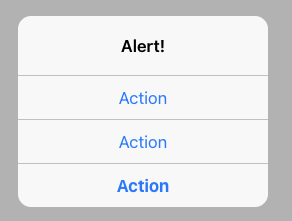
When iOS alert has 3 or more buttons, those are rendered vertically. All
but the last button will have a right border. There shouldn't be a right
border when the buttons are stacked.

## What is the new behavior?
<!-- Please describe the behavior or changes that are being added by
this PR. -->
- Vertical buttons don't have a right border.
- Separated the test in order to also test dark theme.

## Does this introduce a breaking change?
- [ ] Yes
- [x] No
<!--
If this introduces a breaking change:
1. Describe the impact and migration path for existing applications
below.
2. Update the BREAKING.md file with the breaking change.
3. Add "BREAKING CHANGE: [...]" to the commit description when merging.
See
https://github.com/ionic-team/ionic-framework/blob/main/.github/CONTRIBUTING.md#footer
for more information.
-->
## Other information
<!-- Any other information that is important to this PR such as
screenshots of how the component looks before and after the change. -->
N/A
---------
Co-authored-by: ionitron <hi@ionicframework.com>
Issue number: resolves#28818
---------
<!-- Please do not submit updates to dependencies unless it fixes an
issue. -->
<!-- Please try to limit your pull request to one type (bugfix, feature,
etc). Submit multiple pull requests if needed. -->
## What is the current behavior?
<!-- Please describe the current behavior that you are modifying. -->
Select has logic in place to prevent the overlay from opening when
clicking the slotted content. As part of this, we need to deal with the
`<label>` element dispatching another click that then bubbles up and
causes the overlay to open when clicking the slotted content. We
currently deal with this by calling `preventDefault` which prevents this
extra event from being dispatched only when clicking the slotted
content.
We also call `stopPropagation`. This code is not necessary, and in most
cases should not have any adverse effects on developer applications.
However, this does impact React applications due to how React handles
events. When a developer places `onClick` on a slotted element, a native
"click" listener is not immediately applied to that element. Instead,
React adds a native "click" listener to the root element of an
application. When that listener's callback fires, React will dispatch a
synthetic click event on the slotted element. Since we are calling
`stopPropagation`, the click event never bubbles up to this root node's
listener. As a result, the synthetic event is never dispatched on the
slotted element, and the developed `onClick` callback never fires.
## What is the new behavior?
<!-- Please describe the behavior or changes that are being added by
this PR. -->
- Select no longer prevents events from bubbling. The existing
`event.preventDefault` is sufficient to prevent the label from
dispatching another click (thereby causing the select overlay to open)
when clicking the slotted content.
## Does this introduce a breaking change?
- [ ] Yes
- [x] No
<!--
If this introduces a breaking change:
1. Describe the impact and migration path for existing applications
below.
2. Update the BREAKING.md file with the breaking change.
3. Add "BREAKING CHANGE: [...]" to the commit description when merging.
See
https://github.com/ionic-team/ionic-framework/blob/main/.github/CONTRIBUTING.md#footer
for more information.
-->
## Other information
<!-- Any other information that is important to this PR such as
screenshots of how the component looks before and after the change. -->
Dev build: `7.6.5-dev.11705430252.1023daf3`
resolves#28826
BREAKING CHANGE: `getLength` returns `Promise<number>` instead of `<number>`. This method was not previously available in Nav's TypeScript interface, but developers could still access it by casting Nav as `any`. Developers should ensure they `await` their `getLength` call before accessing the returned value.
Issue number: resolves#28827
---------
<!-- Please do not submit updates to dependencies unless it fixes an
issue. -->
<!-- Please try to limit your pull request to one type (bugfix, feature,
etc). Submit multiple pull requests if needed. -->
## What is the current behavior?
<!-- Please describe the current behavior that you are modifying. -->
This import was renamed to `IonBackButton` as part of
9f20780d66.
However, we did not consider that some developers are importing this to
use with `ViewChild`. While we should keep alignment with other
component imports, we need to support the old import until we can make a
breaking change in Ionic 8.
## What is the new behavior?
<!-- Please describe the behavior or changes that are being added by
this PR. -->
- Adds the old IonBackButtonDelegate import
## Does this introduce a breaking change?
- [ ] Yes
- [x] No
<!--
If this introduces a breaking change:
1. Describe the impact and migration path for existing applications
below.
2. Update the BREAKING.md file with the breaking change.
3. Add "BREAKING CHANGE: [...]" to the commit description when merging.
See
https://github.com/ionic-team/ionic-framework/blob/main/.github/CONTRIBUTING.md#footer
for more information.
-->
## Other information
<!-- Any other information that is important to this PR such as
screenshots of how the component looks before and after the change. -->
Dev build: `7.6.5-dev.11705352188.1c6cdb08`
Issue number: N/A

---------

<!-- Please do not submit updates to dependencies unless it fixes an
issue. -->

<!-- Please try to limit your pull request to one type (bugfix, feature,
etc). Submit multiple pull requests if needed. -->

## What is the current behavior?
<!-- Please describe the current behavior that you are modifying. -->

In MD mode, items in an inset list currently receive their own border
radius, separate from the border radius also applied to the inset list
itself. The original intent was likely to ensure that the corners of the
items don't spill out of the list. However, the item's border radius is
no longer needed, for two reasons:
1. MD has since added top/bottom padding to their lists
([spec](https://m2.material.io/components/lists#specs)), which we've
mirrored. This means the borders no longer line up anyway.
2. Even if a developer removes the list's vertical padding (we set it on
the host
[here](535b8ed724/core/src/components/list/list.md.scss (L9)),
so it's easy to overwrite), inset lists currently have `overflow:
hidden` set
[here](535b8ed724/core/src/components/list/list.scss (L20)),
so the list's border radius still applies correctly even with the items'
border radius removed.

## What is the new behavior?
<!-- Please describe the behavior or changes that are being added by
this PR. -->

Item border radius in inset lists removed.

When testing locally, you may find it useful to increase the MD border
radius value
[here](535b8ed724/core/src/components/list/list.md.vars.scss (L47))
so it's easier to see.

## Does this introduce a breaking change?

- [ ] Yes
- [x] No

<!--
  If this introduces a breaking change:
1. Describe the impact and migration path for existing applications
below.
  3. Update the BREAKING.md file with the breaking change.
4. Add "BREAKING CHANGE: [...]" to the commit description when merging.
See
https://github.com/ionic-team/ionic-framework/blob/main/.github/CONTRIBUTING.md#footer
for more information.
-->


## Other information

<!-- Any other information that is important to this PR such as
screenshots of how the component looks before and after the change. -->
Issue number: internal

---------

<!-- Please do not submit updates to dependencies unless it fixes an
issue. -->

<!-- Please try to limit your pull request to one type (bugfix, feature,
etc). Submit multiple pull requests if needed. -->

## What is the current behavior?
<!-- Please describe the current behavior that you are modifying. -->

`ion-button` is being used as a way to open the alerts. It's not being
used to test functionality.

When `ion-button` is updated then the screenshots in the alert tests
must be updated. This shouldn't happen when `ion-button` isn't necessary
to have in these tests.


## What is the new behavior?
<!-- Please describe the behavior or changes that are being added by
this PR. -->

- Replaced `ion-button` with `button`


## Does this introduce a breaking change?

- [ ] Yes
- [x] No

<!--
  If this introduces a breaking change:
1. Describe the impact and migration path for existing applications
below.
  2. Update the BREAKING.md file with the breaking change.
3. Add "BREAKING CHANGE: [...]" to the commit description when merging.
See
https://github.com/ionic-team/ionic-framework/blob/main/.github/CONTRIBUTING.md#footer
for more information.
-->


## Other information

<!-- Any other information that is important to this PR such as
screenshots of how the component looks before and after the change. -->

N/A

---------

Co-authored-by: ionitron <hi@ionicframework.com>
Issue number: resolves#16304, resolves#20681
---------
<!-- Please do not submit updates to dependencies unless it fixes an
issue. -->
<!-- Please try to limit your pull request to one type (bugfix, feature,
etc). Submit multiple pull requests if needed. -->
## What is the current behavior?
<!-- Please describe the current behavior that you are modifying. -->
Split Pane assumes that Menu is a child of the Split Pane. This means
that CSS selectors and JS queries only check for children instead of
descendants. When a Menu is encapsulated in a component that component
can itself show up as an element in the DOM depending on the
environment. For example, both Angular and Web components show up as
elements in the DOM. This causes the Menu to not work because it is no
longer a child of the Split Pane.
## What is the new behavior?
<!-- Please describe the behavior or changes that are being added by
this PR. -->
- Menu can now be used as a descendant of Split Pane. The following
changes make this possible:
1. When the menu is loaded, it queries the ancestor Split Pane. If one
is found, it sets `isPaneVisible` depending on if the split pane is
visible or not.
2. Any changes to the split pane visibility state after the menu is
loaded will be handled through the `ionSplitPaneVisible` event.
3. A menu is now considered to be a pane if it is inside of a split pane
4. Related CSS no longer uses `::slotted` which only targets children.
The CSS was moved into the menu stylesheets. I consider the coupling
here to be valuable as menu and split pane are often used together. We
also already have style coupling between the two components, so this
isn't anything new.
## Does this introduce a breaking change?
- [ ] Yes
- [x] No
There are no known changes to the public API or public behavior.
However, there are two risks here:
1. There is an unknown risk into how this change impacts nested split
panes. This isn't an explicitly supported feature, but it technically
works in Ionic now. We don't know if anyone is actually implementing
this pattern. We'd like to evaluate use cases for nested split panes
submitted by the community before we try to account for this
functionality in menu and split pane.
5. There may be some specificity changes due to the new CSS. CSS was
moved from split pane to menu so it could work with encapsulated
components:
`:host(.split-pane-visible) ::slotted(.split-pane-side)` has a
specificity of 0-1-1
`:host(.menu-page-visible.menu-pane-side)` has a specificity of 0-1-0
There shouldn't be any changes needed to developer code since the
selectors are in the Shadow DOM and developer styles are in the Light
DOM. However, we aren't able to anticipate every edge case so we'd like
to place this in a major release just to be safe.
## Other information
<!-- Any other information that is important to this PR such as
screenshots of how the component looks before and after the change. -->
Dev build: `7.6.2-dev.11704922151.1fd3369f`
Issue number: Internal

---------

<!-- Please do not submit updates to dependencies unless it fixes an
issue. -->

<!-- Please try to limit your pull request to one type (bugfix, feature,
etc). Submit multiple pull requests if needed. -->

## What is the current behavior?
<!-- Please describe the current behavior that you are modifying. -->
The light theme tokens are included in the starter apps but not in Ionic
Framework itself.

## What is the new behavior?
<!-- Please describe the behavior or changes that are being added by
this PR. -->

- The light mode tokens are bundled with Ionic Framework. This allows
developers to always have the light mode accessible to them including
the tokens.

## Does this introduce a breaking change?

- [ ] Yes
- [x] No

<!--
  If this introduces a breaking change:
1. Describe the impact and migration path for existing applications
below.
  2. Update the BREAKING.md file with the breaking change.
3. Add "BREAKING CHANGE: [...]" to the commit description when merging.
See
https://github.com/ionic-team/ionic-framework/blob/main/.github/CONTRIBUTING.md#footer
for more information.
-->


## Other information

<!-- Any other information that is important to this PR such as
screenshots of how the component looks before and after the change. -->

---------

Co-authored-by: ionitron <hi@ionicframework.com>
Issue number: None

---------

<!-- Please do not submit updates to dependencies unless it fixes an
issue. -->

<!-- Please try to limit your pull request to one type (bugfix, feature,
etc). Submit multiple pull requests if needed. -->

## What is the current behavior?
<!-- Please describe the current behavior that you are modifying. -->
Similar to #28809, in my work for FW-5822, I found that I had unexpected
screenshot diffs. `--ion-color-dark` was not defined in our test
infrastructure, and this toggle icon was therefore displaying in the
wrong color in the tests.

## What is the new behavior?
<!-- Please describe the behavior or changes that are being added by
this PR. -->

- Toggle has the correct icon color even when the --ion-color-dark token
is not defined

## Does this introduce a breaking change?

- [ ] Yes
- [x] No

Introduces style changes if the token is undefined, but it should always
be defined in real-world uses.

<!--
  If this introduces a breaking change:
1. Describe the impact and migration path for existing applications
below.
  2. Update the BREAKING.md file with the breaking change.
3. Add "BREAKING CHANGE: [...]" to the commit description when merging.
See
https://github.com/ionic-team/ionic-framework/blob/main/.github/CONTRIBUTING.md#footer
for more information.
-->


## Other information

<!-- Any other information that is important to this PR such as
screenshots of how the component looks before and after the change. -->

---------

Co-authored-by: ionitron <hi@ionicframework.com>
Issue number: None
---------

<!-- Please do not submit updates to dependencies unless it fixes an
issue. -->

<!-- Please try to limit your pull request to one type (bugfix, feature,
etc). Submit multiple pull requests if needed. -->

## What is the current behavior?
<!-- Please describe the current behavior that you are modifying. -->
In my work for FW-5822, I found that I had unexpected screenshot diffs.
`--ion-color-light` was not defined in our test infrastructure, and the
white fallback for the datetime background was causing snapshots to have
a white background when they should have had a light one.

## What is the new behavior?
<!-- Please describe the behavior or changes that are being added by
this PR. -->

- Datetime has the correct background color even when the
`--ion-color-light` token is not defined

## Does this introduce a breaking change?

- [ ] Yes
- [x] No

Introduces style changes if the token is undefined, but it should always
be defined in real-world uses.

<!--
  If this introduces a breaking change:
1. Describe the impact and migration path for existing applications
below.
  2. Update the BREAKING.md file with the breaking change.
3. Add "BREAKING CHANGE: [...]" to the commit description when merging.
See
https://github.com/ionic-team/ionic-framework/blob/main/.github/CONTRIBUTING.md#footer
for more information.
-->


## Other information

<!-- Any other information that is important to this PR such as
screenshots of how the component looks before and after the change. -->

---------

Co-authored-by: ionitron <hi@ionicframework.com>
