mirror of
https://github.com/ionic-team/ionic-framework.git
synced 2026-03-13 10:22:08 +08:00

261 lines
6.7 KiB
JavaScript
261 lines
6.7 KiB
JavaScript
IonicModule
|
|
|
|
/**
|
|
* @ngdoc directive
|
|
* @name ionSideMenus
|
|
* @module ionic
|
|
* @delegate ionic.service:$ionicSideMenuDelegate
|
|
* @restrict E
|
|
*
|
|
* @description
|
|
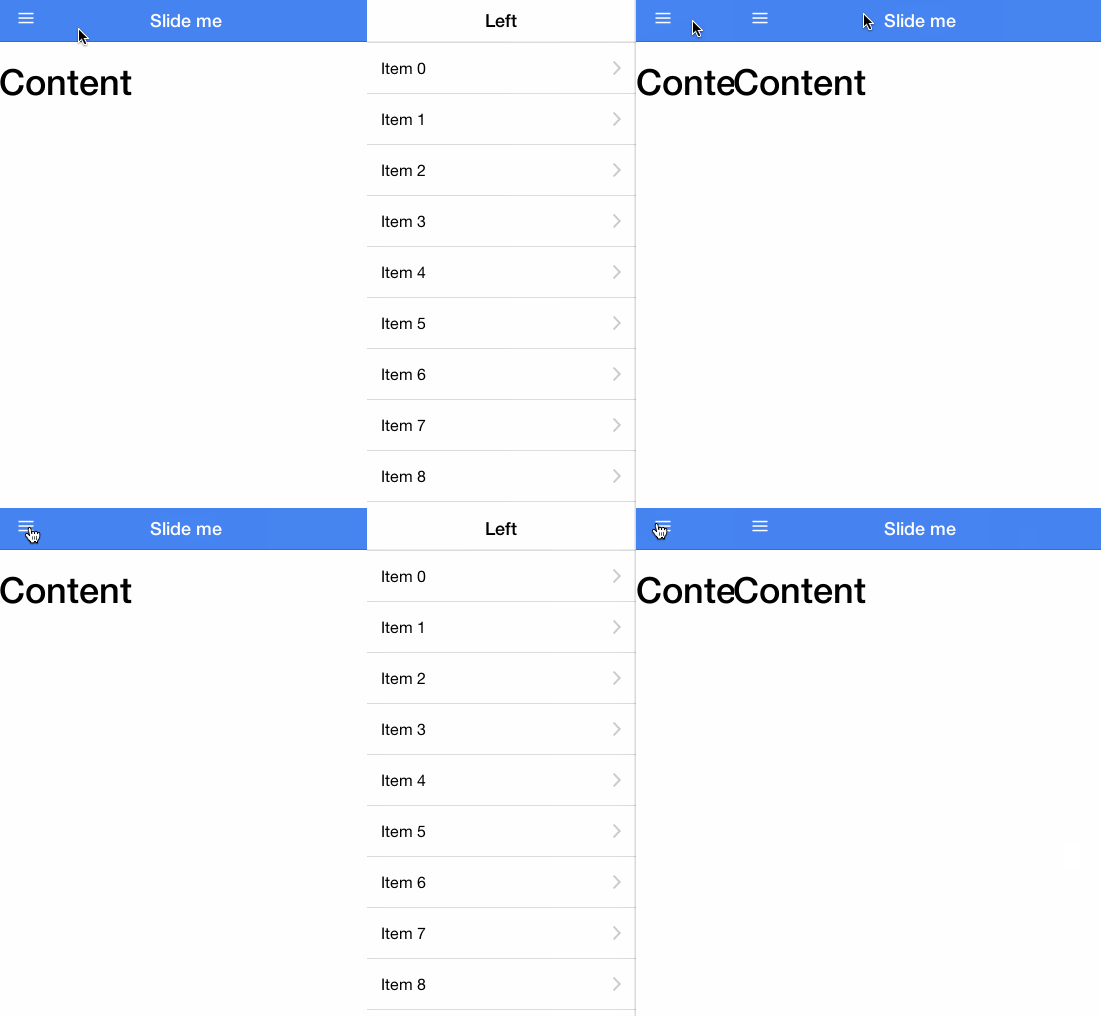
* A container element for side menu(s) and the main content. Allows the left
|
|
* and/or right side menu to be toggled by dragging the main content area side
|
|
* to side.
|
|
*
|
|
* 
|
|
*
|
|
* For more information on side menus, check out the documenation for
|
|
* {@link ionic.directive:ionSideMenuContent} and
|
|
* {@link ionic.directive:ionSideMenu}.
|
|
*
|
|
* @usage
|
|
* To use side menus, add an `<ion-side-menus>` parent element,
|
|
* an `<ion-side-menu-content>` for the center content,
|
|
* and one or more `<ion-side-menu>` directives.
|
|
*
|
|
* ```html
|
|
* <ion-side-menus>
|
|
* <!-- Center content -->
|
|
* <ion-side-menu-content ng-controller="ContentController">
|
|
* </ion-side-menu-content>
|
|
*
|
|
* <!-- Left menu -->
|
|
* <ion-side-menu side="left">
|
|
* </ion-side-menu>
|
|
*
|
|
* <!-- Right menu -->
|
|
* <ion-side-menu side="right">
|
|
* </ion-side-menu>
|
|
* </ion-side-menus>
|
|
* ```
|
|
* ```js
|
|
* function ContentController($scope, $ionicSideMenuDelegate) {
|
|
* $scope.toggleLeft = function() {
|
|
* $ionicSideMenuDelegate.toggleLeft();
|
|
* };
|
|
* }
|
|
* ```
|
|
*
|
|
* @param {string=} delegate-handle The handle used to identify this side menu
|
|
* with {@link ionic.service:$ionicSideMenuDelegate}.
|
|
*
|
|
*/
|
|
/**
|
|
* @ngdoc demo
|
|
* @name ionSideMenus#simple
|
|
* @module sideMenusSimple
|
|
* @javascript
|
|
var app = angular.module('sideMenusSimple', ['ionic']);
|
|
app.controller('SideMenusSimpleCtrl', function($scope, $ionicSideMenuDelegate) {
|
|
|
|
$scope.toggleLeft = function() {
|
|
$ionicSideMenuDelegate.toggleLeft();
|
|
};
|
|
|
|
});
|
|
*
|
|
* @html
|
|
<ion-view title="Side Menus Simple" ng-controller="SideMenusSimpleCtrl">
|
|
<ion-side-menus>
|
|
|
|
<ion-side-menu-content>
|
|
<ion-header-bar class="bar-positive">
|
|
<div class="buttons">
|
|
<div class="button button-clear" ng-click="toggleLeft()">
|
|
<i class="icon ion-navicon"></i>
|
|
</div>
|
|
</div>
|
|
</ion-header-bar>
|
|
<ion-content class="padding">
|
|
<p>Slide the content or press the button on the header to open a side menu.</p>
|
|
</ion-content>
|
|
</ion-side-menu-content>
|
|
|
|
<ion-side-menu side="left">
|
|
<ion-header-bar class="bar-positive">
|
|
</ion-header-bar>
|
|
<ion-content>
|
|
<a class="item" ng-click="toggleLeft()">
|
|
Close Menu
|
|
</a>
|
|
</ion-content>
|
|
</ion-side-menu>
|
|
|
|
</ion-side-menus>
|
|
</ion-view>
|
|
*/
|
|
/**
|
|
* @ngdoc demo
|
|
* @name ionSideMenus#navWithMenu
|
|
* @module sideMenuWithNav
|
|
* @javascript
|
|
angular.module('sideMenuWithNav', ['ionic'])
|
|
.config(function($stateProvider, $urlRouterProvider) {
|
|
$stateProvider
|
|
|
|
.state('app', {
|
|
url: "/app",
|
|
abstract: true,
|
|
templateUrl: "templates/menu.html",
|
|
controller: 'AppCtrl'
|
|
})
|
|
|
|
.state('app.search', {
|
|
url: "/search",
|
|
views: {
|
|
'menuContent' :{
|
|
templateUrl: "templates/search.html"
|
|
}
|
|
}
|
|
})
|
|
|
|
.state('app.browse', {
|
|
url: "/browse",
|
|
views: {
|
|
'menuContent' :{
|
|
templateUrl: "templates/browse.html"
|
|
}
|
|
}
|
|
})
|
|
.state('app.playlists', {
|
|
url: "/playlists",
|
|
views: {
|
|
'menuContent' :{
|
|
templateUrl: "templates/playlists.html",
|
|
controller: 'PlaylistsCtrl'
|
|
}
|
|
}
|
|
})
|
|
|
|
.state('app.single', {
|
|
url: "/playlists/:playlistId",
|
|
views: {
|
|
'menuContent' :{
|
|
templateUrl: "templates/playlist.html",
|
|
controller: 'PlaylistCtrl'
|
|
}
|
|
}
|
|
});
|
|
// if none of the above states are matched, use this as the fallback
|
|
$urlRouterProvider.otherwise('/app/playlists');
|
|
})
|
|
|
|
.controller('AppCtrl', function($scope) {
|
|
})
|
|
|
|
.controller('PlaylistsCtrl', function($scope) {
|
|
$scope.playlists = [
|
|
{ title: 'Reggae', id: 1 },
|
|
{ title: 'Chill', id: 2 },
|
|
{ title: 'Dubstep', id: 3 },
|
|
{ title: 'Indie', id: 4 },
|
|
{ title: 'Rap', id: 5 },
|
|
{ title: 'Cowbell', id: 6 }
|
|
];
|
|
})
|
|
|
|
.controller('PlaylistCtrl', function($scope, $stateParams) {
|
|
})
|
|
*
|
|
* @html
|
|
<ion-nav-view>
|
|
</ion-nav-view>
|
|
|
|
<script type="text/ng-template" id="templates/menu.html">
|
|
<ion-side-menus>
|
|
|
|
<ion-pane ion-side-menu-content>
|
|
<ion-nav-bar class="bar-stable nav-title-slide-ios7">
|
|
<ion-nav-back-button class="button-clear"><i class="icon ion-chevron-left"></i> Back</ion-nav-back-button>
|
|
</ion-nav-bar>
|
|
<ion-nav-view name="menuContent" animation="slide-left-right"></ion-nav-view>
|
|
</ion-pane>
|
|
|
|
<ion-side-menu side="left">
|
|
<header class="bar bar-header bar-stable">
|
|
<h1 class="title">Left</h1>
|
|
</header>
|
|
<ion-content class="has-header">
|
|
<ion-list>
|
|
<ion-item nav-clear menu-close href="#/app/search">
|
|
Search
|
|
</ion-item>
|
|
<ion-item nav-clear menu-close href="#/app/browse">
|
|
Browse
|
|
</ion-item>
|
|
<ion-item nav-clear menu-close href="#/app/playlists">
|
|
Playlists
|
|
</ion-item>
|
|
</ion-list>
|
|
</ion-content>
|
|
</ion-side-menu>
|
|
|
|
</ion-side-menus>
|
|
</script>
|
|
|
|
<script type="text/ng-template" id="templates/browse.html">
|
|
<ion-view title="Browse">
|
|
<ion-nav-buttons side="left">
|
|
<button menu-toggle="left"class="button button-icon icon ion-navicon"></button>
|
|
</ion-nav-buttons>
|
|
<ion-content class="has-header">
|
|
<h1>Browse</h1>
|
|
</ion-content>
|
|
</ion-view>
|
|
</script>
|
|
|
|
<script type="text/ng-template" id="templates/playlist.html">
|
|
<ion-view title="Playlist">
|
|
<ion-content class="has-header">
|
|
<h1>Playlist</h1>
|
|
</ion-content>
|
|
</ion-view>
|
|
</script>
|
|
|
|
<script type="text/ng-template" id="templates/playlists.html">
|
|
<ion-view title="Playlists">
|
|
<ion-nav-buttons side="left">
|
|
<button menu-toggle="left" class="button button-icon icon ion-navicon"></button>
|
|
</ion-nav-buttons>
|
|
<ion-content class="has-header">
|
|
<ion-list>
|
|
<ion-item ng-repeat="playlist in playlists" href="#/app/playlists/{{playlist.id}}">
|
|
{{playlist.title}}
|
|
</ion-item>
|
|
</ion-list>
|
|
</ion-content>
|
|
</ion-view>
|
|
</script>
|
|
|
|
<script type="text/ng-template" id="templates/search.html">
|
|
<ion-view title="Search">
|
|
<ion-nav-buttons side="left">
|
|
<button menu-toggle="left" class="button button-icon icon ion-navicon"></button>
|
|
</ion-nav-buttons>
|
|
<ion-content class="has-header">
|
|
<h1>Search</h1>
|
|
</ion-content>
|
|
</ion-view>
|
|
</script>
|
|
*/
|
|
|
|
.directive('ionSideMenus', [function() {
|
|
return {
|
|
restrict: 'ECA',
|
|
replace: true,
|
|
transclude: true,
|
|
controller: '$ionicSideMenus',
|
|
template: '<div class="view" ng-transclude></div>'
|
|
};
|
|
}]);
|