resolves#21982
BREAKING CHANGE:
- Item no longer automatically delegates focus to the first focusable element. While most developers should not need to make any changes to account for this update, usages of `ion-item` with interactive elements such as form controls (inputs, textareas, etc) should be evaluated to verify that interactions still work as expected.
Issue number: N/A (see below)

---------

<!-- Please do not submit updates to dependencies unless it fixes an
issue. -->

<!-- Please try to limit your pull request to one type (bugfix, feature,
etc). Submit multiple pull requests if needed. -->

## What is the current behavior?
<!-- Please describe the current behavior that you are modifying. -->

Mike found an issue while testing the Ionic 8 beta where there's a
flicker when presenting a picker in a modal on iOS. [We've seen this
issue
before](de13633a18/core/src/utils/forms/notch-controller.ts (L135-L144)),
and the reason why it's happening is there's a quirk in WebKit where the
IntersectionObserver callback is fired _after_ an accelerated animation
completes given a particular IO configuration.

The end result is there's a delay before each picker column is scrolled
to the correct place.

In particular, the modal enter animation on iOS is an accelerated
animation, and we use an IO to control when the picker columns [should
scroll their active options into
view](60056643a9/core/src/components/picker-column/picker-column.tsx (L107)).

## What is the new behavior?
<!-- Please describe the behavior or changes that are being added by
this PR. -->

- The root of the intersection observer is now the parent picker element
which avoids the WebKit quirk.

| `feature-8.0` | branch |
| - | - |
| <video
src="https://github.com/ionic-team/ionic-framework/assets/2721089/7478512b-a691-405e-aafa-e9e377fc47ac"></video>
| <video
src="https://github.com/ionic-team/ionic-framework/assets/2721089/5092e050-733a-4965-8f16-317d251af46a"></video>
|

## Does this introduce a breaking change?

- [ ] Yes
- [x] No

<!--
  If this introduces a breaking change:
1. Describe the impact and migration path for existing applications
below.
  2. Update the BREAKING.md file with the breaking change.
3. Add "BREAKING CHANGE: [...]" to the commit description when merging.
See
https://github.com/ionic-team/ionic-framework/blob/main/.github/CONTRIBUTING.md#footer
for more information.
-->


## Other information

<!-- Any other information that is important to this PR such as
screenshots of how the component looks before and after the change. -->

Dev build: `8.0.0-dev.11709226349.179192de`

Note: Given that this bug is due to a WebKit quirk and is
timing-related, I did not add a test.
Issue number: resolves#29072
---------
<!-- Please do not submit updates to dependencies unless it fixes an
issue. -->
<!-- Please try to limit your pull request to one type (bugfix, feature,
etc). Submit multiple pull requests if needed. -->
## What is the current behavior?
<!-- Please describe the current behavior that you are modifying. -->
The input blurring utility is causing adverse side effects in developer
applications by causing certain UI components to be blurred. This
utility was [added back in
2017](c10f72b1e2).
That commit claims to fix a number of issues, but
https://github.com/ionic-team/ionic-framework/issues/8933 and
https://github.com/ionic-team/ionic-framework/issues/11484 seem most
relevant here.
While the purpose of this utility is not definitively known it appears
that this was created to solve an issue on iOS where the searchbar was
not being blurred when tapping outside of the input. The linked issues
refer to cases where inputs are not blurred when they should be. This
aligns with the input blurring utility behavior where it only blurs
elements and never focuses them.
Additionally, the two linked issues only happened on iOS which aligns
with the default behavior of the input blurring utility which is to only
be enabled on iOS.
I tested the searchbar on iOS with this utility **disabled** and I was
able to blur the searchbar by tapping outside the input. It seems that
this utility was created to work around a WebKit issue that has since
been resolved.
https://github.com/ionic-team/ionic-framework/assets/2721089/7772688b-a0d4-476e-be72-931cc07cd93a
## What is the new behavior?
<!-- Please describe the behavior or changes that are being added by
this PR. -->
- Given that I am not 100% sure that this utility does what I think it
does, I'd like to propose we disable this feature by default starting in
Ionic 8. This will resolve the linked issue but also give developers an
escape hatch (by manually re-enabling it in their apps) if disabling the
utility does cause issues. The team can evaluate remove the code
altogether if disabling it does not have any known adverse side effects.
## Does this introduce a breaking change?
- [ ] Yes
- [x] No
I don't consider this a breaking change because a) `inputBlurring` is a
private API and b) there current thinking is that there should be no
behavior change (other than the buggy behaviors going away) since this
utility exists to solve a WebKit issue that no longer exists.
<!--
If this introduces a breaking change:
1. Describe the impact and migration path for existing applications
below.
2. Update the BREAKING.md file with the breaking change.
3. Add "BREAKING CHANGE: [...]" to the commit description when merging.
See
https://github.com/ionic-team/ionic-framework/blob/main/.github/CONTRIBUTING.md#footer
for more information.
-->
## Other information
<!-- Any other information that is important to this PR such as
screenshots of how the component looks before and after the change. -->
Dev build: `8.0.0-dev.11709245047.1565a499`
---------
Co-authored-by: Amanda Johnston <90629384+amandaejohnston@users.noreply.github.com>
Issue number: Internal

---------

<!-- Please do not submit updates to dependencies unless it fixes an
issue. -->

<!-- Please try to limit your pull request to one type (bugfix, feature,
etc). Submit multiple pull requests if needed. -->

## What is the current behavior?
<!-- Please describe the current behavior that you are modifying. -->

Modal inherits `aria-label` and `role` to an element inside of its
Shadow DOM. However, this only works if developers set the attributes on
the host element directly. Setting the attributes via the
`htmlAttributes` property causes the attributes to be set on the host
and not inherited.

## What is the new behavior?
<!-- Please describe the behavior or changes that are being added by
this PR. -->

- `aria-label` and `role` are inherited even when set using
`htmlAttributes`.

## Does this introduce a breaking change?

- [ ] Yes
- [x] No

<!--
  If this introduces a breaking change:
1. Describe the impact and migration path for existing applications
below.
  2. Update the BREAKING.md file with the breaking change.
3. Add "BREAKING CHANGE: [...]" to the commit description when merging.
See
https://github.com/ionic-team/ionic-framework/blob/main/.github/CONTRIBUTING.md#footer
for more information.
-->


## Other information

<!-- Any other information that is important to this PR such as
screenshots of how the component looks before and after the change. -->

Dev build: `7.7.4-dev.11709154993.1b49c313`
BREAKING CHANGE:

The `legacy` property and support for the legacy syntax, which involved placing an `ion-range` inside of an `ion-item` with an `ion-label`, have been removed from range. For more information on migrating from the legacy range syntax, refer to the [Range documentation](https://ionicframework.com/docs/api/range#migrating-from-legacy-range-syntax).
BREAKING CHANGE:

The `legacy` property and support for the legacy syntax, which involved placing an `ion-checkbox` inside of an `ion-item` with an `ion-label`, have been removed from checkbox. For more information on migrating from the legacy checkbox syntax, refer to the [Checkbox documentation](https://ionicframework.com/docs/api/checkbox#migrating-from-legacy-checkbox-syntax).
Issue number: resolves#28261
---------
<!-- Please do not submit updates to dependencies unless it fixes an
issue. -->
<!-- Please try to limit your pull request to one type (bugfix, feature,
etc). Submit multiple pull requests if needed. -->
## What is the current behavior?
<!-- Please describe the current behavior that you are modifying. -->
When moving focus from a focus-trapped overlay to a toast, focus is
moved back to the overlay. This is the correct behavior as focus should
never leave a focus-trapped overlay (unless the overlay is dismissed or
focus is moved to a _new_ top-most overlay). However, the way we return
focus is a bit unexpected because it always returns focus to the last
focusable element in the overlay.
This means that if you were focused on the first focusable element,
presented the toast, and then focused the toast, focus might not be
moved back to that first focusable element. In the case of the linked
issue, this was causing an unexpected scroll so that the last focused
element could be in view.
## What is the new behavior?
<!-- Please describe the behavior or changes that are being added by
this PR. -->
- This fix adds an exception for `ion-toast` (as it is the only overlay
that is **not** focus trapped) that ensures that focus is moved back to
the last focus element.
## Does this introduce a breaking change?
- [ ] Yes
- [x] No
<!--
If this introduces a breaking change:
1. Describe the impact and migration path for existing applications
below.
2. Update the BREAKING.md file with the breaking change.
3. Add "BREAKING CHANGE: [...]" to the commit description when merging.
See
https://github.com/ionic-team/ionic-framework/blob/main/.github/CONTRIBUTING.md#footer
for more information.
-->
## Other information
<!-- Any other information that is important to this PR such as
screenshots of how the component looks before and after the change. -->
Dev build: `7.7.1-dev.11707253408.186eea70`
Note: We don't recommend this pattern in general because it would be
impossible for a screen reader user to focus the toast. However, we can
at least improve the experience for developers who continue to implement
this pattern by returning focus in a more predictable manner.
Docs: https://github.com/ionic-team/ionic-docs/pull/3432
Testing:
Reviewers should manually test the following behaviors:
1. Create a modal with 2 buttons. Have one of the buttons present a
toast. Open the toast and verify that you can still Tab to cycle through
the buttons in the modal.
2. Create a modal with 2 buttons. Have one of the buttons present a
toast. Open the toast. Move focus to the toast and verify that you can
still Tab to cycle through the buttons in the modal (once focus is
returned to the modal).
- Fix Internal issue (FW-5205) - Removed the build conditional in the
`item` component since the previous issue is already fixed in Stencil.
---------
<!-- Please do not submit updates to dependencies unless it fixes an
issue. -->
<!-- Please try to limit your pull request to one type (bugfix, feature,
etc). Submit multiple pull requests if needed. -->
## What is the current behavior?
<!-- Please describe the current behavior that you are modifying. -->
- No changes were made in terms of behavior.
## What is the new behavior?
<!-- Please describe the behavior or changes that are being added by
this PR. -->
- No changes were made in terms of behavior so it will work as before.
## Does this introduce a breaking change?
- [ ] Yes
- [x] No
<!--
If this introduces a breaking change:
1. Describe the impact and migration path for existing applications
below.
2. Update the BREAKING.md file with the breaking change.
3. Add "BREAKING CHANGE: [...]" to the commit description when merging.
See
https://github.com/ionic-team/ionic-framework/blob/main/.github/CONTRIBUTING.md#footer
for more information.
-->
## Other information
<!-- Any other information that is important to this PR such as
screenshots of how the component looks before and after the change. -->
- Spec tests still pass even after this change (we can see below the
results before and after the change)
- Ran the command `npm run test.spec
src/components/item/test/item.spec.ts
src/components/item/test/item.spec.tsx`

Issue number: N/A

---------

<!-- Please do not submit updates to dependencies unless it fixes an
issue. -->

<!-- Please try to limit your pull request to one type (bugfix, feature,
etc). Submit multiple pull requests if needed. -->

## What is the current behavior?
<!-- Please describe the current behavior that you are modifying. -->

Ionic Framework has fallback detection for Capacitor 2 applications to
avoid applying status bar style changes to the card modal.

## What is the new behavior?
<!-- Please describe the behavior or changes that are being added by
this PR. -->

- Ionic Framework's detection for applying status bar styles will be
based on the APIs available in Capacitor 3+.
- Ionic Framework will no longer support the legacy Capacitor 2
configurations.

## Does this introduce a breaking change?

- [x] Yes
- [ ] No

<!--
  If this introduces a breaking change:
1. Describe the impact and migration path for existing applications
below.
  2. Update the BREAKING.md file with the breaking change.
3. Add "BREAKING CHANGE: [...]" to the commit description when merging.
See
https://github.com/ionic-team/ionic-framework/blob/main/.github/CONTRIBUTING.md#footer
for more information.
-->

Developer should upgrade to the latest major release of Capacitor.

## Other information

<!-- Any other information that is important to this PR such as
screenshots of how the component looks before and after the change. -->
BREAKING CHANGE:

The `legacy` property and support for the legacy syntax, which involved placing an `ion-radio` inside of an `ion-item` with an `ion-label`, have been removed from radio. For more information on migrating from the legacy radio syntax, refer to the [Radio documentation](https://ionicframework.com/docs/api/radio#migrating-from-legacy-radio-syntax).
BREAKING CHANGE:

The `legacy` property and support for the legacy syntax, which involved placing an `ion-toggle` inside of an `ion-item` with an `ion-label`, have been removed from toggle. For more information on migrating from the legacy toggle syntax, refer to the [Toggle documentation](https://ionicframework.com/docs/api/toggle#migrating-from-legacy-toggle-syntax).
Issue number: internal

---------

## What is the current behavior?

In Ionic Framework v7, we [simplified the select
syntax](https://ionic.io/blog/ionic-7-is-here#simplified-form-control-syntax)
so that it was no longer required to be placed inside of an `ion-item`.
We maintained backwards compatibility by adding a `legacy` property
which allowed it to continue to be styled properly when written in the
following way:

```html
<ion-item>
  <ion-label>Label</ion-label>
  <ion-select></ion-select>
</ion-item>
```

While this was supported in v7, console warnings were logged to notify
developers that they needed to update this syntax for the best
accessibility experience.

## What is the new behavior?

- Removes the `legacy` property and support for the legacy syntax.
Developers should follow the [migration
guide](https://ionicframework.com/docs/api/select#migrating-from-legacy-select-syntax)
in the select documentation to update their apps. The new syntax
requires a `label` or `aria-label` on `ion-select`:
    ```html
    <ion-item>
      <ion-select label="Label"></ion-select>
    </ion-item>
    ```
- Removes the legacy tests under under `select/test/legacy/` and all
related screenshots
- Removes the select usage from `item/test/disabled`,
`item/test/legacy/alignment`, and `item/test/legacy/disabled` and all
related screenshots if the test was removed

## Does this introduce a breaking change?

- [x] Yes
- [ ] No

1. Developers have had console warnings when using the legacy syntax
since the v7 release. The migration guide for the new select syntax is
outlined in the [Select
documentation](https://ionicframework.com/docs/api/select#migrating-from-legacy-select-syntax).
2. This change has been documented in the Breaking Changes document with
a link to the migration guide.

BREAKING CHANGE:

The `legacy` property and support for the legacy syntax, which involved
placing an `ion-select` inside of an `ion-item` with an `ion-label`,
have been removed from select. For more information on migrating from
the legacy select syntax, refer to the [Select
documentation](https://ionicframework.com/docs/api/select#migrating-from-legacy-select-syntax).

---------

Co-authored-by: ionitron <hi@ionicframework.com>
Issue number: internal

---------

## What is the current behavior?

In Ionic Framework v7, we [simplified the input
syntax](https://ionic.io/blog/ionic-7-is-here#simplified-form-control-syntax)
so that it was no longer required to be placed inside of an `ion-item`.
We maintained backwards compatibility by adding a `legacy` property
which allowed it to continue to be styled properly when written in the
following way:

```html
<ion-item>
  <ion-label>Label</ion-label>
  <ion-input></ion-input>
</ion-item>
```

While this was supported in v7, console warnings were logged to notify
developers that they needed to update this syntax for the best
accessibility experience.

## What is the new behavior?

- Removes the `legacy` property and support for the legacy syntax.
Developers should follow the [migration
guide](https://ionicframework.com/docs/api/input#migrating-from-legacy-input-syntax)
in the input documentation to update their apps. The new syntax requires
a `label` or `aria-label` on `ion-input`:
    ```html
    <ion-item>
      <ion-input label="Label"></ion-input>
    </ion-item>
    ```
- Removes the legacy tests under under `input/test/legacy/` and all
related screenshots
- Removes the input usage from `item/test/a11y`, `item/test/counter`,
`item/test/disabled`, `item/test/highlight`,
`item/test/legacy/alignment`, `item/test/legacy/disabled`,
`item/test/legacy/fill`, and `item/test/legacy/form` and all related
screenshots if the test was removed

## Does this introduce a breaking change?

- [x] Yes
- [ ] No

1. Developers have had console warnings when using the legacy syntax
since the v7 release. The migration guide for the new input syntax is
outlined in the [Input
documentation](https://ionicframework.com/docs/api/input#migrating-from-legacy-input-syntax).
2. This change has been documented in the Breaking Changes document with
a link to the migration guide.

BREAKING CHANGE:

The `legacy` property and support for the legacy syntax, which involved
placing an `ion-input` inside of an `ion-item` with an `ion-label`, have
been removed from input. For more information on migrating from the
legacy input syntax, refer to the [Input
documentation](https://ionicframework.com/docs/api/input#migrating-from-legacy-input-syntax).

---------

Co-authored-by: ionitron <hi@ionicframework.com>
⚠️ This is a combination of previously approved PRs with the
exception of
fe9dca513c.
This change was made as a result of
https://github.com/ionic-team/ionic-framework-design-documents/pull/248.

Issue number: Internal

---------

<!-- Please do not submit updates to dependencies unless it fixes an
issue. -->

<!-- Please try to limit your pull request to one type (bugfix, feature,
etc). Submit multiple pull requests if needed. -->

## What is the current behavior?
<!-- Please describe the current behavior that you are modifying. -->

Users do not have a way of increasing the contrast in Ionic apps. This
is valuable for people with low vision as increasing the contrast
between foreground and background content helps improve readability.

## What is the new behavior?
<!-- Please describe the behavior or changes that are being added by
this PR. -->

- Adds a high contrast light and high contrast dark theme. As with our
other themes, developers can choose between system, class, and always
stylesheets.

While we aim to improve contrast for text and UI components, this
feature prioritizes text in the event that both text and UI component
cannot be improved without one negatively impacting the other.

## Does this introduce a breaking change?

- [ ] Yes
- [x] No

<!--
  If this introduces a breaking change:
1. Describe the impact and migration path for existing applications
below.
  2. Update the BREAKING.md file with the breaking change.
3. Add "BREAKING CHANGE: [...]" to the commit description when merging.
See
https://github.com/ionic-team/ionic-framework/blob/main/.github/CONTRIBUTING.md#footer
for more information.
-->


## Other information

<!-- Any other information that is important to this PR such as
screenshots of how the component looks before and after the change. -->

Dev build: `7.6.7-dev.11706894781.1cd59fde`

Testing instructions:

1. Open `src/themes/test/css-variables`. Activate the high contrast
light and dark themes to verify that contrast does increase.
2. Use the dev build to integrate the theme into a test app (conference
app, starter app, etc).

I'd recommend using these imports:

```css
@import "@ionic/angular/css/themes/high-contrast.system.css";
@import "@ionic/angular/css/themes/high-contrast-dark.system.css";
```
Note: Make sure this is imported **after** `core.scss`

---------

Co-authored-by: Shawn Taylor <shawn@ionic.io>
Co-authored-by: Brandy Carney <brandyscarney@users.noreply.github.com>
Co-authored-by: Sean Perkins <13732623+sean-perkins@users.noreply.github.com>
Co-authored-by: ionitron <hi@ionicframework.com>
Co-authored-by: Maria Hutt <thetaPC@users.noreply.github.com>
Co-authored-by: Amanda Johnston <90629384+amandaejohnston@users.noreply.github.com>
Issue number: Internal

---------

<!-- Please do not submit updates to dependencies unless it fixes an
issue. -->

<!-- Please try to limit your pull request to one type (bugfix, feature,
etc). Submit multiple pull requests if needed. -->

## What is the current behavior?
<!-- Please describe the current behavior that you are modifying. -->

This code was added to account for a Safari 14 issue that would cause
datetime to render incorrectly. The Safari bug was fixed starting in
Safari 15. However, Ionic v7 supported back to Safari 14.

More context is available
[here](https://github.com/ionic-team/ionic-framework/pull/24421#discussion_r796113907)

## What is the new behavior?
<!-- Please describe the behavior or changes that are being added by
this PR. -->

- Removed the Safari 14 workarounds since Ionic v8 does not support
Safari 14

I tested on iOS 15, 16, and 17 to verify that removing this hack does
not cause any issues. Also verified that removing this hack does
reproduce the issue on iOS 14 (to verify that I am reproducing the
original issue correctly)

## Does this introduce a breaking change?

- [ ] Yes
- [x] No

<!--
  If this introduces a breaking change:
1. Describe the impact and migration path for existing applications
below.
  2. Update the BREAKING.md file with the breaking change.
3. Add "BREAKING CHANGE: [...]" to the commit description when merging.
See
https://github.com/ionic-team/ionic-framework/blob/main/.github/CONTRIBUTING.md#footer
for more information.
-->


## Other information

<!-- Any other information that is important to this PR such as
screenshots of how the component looks before and after the change. -->
Issue number: Internal

---------

<!-- Please do not submit updates to dependencies unless it fixes an
issue. -->

<!-- Please try to limit your pull request to one type (bugfix, feature,
etc). Submit multiple pull requests if needed. -->

## What is the current behavior?
<!-- Please describe the current behavior that you are modifying. -->

Ionic Framework has a patch implementation to workaround a Safari 14 bug
that resulted in the calendar month jumping when opening/closing the
month/year interface.

This bug was fixed in Safari 15.

## What is the new behavior?
<!-- Please describe the behavior or changes that are being added by
this PR. -->

- Ionic v8 no longer supports Safari 14, so we can safely remove this
patch code
- Calendar month does not jump when opening/closing the month/year
interface with Safari/iOS 15-17

## Does this introduce a breaking change?

- [ ] Yes
- [x] No

<!--
  If this introduces a breaking change:
1. Describe the impact and migration path for existing applications
below.
  2. Update the BREAKING.md file with the breaking change.
3. Add "BREAKING CHANGE: [...]" to the commit description when merging.
See
https://github.com/ionic-team/ionic-framework/blob/main/.github/CONTRIBUTING.md#footer
for more information.
-->


## Other information

<!-- Any other information that is important to this PR such as
screenshots of how the component looks before and after the change. -->

I tested on Sims for iOS 15-17. Tested against a physical device for iOS
17 as well.
Issue number: resolves#28849
---------
## What is the current behavior?
If the developer tries to set focus to a custom element on overlay
dismissal, Ionic will always override that focus.
## What is the new behavior?
- If focus is already set by developer during dismissal, then Ionic will
not restore focus to previous element
## Does this introduce a breaking change?
- [ ] Yes
- [x] No
## Other information
In the before video, you can see the text box is focused by developer
code when "Mention User" is tapped, which opens the keyboard. Shortly
after that, when the bottom sheet fully dismisses, Ionic focuses the
button, removing focus from the text box and hiding the keyboard.
In the after, Ionic detects that the developer has already focused the
text box and does not change that focus.
|Before|After|
|---|---|
|<video
src="https://github.com/ionic-team/ionic-framework/assets/2166114/47d55eff-29af-4019-ac3c-00f9fe722ca7"></video>|
<video
src="https://github.com/ionic-team/ionic-framework/assets/2166114/508ae466-d037-41eb-b518-92338a122b22"></video>|
Issue number: internal

---------

## What is the current behavior?
The old `border-radius` mixin added additional selectors and styles
depending on whether the direction was set to `ltr` or `rtl`.

Old mixin usage:

```scss
.old-border-radius {
  @include border-radius(5px, 6px, 7px, 8px)
}
```

generates:

```css
.old-border-radius {
  border-top-left-radius: 5px;
  border-top-right-radius: 6px;
  border-bottom-right-radius: 7px;
  border-bottom-left-radius: 8px;
}

:host-context([dir=rtl]) .old-border-radius {
  border-top-left-radius: 6px;
  border-top-right-radius: 5px;
  border-bottom-right-radius: 8px;
  border-bottom-left-radius: 7px;
}

[dir=rtl] .old-border-radius {
  border-top-left-radius: 6px;
  border-top-right-radius: 5px;
  border-bottom-right-radius: 8px;
  border-bottom-left-radius: 7px;
}

@supports selector(:dir(rtl)) {
  .old-border-radius:dir(rtl) {
    border-top-left-radius: 6px;
    border-top-right-radius: 5px;
    border-bottom-right-radius: 8px;
    border-bottom-left-radius: 7px;
  }
}
```

## What is the new behavior?
The new `border-radius` mixin uses the [logical
properties](https://developer.mozilla.org/en-US/docs/Web/CSS/CSS_logical_properties_and_values/Margins_borders_padding)
which handles switching based on the
[writing-mode](https://developer.mozilla.org/en-US/docs/Web/CSS/writing-mode),
[direction](https://developer.mozilla.org/en-US/docs/Web/CSS/direction),
and
[text-orientation](https://developer.mozilla.org/en-US/docs/Web/CSS/text-orientation):

| Before                       | After                       |
| -----------------------------| ----------------------------|
| `border-top-left-radius`     | `border-start-start-radius` |
| `border-bottom-left-radius`  | `border-end-start-radius`   |
| `border-top-right-radius`    | `border-start-end-radius`   |
| `border-bottom-right-radius` | `border-end-end-radius`     |

New mixin usage:

```scss
.new-border-radius {
  @include border-radius(5px, 6px, 7px, 8px)
}
```

```css
.new-border-radius {
  border-start-start-radius: 5px;
  border-start-end-radius: 6px;
  border-end-end-radius: 7px;
  border-end-start-radius: 8px;
}
```

## Does this introduce a breaking change?

- [ ] Yes
- [x] No

## Other information

The `select` styles have been updated to use the mixin instead of
hardcoding `border-radius`.
Issue number: resolves#23472
---------
<!-- Please do not submit updates to dependencies unless it fixes an
issue. -->
<!-- Please try to limit your pull request to one type (bugfix, feature,
etc). Submit multiple pull requests if needed. -->
## What is the current behavior?
<!-- Please describe the current behavior that you are modifying. -->
If multiple overlays are presented at the same time, none of them
receive `aria-hidden="true"`. This means that screen readers can read
contents from overlays behind the current one, which can be confusing
for users.
The original issue also reports router outlets getting `aria-hidden`
removed when any overlay is dismissed, not just the last one, but we've
since fixed that:
35ab6b4816/core/src/utils/overlays.ts (L573-L576)
## What is the new behavior?
<!-- Please describe the behavior or changes that are being added by
this PR. -->
All overlays besides the topmost one now receive `aria-hidden="true"`.
This means that screen readers will only announce the topmost overlay.
## Does this introduce a breaking change?
- [ ] Yes
- [x] No
<!--
If this introduces a breaking change:
1. Describe the impact and migration path for existing applications
below.
2. Update the BREAKING.md file with the breaking change.
3. Add "BREAKING CHANGE: [...]" to the commit description when merging.
See
https://github.com/ionic-team/ionic-framework/blob/main/.github/CONTRIBUTING.md#footer
for more information.
-->
## Other information
<!-- Any other information that is important to this PR such as
screenshots of how the component looks before and after the change. -->
Issue number: Internal

---------

<!-- Please do not submit updates to dependencies unless it fixes an
issue. -->

<!-- Please try to limit your pull request to one type (bugfix, feature,
etc). Submit multiple pull requests if needed. -->

## What is the current behavior?
<!-- Please describe the current behavior that you are modifying. -->

Team members are running into unexpected errors running spec tests:

```
TypeError: Cannot read properties of undefined (reading '$instanceValues$')
```

This line is the culprit:
f885a5526a/core/src/components/toast/test/toast.spec.tsx (L108)
We set the Ionic config for toastDuration to 5000. This means that on
present a setTimeout callback will fire after 5000ms and dismiss the
toast. For this test, this is fine because we never present the toast
therefore the setTimeout is never created.

The problem is that this config is not automatically reset between
tests. As a result, when we have tests that only present the toast (and
never dismiss it) the duration is also 5000 there:
f885a5526a/core/src/components/toast/test/toast.spec.tsx (L179-L184)

This results in a bunch of setTimeouts being created. The timeout
callback runs dismiss, and the body of that function tries to access
data on the host toast. Since the toast instance has already been torn
down (since the tests are done), the undefined error occurs.


## What is the new behavior?
<!-- Please describe the behavior or changes that are being added by
this PR. -->

- Reset the Ionic config after the test that sets `toastDuration` to
`5000`

## Does this introduce a breaking change?

- [ ] Yes
- [x] No

<!--
  If this introduces a breaking change:
1. Describe the impact and migration path for existing applications
below.
  2. Update the BREAKING.md file with the breaking change.
3. Add "BREAKING CHANGE: [...]" to the commit description when merging.
See
https://github.com/ionic-team/ionic-framework/blob/main/.github/CONTRIBUTING.md#footer
for more information.
-->


## Other information

<!-- Any other information that is important to this PR such as
screenshots of how the component looks before and after the change. -->
In https://github.com/ionic-team/ionic-framework/issues/28981 there was
some confusion surrounding how to remove an overlay from the DOM if it
was never presented. The `dismiss` method will remove the overlay from
the DOM, but only if the overlay is visible. Otherwise, it's a no-op.

This PR updates the `dismiss` method docs for each overlay component to
note that developers can use the browser's remove method to remove the
element from the DOM.
Issue number: internal

---------

## What is the current behavior?

In Ionic Framework v7, we [simplified the textarea
syntax](https://ionic.io/blog/ionic-7-is-here#simplified-form-control-syntax)
so that it was no longer required to be placed inside of an `ion-item`.
We maintained backwards compatibility by adding a `legacy` property
which allowed it to continue to be styled properly when written in the
following way:

```html
<ion-item>
  <ion-label>Label</ion-label>
  <ion-textarea></ion-textarea>
</ion-item>
```

While this was supported in v7, console warnings were logged to notify
developers that they needed to update this syntax for the best
accessibility experience.

## What is the new behavior?

- Removes the `legacy` property and support for the legacy syntax.
Developers should follow the [migration
guide](https://ionicframework.com/docs/api/textarea#migrating-from-legacy-textarea-syntax)
in the textarea documentation to update their apps. The new syntax
requires a `label` or `aria-label` on `ion-textarea`:
    ```html
    <ion-item>
      <ion-textarea label="Label"></ion-textarea>
    </ion-item>
    ```
- Removes the legacy tests under `textarea/test/legacy/` and all related
screenshots
- Removes the textarea usage in `input/test/legacy/spec`,
`item/test/disabled`, `item/test/legacy/disabled` and
`item/test/legacy/fill`

## Does this introduce a breaking change?

- [x] Yes
- [ ] No

1. Developers have had console warnings when using the legacy syntax
since the v7 release. The migration guide for the new textarea syntax is
outlined in the [Textarea
documentation](https://ionicframework.com/docs/api/textarea#migrating-from-legacy-textarea-syntax).
2. This change has been documented in the Breaking Changes document with
a link to the migration guide.

BREAKING CHANGE:

The `legacy` property and support for the legacy syntax, which involved
placing an `ion-textarea` inside of an `ion-item` with an `ion-label`,
have been removed from textarea. For more information on migrating from
the legacy textarea syntax, refer to the [Textarea
documentation](https://ionicframework.com/docs/api/textarea#migrating-from-legacy-textarea-syntax).

---------

Co-authored-by: ionitron <hi@ionicframework.com>
Issue number: resolves#28541
---------
<!-- Please do not submit updates to dependencies unless it fixes an
issue. -->
<!-- Please try to limit your pull request to one type (bugfix, feature,
etc). Submit multiple pull requests if needed. -->
## What is the current behavior?
<!-- Please describe the current behavior that you are modifying. -->
On iOS when dismissing the `ion-action-sheet`, the animation does not
account for the safe area of the device. This results in the action
sheet not completely animating off the visible viewport on a device with
safe area enabled.
## What is the new behavior?
<!-- Please describe the behavior or changes that are being added by
this PR. -->
- The `ion-action-sheet` will animate consistently off the viewport when
dismissing, including the safe area.
To better support custom animations not needing to account for the safe
area, the safe area has been added to the padding of the action sheet
container. This results in the height increasing based on the bottom
safe area and animating correctly when translating between [`100%` and
`0%`](9d57758e3e/core/src/components/action-sheet/animations/ios.enter.ts (L23)).
|Before|After|
|---|---|
|<video
src="https://github.com/ionic-team/ionic-framework/assets/13732623/d9475a54-f1b9-4283-ae1a-86e2b71a9d9e"></video>|<video
src="https://github.com/ionic-team/ionic-framework/assets/13732623/d051b4d9-4f45-4a51-b522-510f8cddef74"></video>|
In the recorded examples the bottom safe area is exaggerated to show the
dismiss animation differences.
## Does this introduce a breaking change?
- [ ] Yes
- [x] No
<!--
If this introduces a breaking change:
1. Describe the impact and migration path for existing applications
below.
2. Update the BREAKING.md file with the breaking change.
3. Add "BREAKING CHANGE: [...]" to the commit description when merging.
See
https://github.com/ionic-team/ionic-framework/blob/main/.github/CONTRIBUTING.md#footer
for more information.
-->
## Other information
<!-- Any other information that is important to this PR such as
screenshots of how the component looks before and after the change. -->
To test this PR, I would recommend adding the following styles to the
action sheet basic test:
```html
<style>
ion-action-sheet {
--ion-safe-area-bottom: 100px;
}
</style>
```
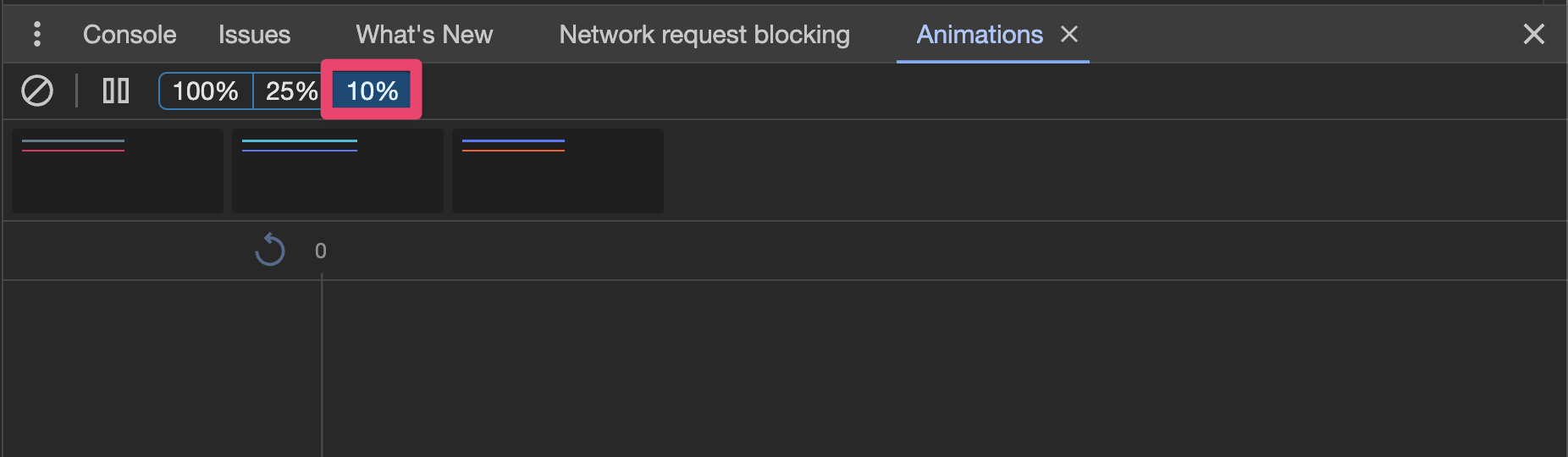
You can then open dev-tools and slow the animation speed to 10%:
- Open and dismiss the action sheet tied to the "Basic" button.
- Verify that the action sheet animates completely off the view when
dismissed.
- Open the and dismiss the action sheet tied to the "Custom CSS Class"
button. This implementation customizes the `--height` of the action
sheet.
- Verify that the action sheet animates completely off the view when
dismissed.
---------
Co-authored-by: ionitron <hi@ionicframework.com>
Co-authored-by: Liam DeBeasi <liamdebeasi@users.noreply.github.com>
Issue number: resolves#28963
---------
<!-- Please do not submit updates to dependencies unless it fixes an
issue. -->
<!-- Please try to limit your pull request to one type (bugfix, feature,
etc). Submit multiple pull requests if needed. -->
## What is the current behavior?
<!-- Please describe the current behavior that you are modifying. -->
In https://github.com/ionic-team/ionic-framework/pull/28861 I fixed an
issue that caused the wrong content inside of a popover to be
scrollable. This CSS should have been applied, but it broke back when
popover was converted to the Shadow DOM. Fixing this issue revealed a
misconfiguration with the select-popover that caused the select-popover
to no longer be scrollable.
## What is the new behavior?
<!-- Please describe the behavior or changes that are being added by
this PR. -->
- Content inside of `ion-select-popover` can now be scrolled
Note that I am considering this a bug fix instead of a regression. While
scrolling used to work in select-popover, it only worked by chance. The
`.popover-viewport` styles should have always applied to the
select-popover, thus requiring the use of `overflow-y: auto` in
select-popover.
## Does this introduce a breaking change?
- [ ] Yes
- [x] No
<!--
If this introduces a breaking change:
1. Describe the impact and migration path for existing applications
below.
2. Update the BREAKING.md file with the breaking change.
3. Add "BREAKING CHANGE: [...]" to the commit description when merging.
See
https://github.com/ionic-team/ionic-framework/blob/main/.github/CONTRIBUTING.md#footer
for more information.
-->
## Other information
<!-- Any other information that is important to this PR such as
screenshots of how the component looks before and after the change. -->
Dev build: `7.7.1-dev.11706893059.1bef4b38`
Issue number: resolves#28352
---------
<!-- Please do not submit updates to dependencies unless it fixes an
issue. -->
<!-- Please try to limit your pull request to one type (bugfix, feature,
etc). Submit multiple pull requests if needed. -->
## What is the current behavior?
<!-- Please describe the current behavior that you are modifying. -->
Not all animations are getting properly destroyed after they run. This
means that styles can get stuck at the end value of their animation.
Specifically for this reproduction (as reported in the bug ticket), if
the modal animates from 1 to 0 opacity and then the modal gets reopened
with a different animation where the opacity should be 1 throughout
(i.e. the opacity isn't supposed to animate at all), the modal is
invisible because the opacity got stuck at 0 and never got reset to the
default value of 1.
This bug is probably causing some incorrect behavior on other edge cases
with overlays, but this is the only one I've identified.
### Reproduction steps
Note: you cannot reproduce this when using a modalController
1. Open a modal, e.g. [this
one](http://localhost:3333/src/components/modal/test/card-nav?ionic:mode=ios)
in `ios` mode on a screen wider than 768px
1. Close the modal
1. Open the same modal on a screen narrower than 768px
1. See that the modal does not appear
## What is the new behavior?
<!-- Please describe the behavior or changes that are being added by
this PR. -->
- Animations are properly destroyed after the animation completes
- The modal now appears as expected after following the reproduction
steps above
## Does this introduce a breaking change?
- [ ] Yes
- [x] No
<!--
If this introduces a breaking change:
1. Describe the impact and migration path for existing applications
below.
2. Update the BREAKING.md file with the breaking change.
3. Add "BREAKING CHANGE: [...]" to the commit description when merging.
See
https://github.com/ionic-team/ionic-framework/blob/main/.github/CONTRIBUTING.md#footer
for more information.
-->
<!--
## Other information
Any other information that is important to this PR such as screenshots
of how the component looks before and after the change. -->
---------
Co-authored-by: Liam DeBeasi <liamdebeasi@users.noreply.github.com>

